
October 2026





CAP Native AI
Agents in CAP Node.js
The @cap-js/agents plugin for CAP Node.js adds an OpenAI model provider and streamed tool status updates in version 0.9.8.
OpenAI Model Provider
You can now connect directly to OpenAI-compatible providers using cds.requires.llm.kind: openai. Prompt caching is also supported for GPT models.
Automatically detected for development
The default kind in development (auto) detects whether an Anthropic or OpenAI provider is configured in Claude, Codex, Opencode, or via environment variables.
The openai and anthropic kinds similarly detect such configuration if none is given via cds.requires.llm.credentials.
Streamed Tool Progress
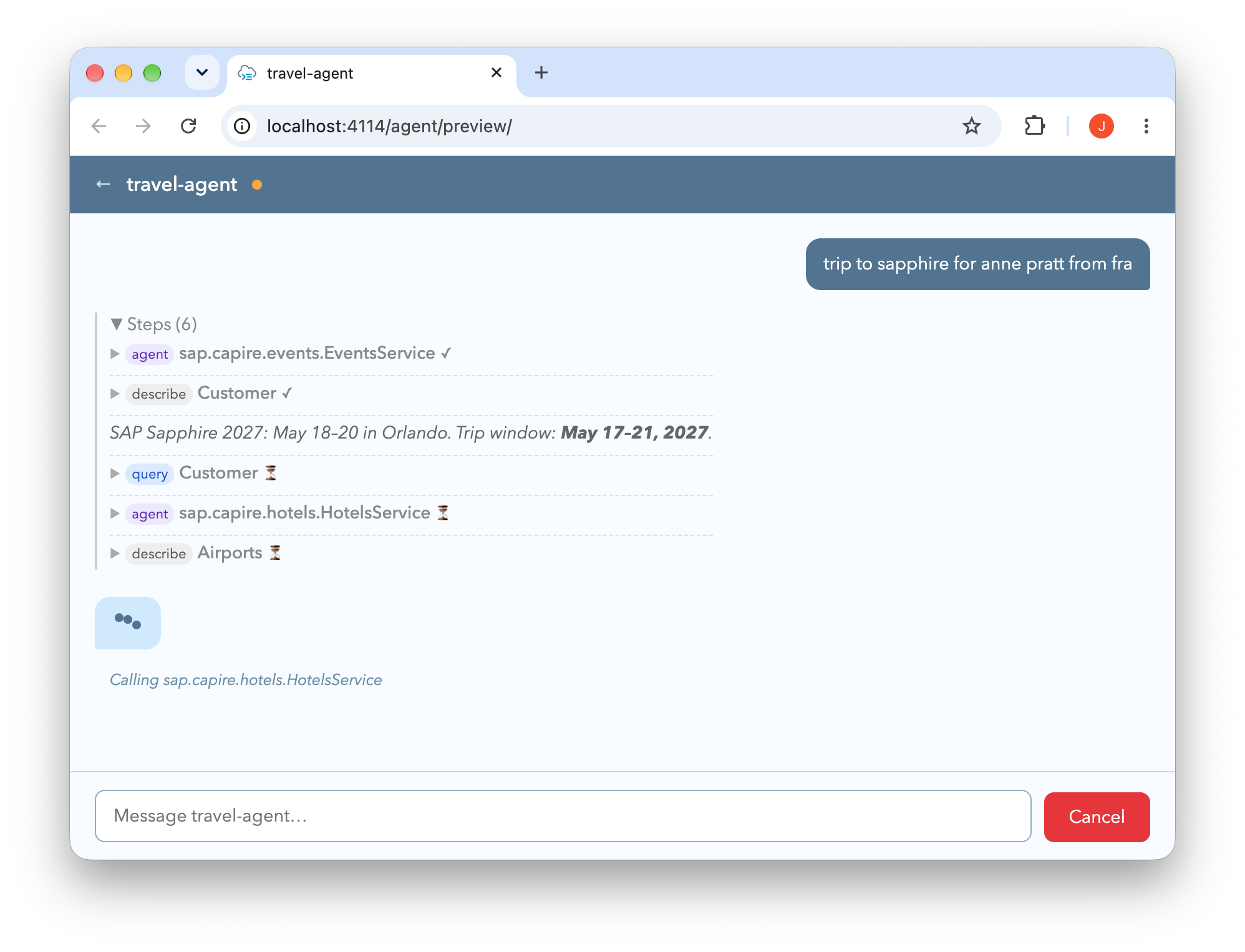
A2A clients can show which tools and subagents are running while an agent works. The adapter streams this progress through artifact-update events:
Generic Action Tool by Default
Agents now expose actions through one generic call tool, as in @cap-js/mcp. This reduces the number of tool definitions sent to the model.
Action Tool Default Changed
If your prompts or integrations depend on a separate tool for each action, set cds.mcp.per_action_tool: true to retain that behavior.
The generic tool honors @agent.hitl by interrupting the agent to ask for user approval. Approval edits can change parameters, but not the target action.
Learn more about CAP-level agents.
Agents in CAP Java
The CAP Java A2A adapter, cds-adapter-agent, now includes all messages raised during tool execution in the result, including validation messages. This gives the model more context for both successful and failed executions.
Persistent Agent Memory Alpha
CAP Java agents can now store and reload their message history from the database, retaining context between separate invocations without session stickiness.
Alpha — Not for Production Use
This feature is under active development. The data model and APIs may change. There's no automatic cleanup yet. Clear the session table periodically.
Learn more about agents in CAP Java.
Agent and MCP Telemetry
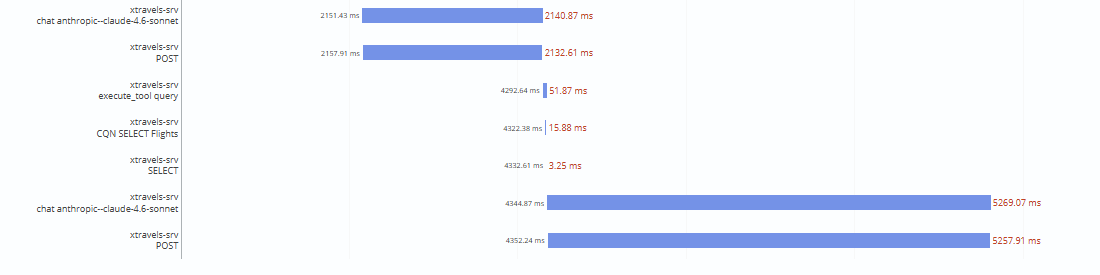
Follow an agent request from model calls through tool execution to database queries, and identify where it spends time. With agents or MCP and the runtime's telemetry integration enabled, CAP emits OpenTelemetry traces and token-use metrics without additional setup.
In this SAP Cloud Logging trace, a model call takes about 5.27 seconds, compared with 3.25 milliseconds for the SELECT. The connected spans help distinguish time spent in the model from database work:
Learn more about agent telemetry in CAP Node.js.Learn more about OpenTelemetry in CAP Java.
MCP for CAP Development
The @cap-js/mcp-server package gives coding assistants documentation results matched to your project's CAP runtime and version. Model searches refresh automatically when CDS files or project configuration changes. The following improvements are available with version 0.0.8 or later.
Improved Documentation Search
search_docs now searches both by meaning and by the words in your query, helping it find related concepts and specific technical terms. It uses the local vector embedding capabilities of @cap-js/ai, introduced in September.
The search index now uses documentation passages instead of AI-generated summaries, preserving explanations, code examples, and source links. Improved chunk creation keeps section context with each passage and separates Java and Node.js guidance. Passage sizes are tailored to the embedding model's input limits to retain useful context.
The default embedding model has changed to BAAI/bge-small-en-v1.5. CAP documentation search evaluations showed better retrieval quality with the new model.
Experimental Reranking
Set RERANK_ENABLED=true to let a second local model compare candidate documentation passages with your query. This can bring more relevant passages into the top results without sending your query to an external AI service.
The trade-off is an additional model download, higher memory use, and slower searches. Reranking is disabled by default. Compare result relevance and response time before adopting it.
Automatic CDS Model Refresh
search_model now refreshes the model when CDS files or project configuration changes, without polling. Model compilation is isolated between projects, and access is restricted to the client's workspace roots.
Learn more about the CAP MCP server.
CDS Language
Service Auto-Exposure
You can now annotate a service with @cds.autoexpose: false to prevent entities annotated with @cds.autoexpose: true (such as reuse types from @sap/cds/common) from being auto-exposed in that service. This is useful for API services exported via cds export, where auto-exposure of shared entities would cause duplicates when the service is imported in a consumer model.
@cds.autoexpose: false
service MyApiService { ... }
Note: composition children are still auto-exposed regardless of this annotation.
Learn more about auto-exposed entities.
CAP Runtimes
Optimized Draft Deletion
CAP Node.js and CAP Java can now use database ON DELETE CASCADE constraints to remove a draft document's rows when its DraftAdministrativeData record is deleted, avoiding separate deletion operations for each draft table.
To opt in, enable this on each draft table's DraftAdministrativeData_DraftUUID foreign key:
This also applies to CAP Java projects built with cds-dk.
Custom handler behavior changes
Optimized draft deletion changes which handlers are called in both runtimes. Verify the behavior of your custom handlers before adopting it.
After enabling:
- CAP Node.js - draft activation and root cancellation delete only the administrative record. The database removes the associated draft rows.
- CAP Java - additional deletion configuration is required.
On SAP HANA and PostgreSQL, these constraints are deployed with NOT VALIDATED and NOT VALID, respectively. Existing data isn't checked, so orphan cleanup isn't a prerequisite for deployment. The constraints don't remove existing orphaned draft rows.
Orphan Cleanup in CAP Node.js
Enable cds.fiori.draft_orphan_cleanup: true to remove orphaned rows as part of background draft cleanup in @sap/cds 10.2. The flag defaults to false and works independently of cds.fiori.draft_admin_integrity.
Background cleanup requires enabled draft deletion and is triggered by draft creation or editing. On SAP HANA and PostgreSQL, you can run orphan cleanup before or after deploying the constraints. Disable orphan cleanup once no longer needed.
Learn more about Fiori drafts in CAP Node.js.
Draft Deletion in CAP Java
In CAP Java, cds.drafts.deleteStrategy controls draft deletion. The default flat strategy deletes each draft table's rows by draft UUID.
The deep strategy deletes from the draft root. The dad strategy deletes only the administrative record and relies on database cascades. The setting applies during draft activation, root cancellation, and garbage collection.
To use dad, first satisfy the shared migration requirements and deploy the cascade constraints, then set cds.drafts.deleteStrategy: dad. Until then, retain flat for existing databases.
Learn more about Fiori drafts in CAP Java.
CAP Node.js
Service Browser Beta
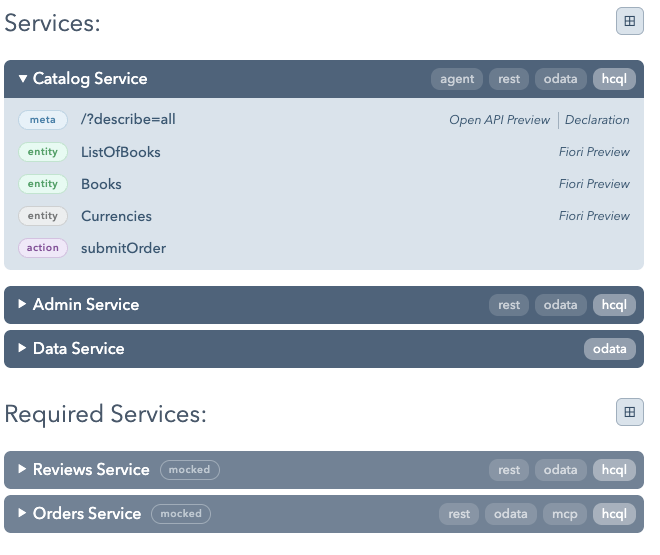
During development, the CAP index page groups endpoints by service, so you can switch protocols without scanning repeated service listings. Each service has its own protocol selector, for example for OData or MCP.
Required services appear separately with their remote or mocked status. CAP-based agents also have a dedicated section.
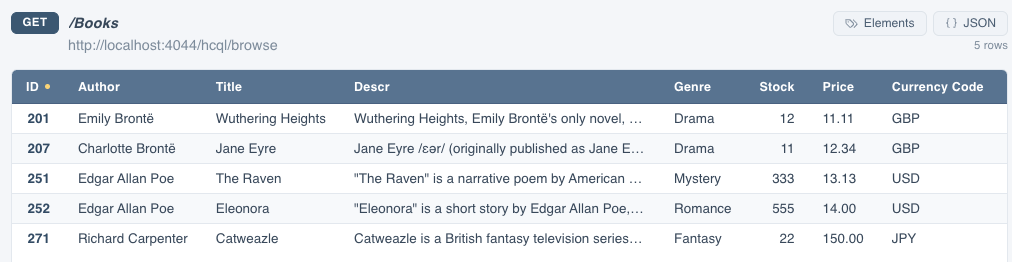
Entity links now open a paginated HTML table for inspecting data without reading raw JSON. You can sort columns, edit the request URL, or switch back to the JSON response.
Native TypeScript
On Node.js 24 or later, the CAP runtime can load .ts service implementations, server.ts, and init.ts using Node.js's native TypeScript support.
That means you can start with a .ts handler and run cds watch without a tsconfig.json, an additional TypeScript loader, or a compilation step. This reduces initial setup and lets you adopt TypeScript gradually alongside existing JavaScript implementations.
Native loading strips type annotations but doesn't type-check. TypeScript features that require transformation, such as enums, still need a compiler or loader. See Node.js's TypeScript documentation for supported syntax.
Learn more about TypeScript in CAP.
CAP Java
Important Changes ❗️
- The
cds-services-jdbcmodule had transitive Maven dependencies withcompilescope to mockito and to AssertJ. You now need to set these dependencies in your project if required. - OData responses no longer contain the
@odata.metadataEtagby default. CAP now provides the information only when you set theAcceptheader toapplication/json;odata.metadata=full. - The method
CqnSelect.getTransformations()now returns an immutable collection. Use the new methodSelect.transformations(List<CqnTransformation> transformations)to modify the transformation pipeline of a select.
Tenant Model Caching
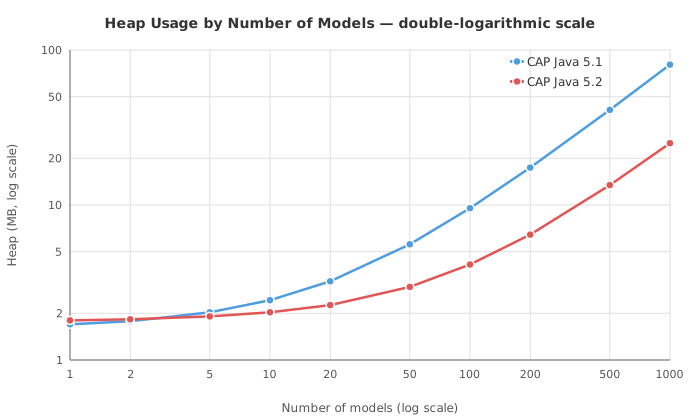
CAP Java 5.2 reduces the memory needed for tenant-specific models. In a benchmark with 1,000 tenant models, model heap usage decreased from 80 MB to 25 MB. These figures describe the models, not total application memory.

Benchmark Setup and Scaling
The benchmark used a web-shop model with Products, Categories, Suppliers, and Reviews: 50 elements, 11 relationships, and 17 service projections. For 1,000 tenants, variants extended Products, Categories, or both with one to six scalar elements of different types.
Each tenant model averaged 108 kB on disk. Its additional heap usage decreased from about 80.7 kB in CAP Java 5.1 to 23.8 kB in 5.2. The following chart shows model heap usage as the number of tenant models grows, with logarithmic scales on both axes:
Automatic Memory Savings
The smaller CDS model representation takes effect when you upgrade. The model cache also reuses the application's packaged base model where possible. References to this base model don't count against the cache size, so they don't evict tenant-specific models.
Moreover, the MTX EDMX cache now stores EDMX files with gzip compression to reduce memory consumption. With various EDMX models of different sizes, we observed a compression ratio of 80–95%.
Extension-Independent Tasks
Background tasks such as outbox checks or dead-letter cleanup often don't need tenant extensions. Use systemUserWithBaseModel(String tenant) to run these tasks without loading each tenant's extended model or evicting models used by active requests:
runtime.requestContext()
    .systemUserWithBaseModel("myTenantId")
    .run(context -> {
        // Only run operations that do not depend on tenant-specific extensions.
    });
Bypass EDMX Cache Gamma
Serving OData V4 requests requires model information. A request for $metadata needs to access the cached EDMX file, which is then internationalized at request time.
Previously, the EDMX cache was also accessed for non-$metadata requests. A new configuration option cds.ODataV4.cdsToEdm.enabled: true allows you to derive EDM metadata from the CDS model, so non-$metadata requests can be served without accessing the EDMX cache.
Opt in and test
This option is disabled by default, so all OData requests still use cached EDMX.
Optional Cache Controls
You can now also size the caches individually with cds.model.provider.cache.maxSizeCdsModel, *.maxSizeEdmx, and *.maxSizeI18n. Each overrides cds.model.provider.cache.maxSize for that cache. Limits count entries, not bytes.
Learn more about configuration properties in CAP JavaLearn more about multitenancy in CAP Java.
Integration Suite Messaging Beta
CAP Java now supports the Event Mesh capability of SAP Integration Suite as a message broker. The new messaging kinds event-mesh and event-mesh-shared both connect over AMQP and behave identically in CAP Java.
Both build on the existing cds-feature-enterprise-messaging runtime, so no extra plugin dependency is needed. Bind a service instance of type event-mesh-message-client, then pick the kind in your configuration:
cds:
  messaging.services:
  - name: "messaging-name"
    kind: "event-mesh"        # or: event-mesh-shared
Learn more about messaging in CAP Java.
SAP Passport Tracing
Correlate SAP HANA server-side traces with the application request that triggered them. CAP Java propagates the active OpenTelemetry trace through SAP Passport. A passport is emitted only when a valid span is active.
Learn more about OpenTelemetry in CAP Java.
Delta Save Mode for Drafts
CAP Java's draft save now supports a delta save mode. When enabled, draft activation performs a deep comparison of the draft and active versions and issues update operations only for changed entities. Unchanged paths are skipped, reducing database operations for large documents.
Enable delta save mode via cds.drafts.saveMode: true. Compared to the default full mode, the observable impact is:
- Update handlers receive only the delta representation (the changed subtree) rather than the full document.
- Managed timestamps (
modifiedAt,createdAt) are updated only for nodes on the changed path, accurately reflecting which parts of the document were touched.
The mechanism for delta detection can be further optimized in future releases.
Check Custom Update Handlers
Make sure your handlers can deal with the delta representation. Retain cds.drafts.saveMode: full, the default, if your handlers require the full document.
Learn more about the delta representation.Learn more about Fiori drafts in CAP Java.
Miscellaneous
- The label
managing_client_libis now added again for newly created HDI container bindings via Service Manager. - When using multi-tenancy, you can now prevent Service Manager or HANA TMS v2 from being used even if a binding exists (by setting cds.multiTenancy.serviceManager.enabled: false or cds.multiTenancy.hanaMtService.enabled: false). By default, CAP considers existing service bindings for both Service Manager and HANA TMS v2.
- OData V4 JSON batch requests and responses now support the
dependsOnproperty to sequence dependent requests.
CAP Tools
CAP Project Explorer
The explorer now automatically refreshes when definitions change. A new toggle button links it with the editor: 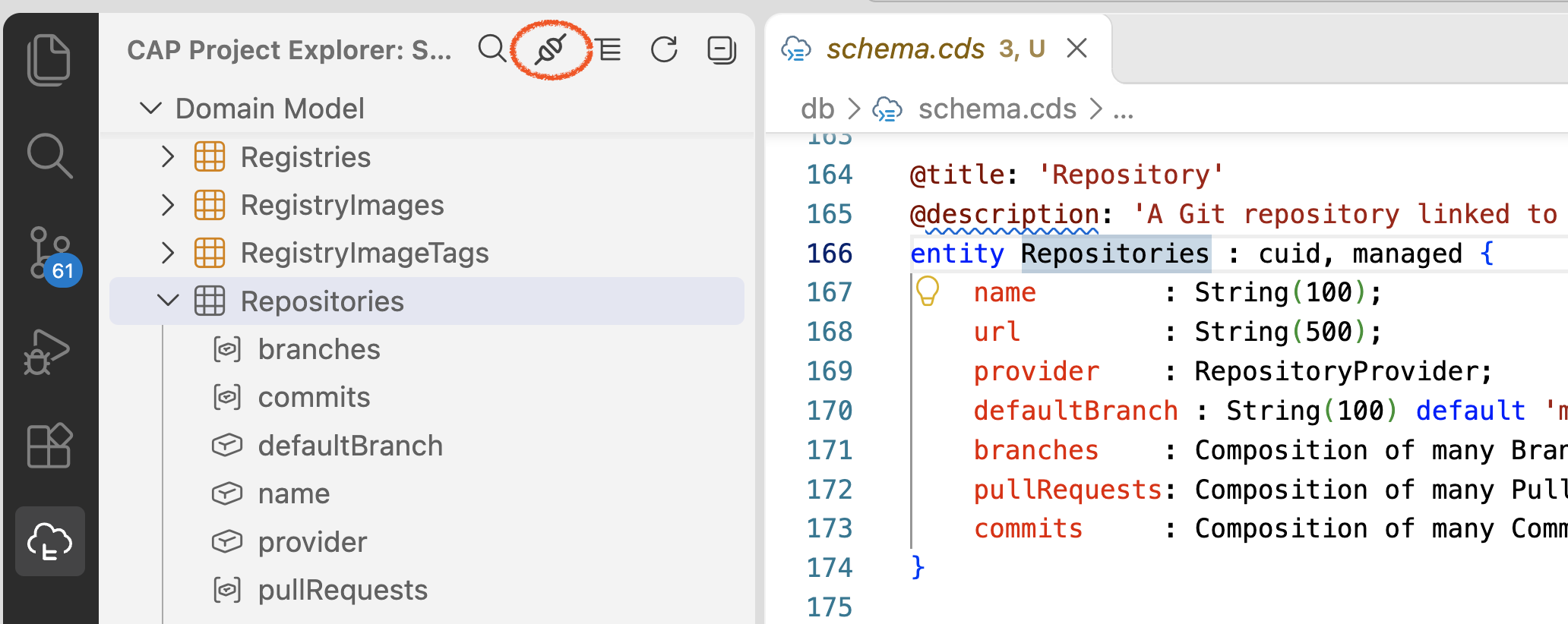 Text entities are now grouped in a separate folder: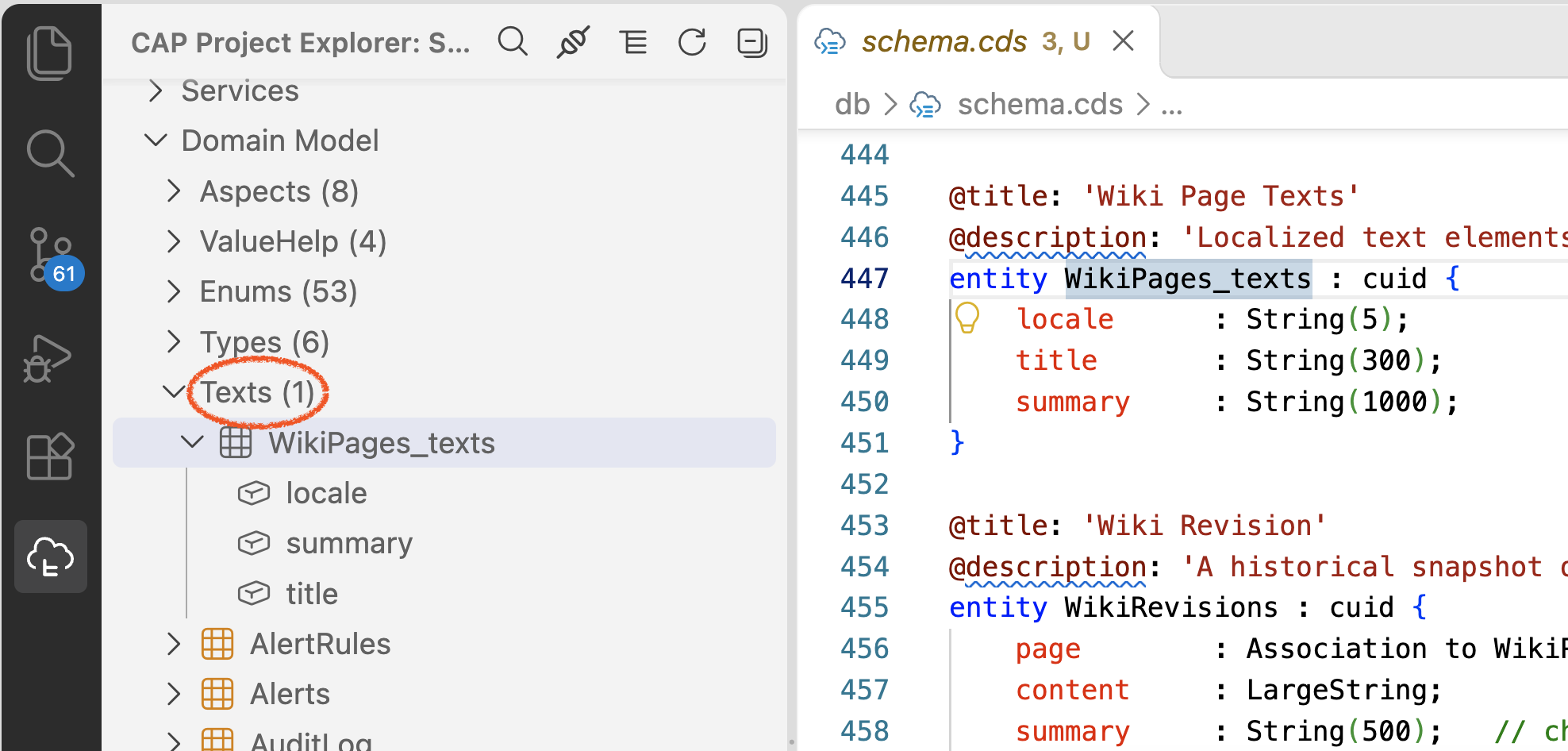
Multitenancy
Faster Tenant Upgrades Beta
The MTX sidecar can now shorten tenant upgrades by deploying artifacts directly through the HDI SQL APIs. In our benchmarks, upgrades with model and seed-data changes took 64–71% less time. Each measurement upgraded one tenant with a generated model of 250, 1,000, or 2,000 entities.

Benchmark Measurements
Elapsed time in seconds for one tenant per measurement:
| Entities | Changed Upgrade: Default | Changed Upgrade: Native | No-Change Upgrade: Default | No-Change Upgrade: Native |
|---|---|---|---|---|
| 250 | 32.7 | 11.6 | 4.44 | 2.32 |
| 1,000 | 123.6 | 36.4 | 4.22 | 3.46 |
| 2,000 | 176.6 | 63.9 | 6.73 | 3.19 |
The new deployment path uploads only changed artifacts, batches HDI inputs, and streams large artifacts. Enable it in the MTX sidecar with:
cds.features.native_hdi_deploy: trueThe existing @sap/hdi-deploy-based implementation remains the default while native HDI deployment is in beta.
Service Manager v2 Beta
Applications with many tenants can use version 2 of the SAP BTP Service Manager API to benefit from higher API rate limits where these are configured. This can reduce rate-limit pressure during tenant provisioning and upgrades. Check the limits available in your landscape before adopting it.
Enable it in the MTX sidecar with:
cds.features.service_manager_v2: trueService Manager v1 remains the default while v2 support is in beta.