
CAP-level Agents
The @cap-js/agents plugin allows to easily create enterprise grade CAP-level agents, served via the A2A protocol out-of-the-box. Simply annotate a CAP service with @agent to do so. The plugin uses state-of-the-art agent harness frameworks like LangChain or Pi internally.
SAP API Policy Applies!
CAP-level agents are intended only for exposing custom CAP application services. They are NOT an SAP-endorsed architecture or pathway for exposing, proxying, or providing agentic access to SAP Application APIs as referred to in the SAP API Policy, section 2.2.2. -> Read section SAP API Policy below!
Add the Agents Plugin
Within your project root run this to add the @cap-js/agents plugin:
npm add @cap-js/agents<dependency>
<groupId>com.sap.cds</groupId>
<artifactId>cds-adapter-agent</artifactId>
</dependency>Declare @agent Services
Using @agent Annotation
Simply add the @agent annotation to a service definition to create an agent. For example, clone the capire/bookshop sample, and add a new file srv/cat-service-agent.cds with the following content:
using { CatalogService  } from './cat-service';
annotate CatalogService with @agent;
Optionally specify an alternative endpoint path ...
As usual with CAP protocol annotations, you can also choose a custom path under which the A2A endpoint should be served, instead of using the default path /a2a/<service>:
annotate CatalogService with @agent: '/cats-agent'More than Just Another Protocol
With that, the plugin auto-generates MCP tools from the service's entities and actions, creates a ReAct loop, and serves it via A2A protocol — no code required.
Using @agent.hitl
In AI land, HITL stands for Human-in-the-Loop and describes a mechanism that allows human intervention in the agent's decision-making process. Annotate a CDS action with @agent.hitl to require human approval before the agent may execute it. For example, the submitOrder action in the CatalogService can be annotated like this:
using { CatalogService  } from './cat-service';
annotate CatalogService with @agent;
annotate CatalogService.submitOrder with @agent.hitl;
When the agent decides to call the action, the task pauses and transitions to the A2A input-required state instead of running the action immediately.
Only supported by CAP Node.js
@agent.hitl is not yet supported by CAP Java.
Optional: AGENTS.md
You can add an AGENTS.md file next to the service definition's .cds file to add detailed information about the agent's identity and behaviour. When present, it replaces the generic default agentification: instead of the auto-generated ReAct agent, the plugin auto-builds the agent from the directory at startup — no custom handlers required.
For example, we do so in the XTravels sample:
srv/travel-agent/
 ├── service.cds         # the service definition
 ├── service.js          # next to the service definition
 └── AGENTS.md           # next to the service definition
AGENTS.md defines who the agent is. The frontmatter populates the agent card; the body is the agent's system prompt:
---
name: travel-agent
version: 1.0.0
description: >
  An agent to do travel planning, including choosing and booking hotels,
  event passes, and flights using distributed subagents and tools, then
  persists confirmed itineraries into the xtravels app.
---

# Travel Agent

## Identity

You are a friendly and knowledgeable travel planning assistant within the
XTravels application — the trips you persist show up in the app's Fiori UI.

## Guidelines

- Be proactive: when a user asks to plan a trip, start searching immediately.
  Ask clarifying questions only when necessary.

- Use reasonable defaults for missing details: pick an upcoming weekend,
  prefer mid-range budgets, suggest popular options.

- Call multiple tools or subagents in parallel when the request spans multiple
  domains (flights + hotels + events).

...
See full source in capire/xtravels
Using ./srv/* subfolders
You can use subfolders like ./srv/travel-agent as shown above for the XTravels sample. This helps keeping your service definitions and agent-related files organized, especially when working with multiple services and agents, and is supported by the cds.folders.srvs: srv/* config option added included with the @cap-js/agents plugin.
Optional: */SKILL.mds
In addition to defining the agent's identity and behaviour in AGENTS.md, you can define specific skills and their workflows in SKILL.md files within the skills subfolder.
Again, we did so in the XTravels sample:
srv/travel-agent/
 ├── AGENTS.md           # next to the service definition
 ├── skills/
 │ ├── flight-booking/SKILL.md
 │ ├── itinerary/SKILL.md
 │ └── planning/SKILL.md
 ├── service.cds         # the service definition
 └── service.js          # next to the service definition
With the content of a SKILL.md looking like this:
---
name: flight-booking
description: >
  Search, book, and cancel flights via the `FlightsService` MCP.
metadata:
  tags: [flights, booking, mcp, airlines, airports]
  examples:
    - List flights from New York to Paris
---

# Skill: Flight Booking

## When to Use

- User wants to search, book, or cancel a flight
- User mentions departure/arrival cities or airport codes
- A trip plan needs concrete flight options

## Instructions

1. Resolve city names to airport codes by calling `query` against
the `Airports` entity (e.g. "Paris" → CDG, ORY).

2. Call `query` against the `Flights` entity, filtered by departure
/ arrival airports and date.

3. Present options with airline, flight ID, time, and price.

## Notes

- Don't invent airport codes, `query` the `Airports` entity instead.
- If a query fails with a schema error, use the output of `describe`
  and retry with the correct field names.
See full source in capire/xtravels
Modular Skills for Subtasks
Think of such skills as modular capabilities that your agent can leverage to handle specific subtasks or workflows. Each skill is defined in its own SKILL.md file, making it easier to manage and extend the agent's functionality, at the same time keeping the context window contrained to the relevant skills required for the current task.
Test-drive Locally
As usual, and following the Calesi principles of "convention over configuration", you can run your CAP server locally in development profile using cds watch including agents connected to available LLMs, with minimal additional setup.
Run with cds watch
Start your server with cds watch, and note that the @agent-annotated service gets served with an additional endpoint for the A2A protocol:
cds watch[cds] - serving CatalogService {
at: [ ..., '/a2a/browse' ]
...
}Automatic Config
In development profile, the plugin uses the pre-configured cds.requires.llm: auto config option, which automatically fetches required/missing credentials from given local installations of Claude Code or OpenCode, if any.
You can see the effects of this in the server logs when starting your CAP application with cds watch:
[agents] - cds.connect.to 'llm' with: {
  kind: 'anthropic',
  model: 'claude-sonnet-4-6',
  credentials: {
    anthropicApiUrl: 'http://localhost:4711/anthropic/',
    apiKey: '***'
  }
}
Switch on DEBUG output with cds watch to see detailed logs for the agent and LLM interactions, including something as shown below:
DEBUG=agents cds watch[agents] - Loaded config from ~/.claude/settings.json : {
anthropicApiUrl: 'http://localhost:4711/anthropic/',
model: 'claude-sonnet-4-6',
apiKey: '***'
}Learn more about configuring LLMs below.
Zero Configuration
The plugin can automatically fetch required/missing credentials from local installations of supported LLMs, allowing you to work with zero additional configuration.
CAP Node.js only
Auto configuration from local Claude and OpenCode installations is not supported by CAP Java.
Using Chat Preview Alpha
A rudimentary experimental chat preview is provided in the generic index.html page → see the Preview links next to the A2A endpoints – which can be used in local development.
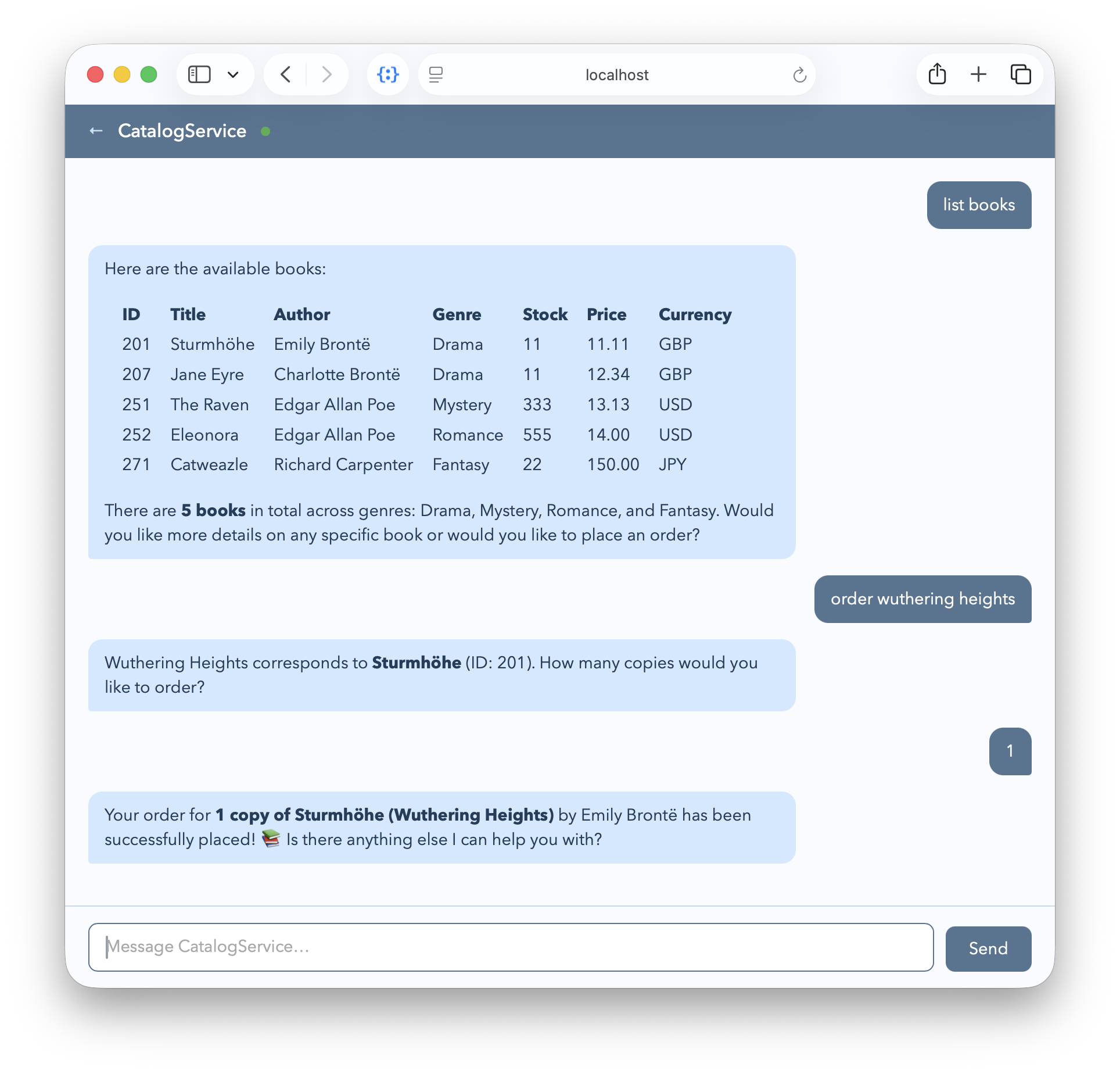
For our bookshop sample, open the chat preview in your browser at http://localhost:4004/a2a/browse/preview/ to interact with the agent. In the chat, enter the same prompts as we did over in the MCP Services guide with OpenCode:
list booksorder wuthering heightsAlso answer the questions that the agent asks you back.
Embedded with the CAP application
Essentially we see that the CAP-level agent accomplishes the same functionality as the generic agent that comes with OpenCode. The main difference is that it is tightly integrated with the CAP application, allowing for more seamless interaction with the underlying services and data models. Also the end user doesn't need any local AI client like OpenCode, nor do they need access to an LLM directly.
Served out of the box
Given @agent-annotated service definitions, the plugin automatically creates an agent per CAP service with the configured models, served out of the box via A2A endpoints, with seamless integration with local service capabilities, and ready-to-use support for persistence, telemetry, quotas, content filtering, as well as enterprise-grade features like audit logging, data privacy, and security.
CAP Node.js only
Persistent chat history, telemetry, quotas, content filtering, audit logging and data privacy features are not yet supported by CAP Java.
Learn more about agents in CAP Java.
Autowired Tools via MCP
All entities and actions/functions defined in the CAP service are automatically made available as MCP tools to the agent locally. The tools are constructed and served as documented in the MCP Adapter guide.
We can see the effects of that in the log output, for example, when asked to "list books", the agent queried the service's Books entity via the query tool:
[agents] - CatalogService request {
  text: 'list books', ...
}
[mcp] - CatalogService describe {
  entities: [ 'Books' ]
}
[mcp] - CatalogService query {
  cql: 'SELECT ID, title, author, genre, ... from Books'
}
Similarly, when asked to "order wuthering heights", the agent eventually invoked the appropriate service action via the call tool:
[agents] - CatalogService request {
  text: 'order wuthering heights', ...
}
[mcp] - CatalogService - call submitOrder {
  book: 201, quantity: 1
}
Subagents via A2A
In addition to a main agent served out of the box, developers can define subagents that handle specific tasks or domains within the CAP application, allowing for modular and scalable agent architectures.
This includes @agent-ified services, imported from external CAP projects. The main agent coordinates these subagents, and communicates with them via A2A endpoints.
We demonstrate the use of subagents in the XTravels sample application.
Audit Logging
When @cap-js/audit-logging is installed, the plugin automatically emits audit log events which record agent decisions, actions, tool usage, and outcomes.
npm add @cap-js/audit-logging| Event | Trigger |
|---|---|
AgentDecision | LLM invocation returns |
AgentInputRequired | Agent requests human approval |
AgentTaskCanceled | Task canceled |
AgentTaskCompleted | Task succeeds |
AgentTaskFailed | Task fails |
AgentTaskResumed | HITL resume (approve/reject) |
AgentTaskStarted | New task submitted |
ContentFilterBlocked | Input blocked by content filter |
IncomingMessageExceedingLength | Incoming message exceeds length limit |
QuotaExceeded | Quota breach |
ToolInvocation | Tool executed |
In development, audit events are logged to the console. In production, they are sent to the SAP Audit Log Service via the transactional outbox. All events are emitted as SecurityEvent for compatibility with the SAP Audit Log Service.
For details on configuring and using audit logging, refer to the documentation at: https://github.com/cap-js/agents/blob/main/.docs/audit-logging.md.
Persistence
The CAP-based agent harness provides short-term memory out-of-the-box via the connected primary database – that is in SQLite in local dev, SAP HANA in production.
This allows agents to persist conversational context and workflow checkpoints, so that they can resume sessions seamlessly even after server restarts, as well as boosting scalability in clustered environments. In addition, it provides a foundation for implementing long-term memory, monitoring and analytics on agent interactions.
Telemetry
When @cap-js/telemetry is installed, the plugin automatically instruments the agent harness to emit OpenTelemetry tracing and metrics.
npm add @cap-js/telemetryFollowing metrics are emitted by default:
| Metric | Description |
|---|---|
agent.requests.total | Total inbound agent requests |
agent.errors.total | Requests resulting in error |
agent.workflows.completed | Completed agent workflows |
agent_actions | LLM invocations (agent node calls) per tenant |
agent.llm.input_tokens | LLM input tokens consumed |
agent.llm.output_tokens | LLM output tokens generated |
agent.llm.invocations | LLM invocation count |
agent.tool.invocations | Tool invocation count |
agent.request.duration | End-to-end agent request duration |
active_users | Active users per service (24h rolling window) |
agent.executions.concurrent | Currently active workflow executions |
For in-depth details on configuring telemetry, refer to the documentation at: https://github.com/cap-js/agents/blob/main/.docs/telemetry.md
MLFlow
The plugin can also export traces to MLflow for GenAI observability. Switch that on by enabling the mlflow option in the agent configuration:
  cds:
    agents:
mlflow: true{
"cds": {
"agents": {
"mlflow": true
}
}
}When enabled, an MLflow exporter is added as a second span processor alongside any existing exporter (Dynatrace, Cloud Logging, Grafana, etc.), and the plugin automatically adds the following mlflow.* span attributes to existing OTel spans so the MLflow OTLP ingestion endpoint assembles them into proper MLflow traces — no additional SDK required.
| Attribute | Source |
|---|---|
mlflow.experimentId | @Core.SchemaVersion annotation or service credentials |
mlflow.traceRequestId | cds.context.id |
mlflow.spanType | AGENT / LLM / TOOL / CHAIN |
mlflow.spanInputs | Tool args, user message (JSON) |
mlflow.spanOutputs | Agent response (JSON) |
mlflow.chat.tokenUsage | {input_tokens, output_tokens, total_tokens, cache_read_input_tokens?, cache_creation_input_tokens?} |
mlflow.traceTag.* | Session, user, tenant (extracted as trace tags by MLflow server) |
For in-depth details on using MLFlow telemetry, refer to the documentation at: https://github.com/cap-js/agents/blob/main/.docs/telemetry.md
Quotas
The plugin automatically enforces rate limits and resource quotas. You can configure these limits according to your application's requirements using the cds.env.agents.quotas configuration.
cds:
  agents:
    quotas:
      maxConcurrentTasksPerUser: 4
      maxLLMCallTimeout: 120s
      maxExecutionTimePerTask: 5min
      maxIncomingMessageLength: 5000
...{
"cds": {
"agents": {
"quotas": {
"maxConcurrentTasksPerUser": 4,
"maxLLMCallTimeout": "120s",
"maxExecutionTimePerTask": "5min",
"maxIncomingMessageLength": 5000,
...
}
}
}
}Pre-Request Limits (HTTP 429)
Pre-request limits are checked before graph execution starts.
| Limit | Retry-After | Scope |
|---|---|---|
maxConcurrentTasks | 30s | Tenant |
maxConcurrentTasksPerUser | 30s | User |
maxTasksPerHour | Next hour boundary | Tenant |
maxTasksPerHourPerUser | Next hour boundary | User |
maxToolCallsPerHour | Next hour boundary | Tenant |
maxLLMTokensPerDay | Midnight UTC | Tenant |
maxIncomingMessageLength | — (HTTP 400) | Request |
When one of these pre-request limits is exceeded, the response is a HTTP 429 Too Many Requests response like that:
Click to expand the HTTP 429 example
HTTP/1.1 429 Too Many Requests
Retry-After: 1847
Content-Type: application/json

{
  "jsonrpc":"2.0",
  "error": {
    "code":-32029,
    "message":"The maximum of 100 tasks per hour..."
  }
}
Per-Task Limits
Per-task limits are checked after each LLM iteration inside the graph, and result in a failed task error response if exceeded.
| Limit | Checked at | Effect |
|---|---|---|
maxLLMInvocationsPerTask | After each LLM call | Graph throws → task failed |
maxLLMTokensPerTask | After each LLM call | Same |
maxToolCallsPerTask | After each LLM call | Same |
maxLLMCallTimeout | Per LLM HTTP call | Request aborted → error |
maxExecutionTimePerTask | Timeout wrapper | Graph asks via HITL whether to continue |
On all errors the plugin will summarize the progress till that point. The summary is the status message of the cancelation. On execution timeouts the graph does not fail but instead interrupts and sends a HITL message asking the user whether to continue, including the summary about the progress.
More to come...
Following are features and areas we are currently working on, and plan to release in the near future:
- Evals-based Agent Testing – using best practice evaluation frameworks.
- RAG & Knowledge Graphs – for agents to leverage structured knowledge.
- Alternative Agent Harnesses – to provide different execution environments for agents.
- Custom-coded Agents – to inject custom logic and behavior into agent harness.
- Advanced Streaming – improved streaming capabilities for agent interactions.
- Sandboxed Scripts – allowing agents to securely create and run scripts.
- Push Notifications – to send notifications to external listeners.
- Agent Memory – enabling agents to maintain and utilize memory across sessions.
- File I/O – enabling agents to create, read and write files.
- Data Parts – covering respective A2A protocol aspects for returning structured data.
- Data Privacy – ensure agents handle sensitive data in compliance with regulations.
Configuration
cds.requires.llm
The LLM used by an agent is configured via cds.requires.llm. You can provide a kind as with any required service.
cds:
  requires:
    llm:
      kind: aicore
model: anthropic--claude-4.6-sonnet"cds": {
"requires": {
"llm": {
"kind": "aicore",
"model": "anthropic--claude-4.6-sonnet"
}
}
}| Kind | Description |
|---|---|
aicore | The default for production and hybrid, connects to SAP AI Core |
auto | The default for development, using local Claude, Codex or OpenCode configuration |
mock | A pure mock for development, provides dummy responses when called |
See SAP AI Core → Create a Service Instance for how to create an instance.
Automatically Fetching Credentials
In development profile, with the pre-configured auto kind, the plugin tries to fetch missing credentials from local installation of Claude Code, Codex or OpenCode. This allows you to work with local LLM instances without providing any additional config at all.
cds.agents.mlflow
This is a boolean flag, enabling addition of MLflow attributes to telemetry events. See section Telemetry > MLflow above for details.
cds.agents.quotas
A record of the quotas configurations, specifying limits on resource usage such as API calls, execution time, and memory consumption. See section Quotas above for details.
SAP API Policy
Caution!
CAP-level agents as documented herein must not be used as gateways or proxies for SAP Application APIs. The @cap-js/agents plugin is not an SAP-endorsed architecture, data service, or service-specific pathway under section 2.2.2 of the SAP API Policy and is not an endorsed mechanism for exposing, proxying, or providing agentic access to SAP Application APIs. Any use of SAP Application APIs must be in accordance with the SAP API Policy. For SAP-endorsed patterns on agentic access to SAP Application APIs, consult the SAP Architecture Center reference architectures.