
Deploy to Cloud Foundry
A comprehensive guide on deploying applications built with SAP Cloud Application Programming Model (CAP) to SAP BTP Cloud Foundry environment.
Intro & Overview
After completing the functional implementation of your CAP application by following the Getting Started or Cookbook guides, you finally deploy it to the cloud for production. The essential steps are illustrated in the following graphic:

First, you apply these steps manually in an ad-hoc deployment, as described in this guide. Then, after successful deployment, you automate them using CI/CD pipelines.
Prerequisites
The following sections are based on a new project that you can create like this:
cds init bookshop --nodejs --add sample
cd bookshopcds init bookshop --java --add sample
cd bookshopAlternatively, use the ready-to-deploy sample project
git clone https://github.com/capire/bookshop
cd bookshopgit clone https://github.com/sap-samples/cloud-cap-samples-java
cd cloud-cap-samples-javaIn addition, you need to prepare the following:
1. SAP BTP with SAP HANA Cloud Database Up and Running
- Access to SAP BTP, for example a trial
- An SAP HANA Cloud database running in your subaccount
- Entitlement for
hdi-sharedservice plan for your subaccount - A Cloud Foundry space
Starting the SAP HANA database takes several minutes
Therefore, do these steps early on. In trial accounts, you need to start the database every day.
2. Latest Versions of @sap/cds-dk
Ensure you have the latest version of @sap/cds-dk installed globally:
npm -g outdated       #> check whether @sap/cds-dk is listed
npm i -g @sap/cds-dk  #> if necessary
For Node.js projects, ensure that the latest version of @sap/cds is installed in your project:
npm outdated          #> check whether @sap/cds is listed
npm i @sap/cds        #> if necessary
3. Cloud MTA Build Tool
Run
mbtin a terminal to check whether you've installed it.If not, install it according to the MTA Build Tool's documentation.
For macOS/Linux machines, it's best to install using
npm:shnpm i -g mbtFor Windows, please also install
GNU Make.
4. Cloud Foundry CLI w/ MTA Plugins
Run
cf -vin a terminal to check whether you've installed version 8 or higher.If not, install or update it according to the Cloud Foundry CLI documentation.
In addition, ensure to have the MTA plugin for the Cloud Foundry CLI installed.
shcf add-plugin-repo CF-Community https://plugins.cloudfoundry.org cf install-plugin -f multiapps cf install-plugin -f html5-plugin
Prepare for Production
If you followed CAP's grow-as-you-go approach, you've developed your application with an in-memory database and basic (mocked) authentication. In the cloud, you typically use production-grade services like SAP HANA and authentication providers.
The cds add <facets> command ensures required services are configured correctly and their dependencies are added to your package.json.
1. SAP HANA Database
While you used SQLite (Node.js) or SQLite/H2 (Java) as a low-cost stand-in during development, you use an SAP HANA Cloud database for production:
cds add hanaLearn more about using SAP HANA for production.
2. Authorization/Authentication
Configure your app for XSUAA-based authentication:
cds add xsuaaThis will also generate an xs-security.json file
The roles/scopes are derived from authorization-related annotations in your CDS models. Ensure to rerun cds compile --to xsuaa, as documented in the Security guide whenever there are changes to these annotations.
Learn more about SAP Authorization and Trust Management/XSUAA.
3. Remote Service Consumption
CAP supports two HTTP clients for remote service calls: SAP Cloud SDK and CAP's built-in native fetch client.
If you need full SAP BTP Destination service support including on-premise connectivity, add the SAP Cloud SDK packages:
npm add @sap-cloud-sdk/connectivity
npm add @sap-cloud-sdk/http-client
npm add @sap-cloud-sdk/resilience
Learn more about consuming remote services with SAP Cloud SDK.
Alternatively, CAP's built-in native fetch client supports SAP BTP destinations without SAP Cloud SDK.
Learn more about the native fetch client.
4. MTA-Based Deployment
You use the Cloud MTA Build Tool to execute the deployment. The modules and services are configured in an mta.yaml deployment descriptor:
cds add mtaLearn more about MTA-based deployment.
5. User Interfaces
Option A: SAP Cloud Portal
If you intend to deploy multitenant applications with a UI, set up the HTML5 Application Repository in combination with the SAP Cloud Portal service:
cds add portalcds add portal adds an App Router configuration to your project
The App Router acts as a single point-of-entry gateway to route requests to. In particular, it ensures user login and authentication in combination with XSUAA or IAS.
Option B: SAP BTP Application Frontend Beta
For single-tenant applications, you can use the new SAP BTP Application Frontend service:
cds add app-frontendEnable the service for consumption in your subaccount
Other deployment variants...
For single-tenant applications, you can integrate with SAP Build Work Zone, standard edition:
cds add workzoneThis approach uses the managed App Router provided by SAP Fiori Launchpad — you don't need to deploy your own. Instead, destinations are configured.
You might also use a custom App Router setup without SAP BTP Cloud Portal service:
cds add approuterLearn more about the SAP BTP Application Router.
However, in this case, you need to create symlinks from your app folders to make them visible to the deployed App Router. The samples modulith project uses this setup for serving a static index.html consuming Vue.js via CDN.
Find the symlink directory in the App Router's resources folder
6. Optional: Multitenancy
To enable multitenancy for production, run the following command:
cds add multitenancyYou're set!
The previous steps are required only once in a project's lifetime. With that done, we can repeatedly deploy the application.
Build and Deploy
Make sure you are logged in to Cloud Foundry and target the space you want to deploy to:
cf login --sso  # to log on with SAP Universal ID
cf targetIf your project already includes a package-lock.json, freeze your updated dependencies:
npm install --package-lock-onlyYou can now build and deploy the application:
cds upEssentially, this automates the following steps...
# Installing app dependencies, e.g.
npm i app/browse
npm i app/admin-books

# If project is monorepo
ln -sf ../package-lock.json

# If project is multitenant
npm i --package-lock-only --prefix mtx/sidecar

# If package-lock.json doesn't exist
npm i --package-lock-only

# Final assembly and deployment...
mbt build -t gen --mtar mta.tar
cf deploy gen/mta.tar -f
Test with cds build
While cds build is already run as part of mbt build in cds up, you can also run it standalone to inspect what is generated for production:
cds build --productionGot errors? See the troubleshooting guide.Learn how to reduce the MTA archive size during development.
This process can take some minutes and finally logs an output like this:
[…]
Application "bookshop" started and available at
"[org]-[space]-bookshop.<landscape-domain>.com"
[…]
You can use this URL to access the App Router as the entry point of your application.
For multitenant applications, you have to subscribe a tenant first. The application is accessible via a tenant-specific App Router URL after subscription.
SaaS Extensibility
Share the generic App-Router URL with SaaS consumers for logging in as extension developers using cds login or other extensibility-related commands.
No index page and SAP Fiori preview in the cloud
The default index page and SAP Fiori preview, that you're used to seeing during local development, are meant only for the development profile and aren't available in the cloud. For productive applications, you should add a proper SAP Fiori elements application through one of the user interface options outlined before.
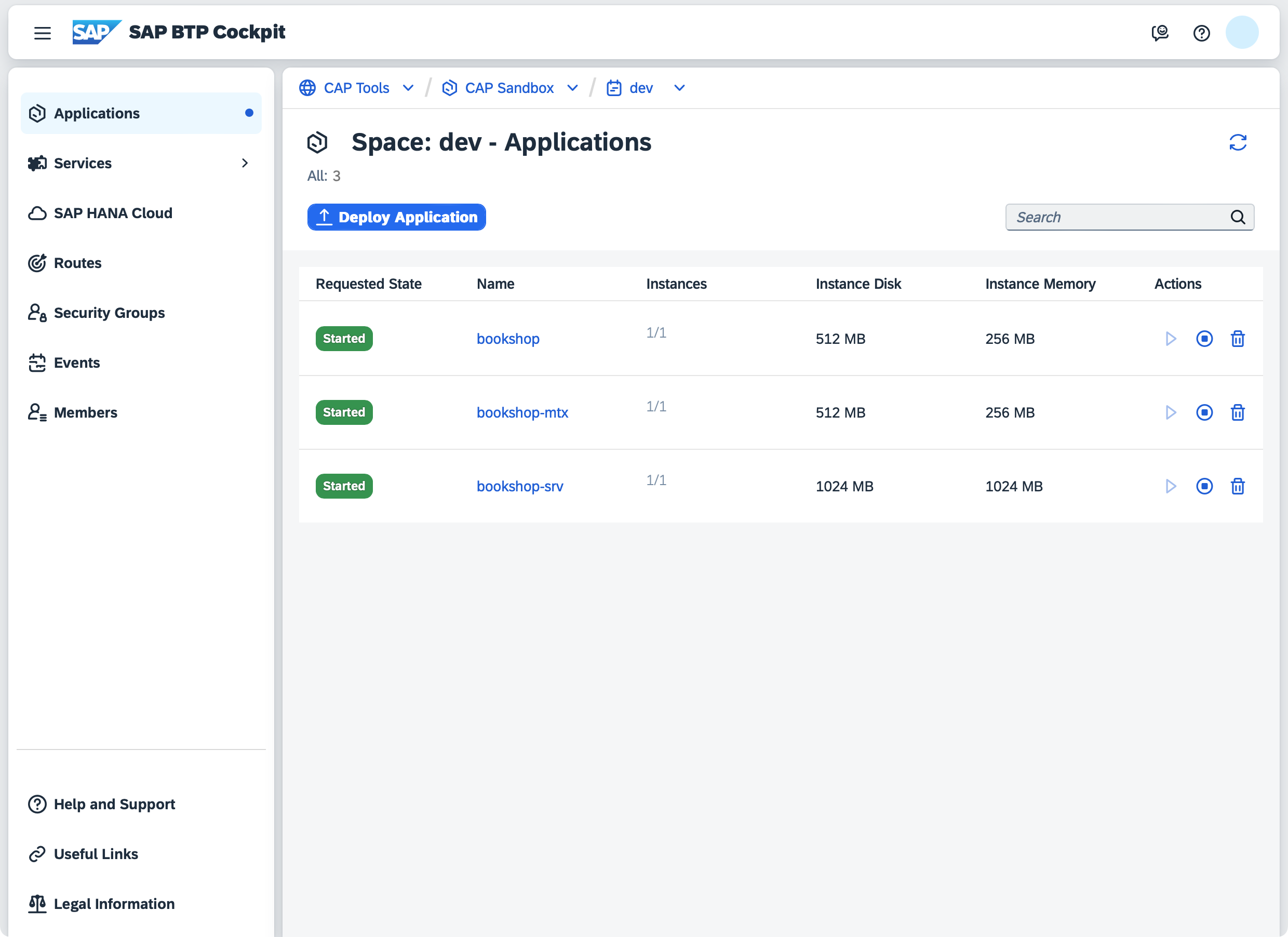
Inspect Apps in BTP Cockpit
Visit the "Applications" section in your SAP BTP cockpit to see the deployed apps:
Next up: Assign the admin role
To access the admin APIs, assign the admin role required by the AdminService. By default, CAP creates a role collection named admin‑<org>‑<space>. Assign it to your user to get access.
Use MTA Extensions with cds up
For Cloud Foundry deployments, you can pass an MTA extension descriptor to cds up using --overlay:
cds up --overlay .deploy/eu10-prod.mtaextThis allows you to keep landscape-specific deployment settings outside your base mta.yaml, for example, scaling parameters:
_schema-version: 3.3.0
ID: bookshop-eu10-prod
extends: bookshop

modules:
  - name: bookshop-srv
    parameters:
      instances: 2
Staying Up-to-date
Deployed applications should freeze all their dependencies, including transient ones. Therefore, on first execution, cds up creates a package-lock.json file for all application modules.
It is essential to regularly update dependencies to consume latest bug fixes and improvements. Not doing so will increase the risk of security vulnerabilities, expose your application to known bugs, and make future upgrades significantly harder and more time-consuming.
We recommend setting up Dependabot, Renovate or similar automated solutions to update dependencies one-by-one to easily identify breaking changes, minimize risks, and ensure continuous compatibility and stability of your application.
Upgrade Tenants in Java
The CAP Java SDK offers main methods for Subscribe/Unsubscribe in the classes com.sap.cds.framework.spring.utils.Subscribe/Unsubscribe that can be called from the command line. This way, you can run the tenant subscribe/unsubscribe for the specified tenant. This triggers your custom handlers, which is useful for local testing scenarios.
To register all handlers of the application properly during the execution of a tenant operation main method, the component scan package must be configured. To set the component scan, the property cds.multitenancy.component-scan must be set to the package name of your application.
The handler registration provides additional information that is used for the tenant subscribe, for example, messaging subscriptions that are created.
The MTX sidecar must be running
You can stop the CAP Java backend when you call this method, but the MTX sidecar application must be running!
You can also automate this synchronization, for example using Cloud Foundry Tasks on SAP BTP and Module Hooks in your MTA.
The main method optionally takes tenant ID (string) as the first input argument and tenant options (JSON string) as the second input argument. Alternatively, you can use the environment variables MTCOMMAND_TENANTS and MTCOMMAND_OPTIONS instead of arguments. The command-line arguments have higher priority, so you can use them to override the environment variables.
The method returns the following exit codes.
| Exit Code | Result |
|---|---|
| 0 | Tenant subscribed/unsubscribed successfully. |
| 3 | Failed to subscribe/unsubscribe the tenant. Rerun the procedure to make sure the tenant is subscribed/unsubscribed. |
To run this method locally, use the following command where <jar-file> is the one of your applications:
java -cp <jar-file> -Dloader.main=com.sap.cds.framework.spring.utils.Subscribe/Unsubscribe org.springframework.boot.loader.launch.PropertiesLauncher <tenant> [<tenant options>]java -cp <jar-file> -Dloader.main=com.sap.cds.framework.spring.utils.Subscribe/Unsubscribe org.springframework.boot.loader.PropertiesLauncher <tenant> [<tenant options>]In the SAP BTP, Cloud Foundry environment, it can be tricky to construct such a command. The reason is that the JAR file is extracted by the Java buildpack and the place of the Java executable isn't easy to determine. Also the place differs for different Java versions. Therefore, we recommend adapting the start command that is generated by the buildpack and run the adapted command:
sed -i 's/org.springframework.boot.loader.launch.JarLauncher/org.springframework.boot.loader.launch.PropertiesLauncher/g' /home/vcap/staging_info.yml && sed -i 's/-Dsun.net.inetaddr.negative.ttl=0/-Dsun.net.inetaddr.negative.ttl=0 -Dloader.main=com.sap.cds.framework.spring.utils.Subscribe/Unsubscribe/g' /home/vcap/staging_info.yml && jq -r .start_command /home/vcap/staging_info.yml | sed 's/^/ MTCOMMAND_TENANTS=my-tenant [MTCOMMAND_TENANTS=<tenant options>]/' | bashsed -i 's/org.springframework.boot.loader.JarLauncher/org.springframework.boot.loader.PropertiesLauncher/g' /home/vcap/staging_info.yml && sed -i 's/-Dsun.net.inetaddr.negative.ttl=0/-Dsun.net.inetaddr.negative.ttl=0 -Dloader.main=com.sap.cds.framework.spring.utils.Subscribe/Unsubscribe/g' /home/vcap/staging_info.yml && jq -r .start_command /home/vcap/staging_info.yml | sed 's/^/ MTCOMMAND_TENANTS=my-tenant [MTCOMMAND_TENANTS=<tenant options>]/' | bashsed -i 's/org.springframework.boot.loader.JarLauncher/-Dloader.main=com.sap.cds.framework.spring.utils.Subscribe/Unsubscribe org.springframework.boot.loader.PropertiesLauncher/g' /home/vcap/staging_info.yml && jq -r .start_command /home/vcap/staging_info.yml | sed 's/^/ MTCOMMAND_TENANTS=my-tenant [MTCOMMAND_TENANTS=<tenant options>]/' | bash