
February 2026





Live Queries in Documentation
You can now run CDS queries directly in the browser. Press the play button in the code block to see the query result and the corresponding SQL statements:
SELECT from Books { title, author.name as author, stock }You can also edit the query by typing in the box, making this your personal playground.
See 'CDS Expression Language' for more examples and context.
Node.js
Parallel GETs in $batch
OData $batch requests that exclusively contain GET requests can now process atomicity groups in parallel. Configuration cds.odata.max_batch_parallelization=3 specifies the maximum number of atomicity groups processed concurrently. The default is 1, which means sequential processing as before.
Note
Parallel processing of atomicity groups is in conflict with the OData specification for multipart/mixed. For example, the continue-on-error preference default can then no longer be adhered to.
Learn more about parallel batch processing.
Calculated Elements for Drafts
For draft-enabled entities, calculated elements can now be reliably used for values shown on the UI or for influencing UI behavior. Previously, you had to fall back to virtual elements or static expressions null as ... with custom calculations.
Calculated elements in the _drafts table are always calculated on read, even if the original calculated element is stored.
Call to action
Reconsider using calculated elements to avoid custom code and to push calculations to the database.
In case of issues, you can opt out using cds.fiori.calc_elements:false.
CAP Java supports this since November 2025.
Learn more about calculated elements.
Native SQLite Support Beta
Node.js version 22.5 and higher provides native support for SQLite, which is compatible with the NPM module better-sqlite3 currently used by @cap-js/sqlite.
Starting with @cap-js/sqlite version 2.2.0, you can leverage the native Node.js SQLite implementation by setting cds.requires.db.driver:node. This native implementation is planned to become the default in a future release when it becomes stable in Node.js.
We've also added an option for usage in, for example, a browser based on NPM module sql.js. You can enable this with the above configuration using sql.js as the value.
Java
Important Change ❗️
Using a reference as the value for the substring, prefix, or suffix in the contains, startsWith, or endsWith functions is now rejected. Only literals or parameters may be used.
Performance Improvements
- Requests for the Fiori Draft list report "All" filter have been optimized for situations where there are many inactive entities. The amount of data that needs to be read to return the correct data for a page after merging actives and drafts has been reduced for the first few pages.
- The deletion of inactive drafts during draft activation has been optimized.
- Hierarchical selects now optimize the select list, resulting in simpler queries.
Tools
Query Mode in cds repl
With the new .ql command inside cds repl, or by running cds repl --ql, you can enter a simpler mode to run queries.
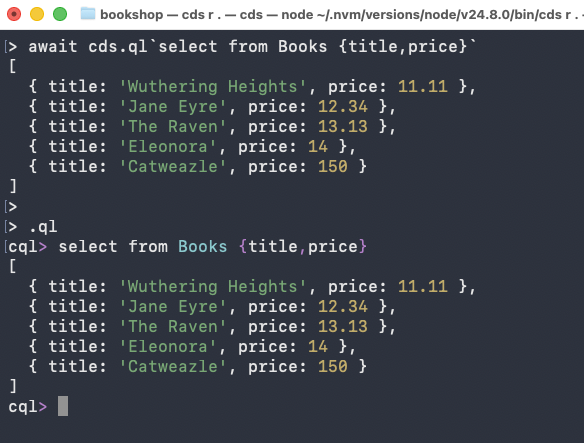
In the example shown in the screenshot, instead of typing the verbose JavaScript statement await cds.ql `select from Books {title,price}` , you can simply type the CDS query directly in query mode:
> .ql
cql> select from Books {title, price}Support for ESLint 10
CAP now supports version 10 of ESLint besides version 9. We recommend updating your dependencies.
Previously undefined ESLint version now installs ESLint 10
In the rare case of no dependency to eslint being set in your package.json, eslint 9 has been used so far, while now eslint 10 is installed. This might yield unexpected new findings due to newly introduced recommended rules.
In that case, fix the new findings (recommended) or enforce eslint 9 using npm add -D eslint@9.
MTA Extensions with cds up
For Cloud Foundry, cds up can now be adjusted using MTA extensions.
Simply pass the path to your MTA extension in the command:
cds up --overlay .deploy/eu10-prod.mtaextExample for an MTA extension file
This example eu10-prod.mtaext file scales the CAP backend of a simple bookshop application to two instances:
_schema-version: 3.3.0
ID: bookshop-eu10-prod
extends: bookshop

modules:
  - name: bookshop-srv
    parameters:
      instances: 2