
June 2026





Major Release Upgrade
This release marks the next major release of CAP, colloquially referred to as "cds 10", which includes major version upgrades of these packages:
| Packages | Version |
|---|---|
@sap/cds, @sap/cds-dk | 10.x |
@sap/cds-compiler | 7.x |
@sap/cds-mtxs | 4.x |
@cap-js/sqlite, @cap-js/hana, @cap-js/postgres | 3.x |
CAP Java | 5.x |
Don't mix with prior versions
Ensure you use the correct, latest versions of these packages. Don't mix with older versions, as they are not tested, and guaranteed to work with the new ones. For example, don't use @sap/cds 10.x with @sap/cds-mtxs 3.x, or @cap-js/hana 2.x.
Use `cds upgrade` for that
Use the new cds upgrade tool to assist you in checking and upgrading these dependencies for your projects.
Upgrade Node.js & JDK
Node.js v20 is end of life. We recommend using Node.js v24 or v26, which are the active/upcoming LTS versions.
| Version | Status | Support in cds10 |
|---|---|---|
| Node.js v20 | Reached end of life in April 2026 | Not supported any longer |
| Node.js v22 | Entered Maintenance LTS status | Minimum required version |
| Node.js v24 | Became Active LTS in May 2026 | Recommended version |
| Node.js v26 | Will become Active LTS in Oct 2026 | Already tested / usable in dev |
With CAP Java 5.x, support for JDK 17 is dropped, and the minimum required version is now JDK 21. We recommend using JDK 21 or JDK 25, which are the most recent supported LTS versions.
| Version | GA Since | End of Life | Supported by CAP Java 5.x |
|---|---|---|---|
| JDK 17 | 09/2021 | 09/2026 | Not supported any longer |
| JDK 21 | 09/2023 | 09/2028 | Minimum required version |
| JDK 25 | 09/2025 | 09/2030 | Recommended version |
New Migration Guides
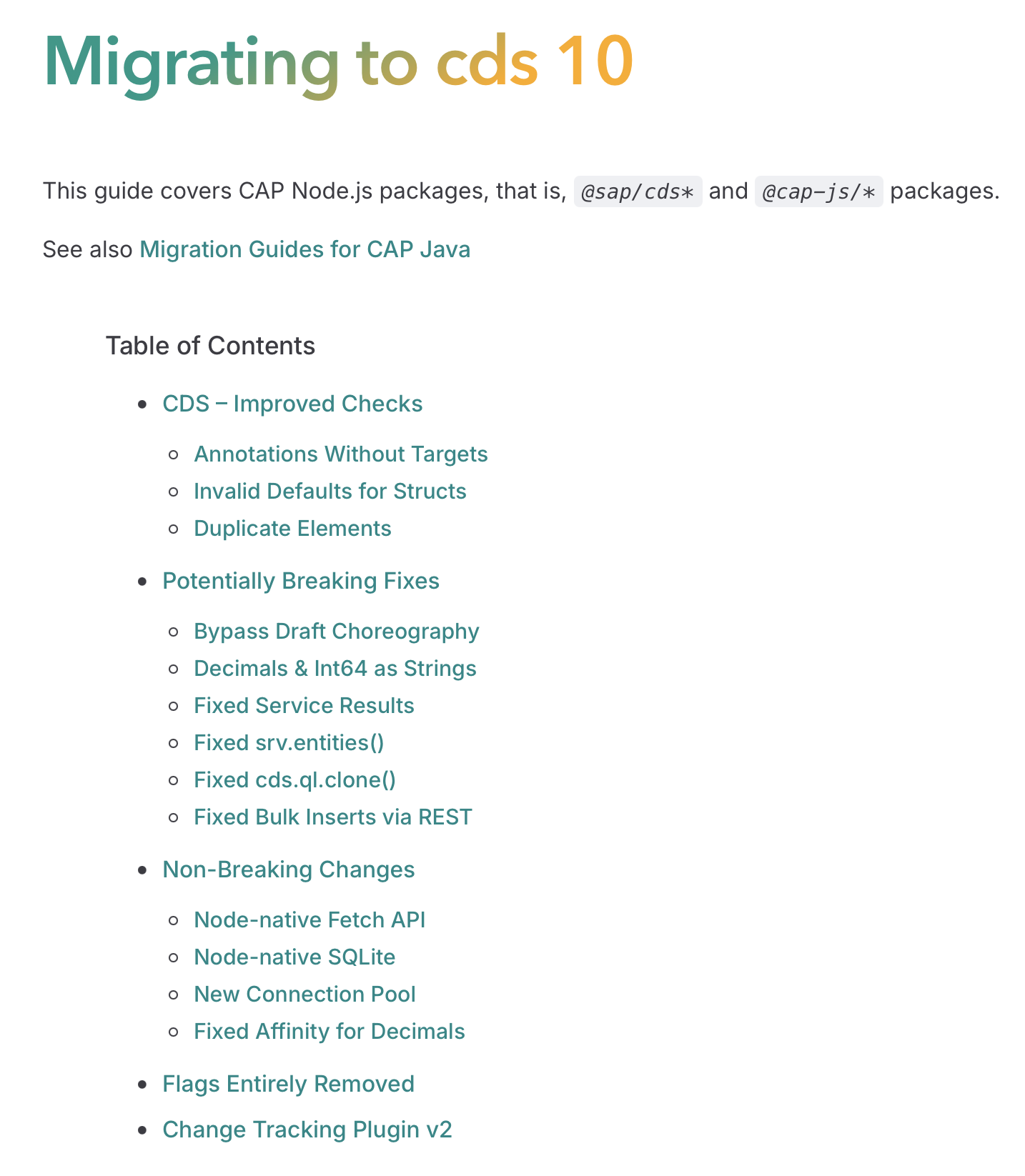
Starting with cds10, we provide migration guides to help you upgrade your CAP projects to the latest version. The guides cover breaking changes, new features, and recommended migration practices.
Info
While we already provided migration guides for CAP Java in the past, we now also provide the same for all Node.js-based CAP packages, including cds-dk, compiler, and runtime packages.
New cds upgrade Alpha
Run the new cds upgrade tool to help you upgrade your project to the latest CDS version. It checks your project for breaking changes, reports which ones affect you, and provides migration guidance for each finding:
npm i -g @sap/cds-dkcds upgradeLearn more about cds upgrade in the cds CLI guide.
Why is it still Alpha?
The cds upgrade tool is still in alpha because we're still working on giving it a more comprehensive set of checks and migration guidance. Think of the current level as a very raw diamond, which still needs some polishing, which will come in future releases. We welcome your feedback and contributions to help us improve it.
Highlights
Aggregates in Hierarchies Beta
CAP Java added support for hierarchical data displayed in a tree table with computed elements that aggregate data of all descendant nodes. CAP Node.js support will follow in a later release.
This is useful for scenarios like product catalogs, organizational charts, and bill-of-materials (BOM) structures, where you want to show a summary of values for each node based on its children:
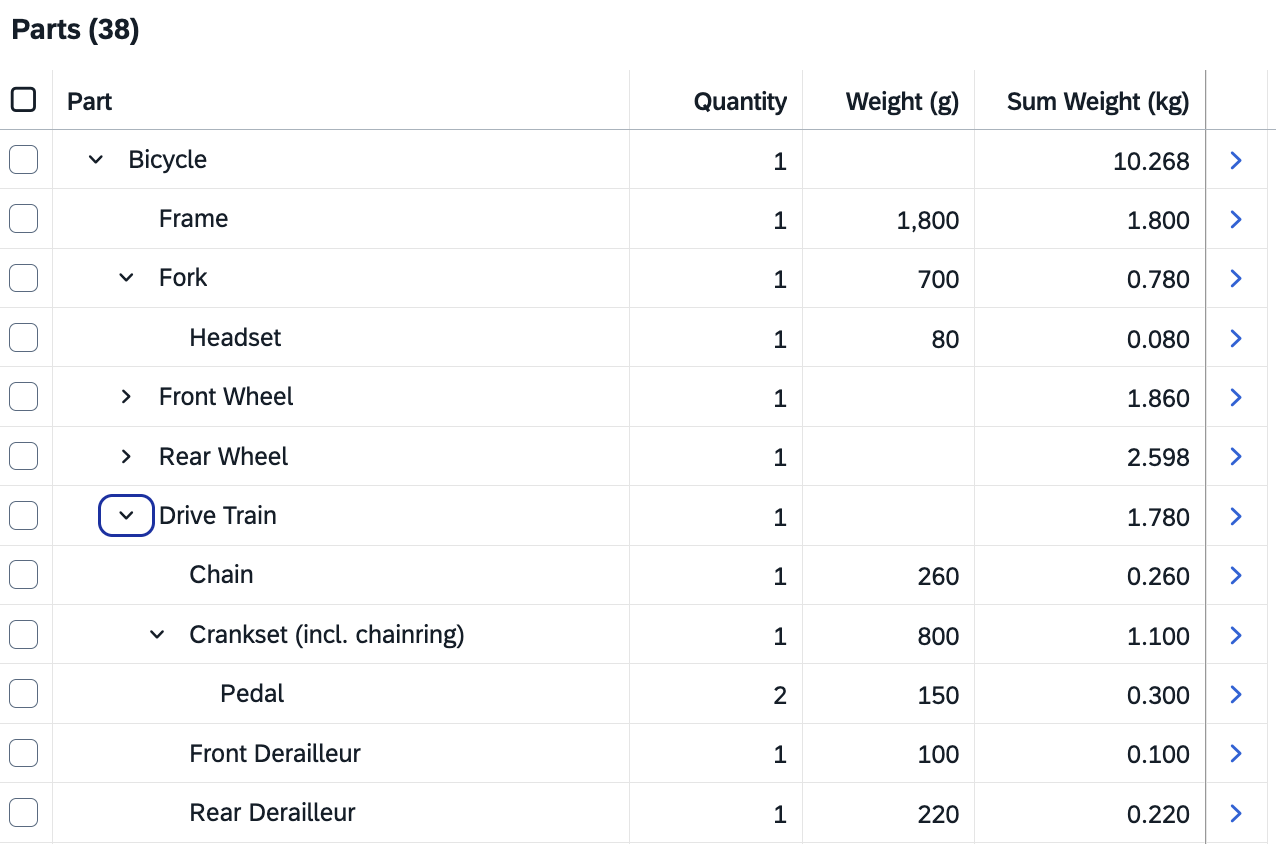
Annotate a virtual element with @cds.java.descendants.aggregate and provide the expression to aggregate as the value:
  entity Parts as
    projection on dbParts;

  extend Parts with columns {
    @cds.java.descendants.aggregate: (sum(weight * quantity * 0.001))
    virtual null as sumWeight : Decimal(9,3)
  }
Warning
The way descendant aggregates are declared, in particular the annotation @cds.java.descendants.aggregate, is beta and is likely to be changed in a subsequent release.
New CAP Project Explorer Beta
CAP Project Explorer is a new sidebar view for exploring your CAP projects directly within VS Code. It gives you access to your project's structure and symbols. To get started, select the CAP Project Explorer icon in the VS Code activity bar (left sidebar).
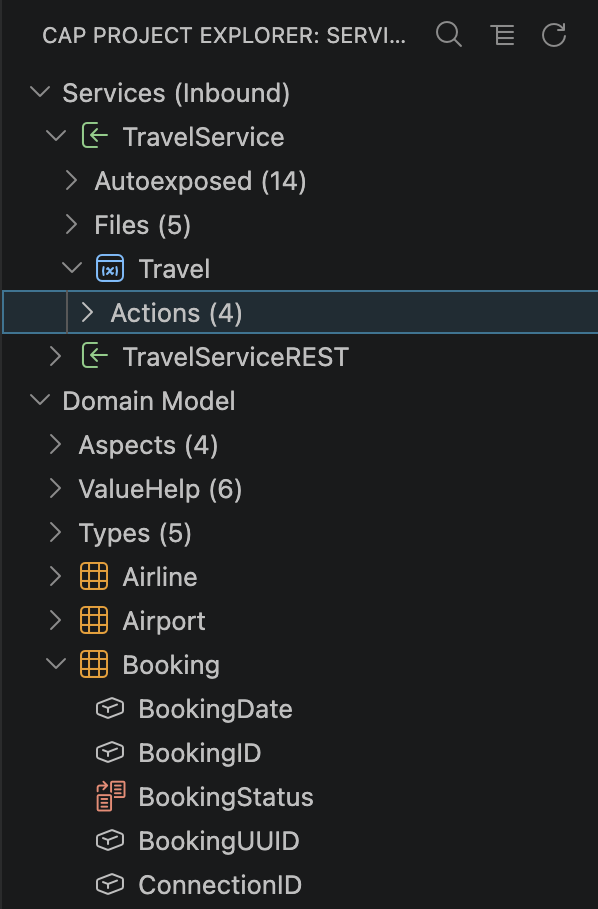
See the list of features
Navigation
- Browse entities, services, actions, types, and other CDS artifacts in a structured tree view
- Navigate to definitions, implementations, and references
- View tooltips with contextual information on hover
Search and Filtering
- Search and filter CDS artifacts by name
- Filter by artifact type (entities, services, actions, types, and more)
- Filter by specific services to focus on relevant parts of your project
We hope this new feature helps streamline your CAP development workflow. Give it a try and let us know your feedback!
Learn more about the CAP Project Explorer
New HCQL Protocol Adapter Beta
In the past we already shared previews and traces of the HCQL (read as CQL over HTTP) protocol, and respective protocol adapters, which we make officially available with cds10, for CAP Node.js and CAP Java. As with other protocols, serving a service over HCQL is as simple as annotating it with @hcql, for example, as done since quite some time, in the capire/bookshop sample:
annotate CatalogService with @hcql;Clients can then send CQN SELECT queries as a JSON body:
POST http://localhost:4004/hcql/admin HTTP/1.1
Content-Type: application/json

{ "SELECT": {
  "from": { "ref": [ "Authors" ] },
  "columns": [
    { "ref": [ "ID" ] },
    { "ref": [ "name" ] },
    { "ref": [ "books" ], "expand": [
      { "ref": [ "ID" ] },
      { "ref": [ "title" ] },
      { "ref": [ "genre", "name" ], "as": "genre" }
    ]}
  ]
}}
Available for both CAP Node.js and CAP Java.
In case of Node.js also as CQL text bodies:
POST http://localhost:4004/hcql/admin HTTP/1.1
Content-Type: text/plain

SELECT from Authors {
  ID, name, books {
    ID, title,
    genre.name as genre
  }
}
Available for CAP Node.js only.
The CAP runtime's remote client proxies, also contain outbound adapters for HCQL, so that you can consume remote services over HCQL in a protocol-agnostic way, same as for OData or REST, which we already showed traces of early this year in the Getting Started > Bookshop guide:
const AdminService   = await cds.connect.to ('AdminService')
await AdminService .read`Authors {
  ID, name, books {
    ID, title, genre.name as genre
  }
}`
As
@hcqlis automatically chosen when available, over@odata, or@rest.
Why using HCQL?
Compared to REST, OData, or GraphQL, CQL is most native to CAP, hence most efficient, as well as the most feature-rich query language. And thus HCQL is the most powerful protocol when it comes to CAP-to-CAP service integrations. In particular, it is best suited, and thus chosen automatically for data federation scenarios. -> Learn more about that in the CAP-level Service Integration and CAP-level Data Federation guides.
Why is it still Beta?
HCQL is still in beta because it's not fully documented yet, nor specified on protocol level. Moreover only the feature subset for read operations is currently guaranteed to be stable and work cross CAP Node.js and CAP Java. We will provide a full specification and documentation in a subsequent release.
New MCP Protocol Adapter Beta
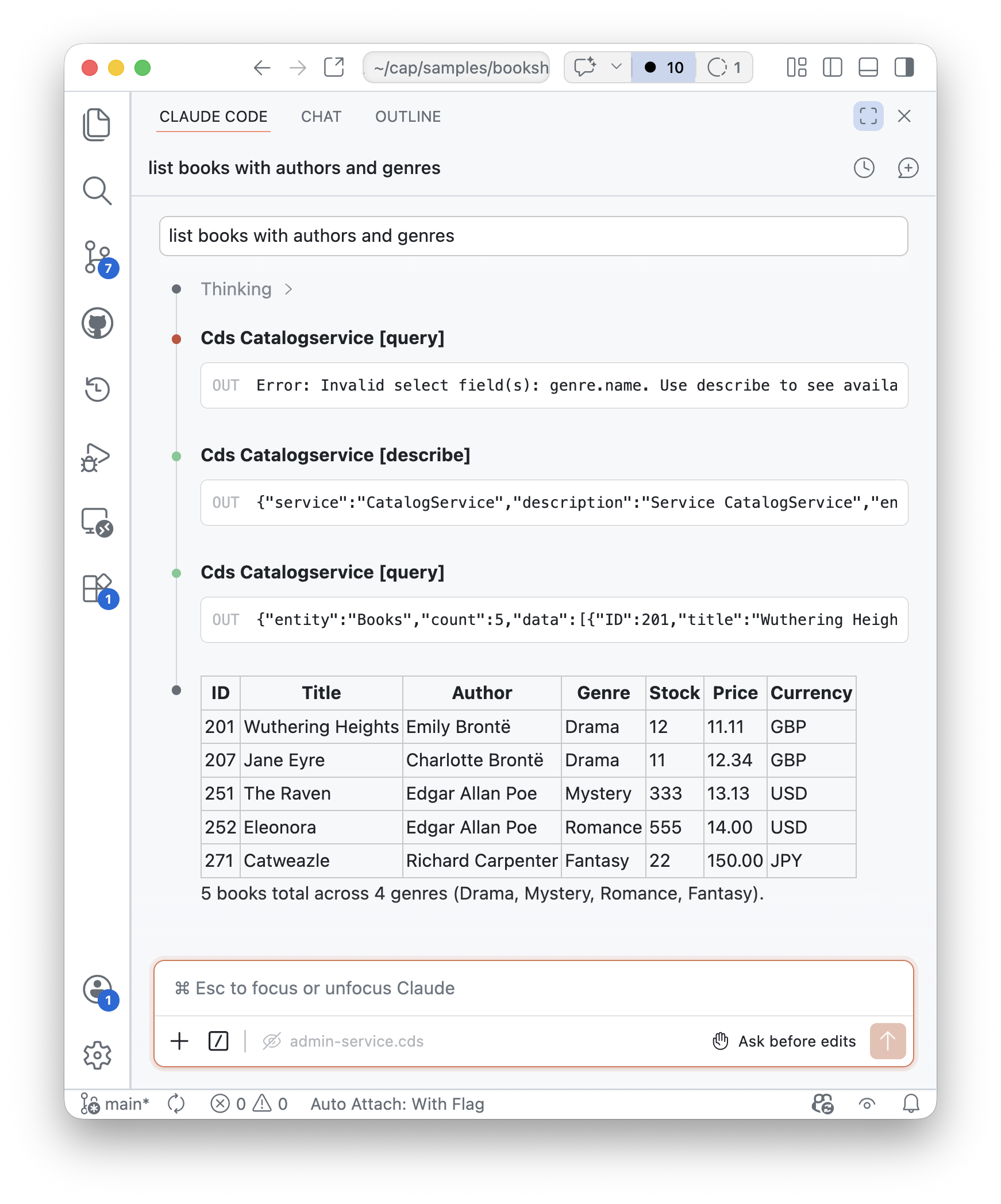
This release includes an initial implementation of a generic MCP adapter for both CAP Node.js (also CAP Java, but not released to public yet). It allows exposing existing CAP services to AI agents and LLM-powered as yet another protocol, simply install the plugin and annotate services with @mcp like that:
npm add @cap-js/mcpannotate CatalogService with @mcp; //> yet another protocol
annotate CatalogService with @odata @rest @hcql;With that you can query your application data with different AI agents:
Just Another Protocol
From the perspective of a developer in a CAP-based project, @mcp is just another protocol for your services, similar to @odata, @graphql, @rest, or @hcql. The adapter takes care of the rest, with all the standard CAP features you know working out of the box also with MCP, including annotations like @cds.query.limit, etc.
CAP native
The MCP adapter is fully integrated with existing CAP features, such as authentication, authorization, constraints, etc. Instead of inventing new annotation vocabularies, it uses standard CAP capabilities such as /**...*/ doc comments, @title, and @description annotations, to provide context to the LLM. This even more holds true for providing tailored interfaces via MCP: Simply declare use-case specific services, with respective projections.
Minimum number of powerful tools
The adapter automatically serves a full-fledged MCP endpoint with three tools:
describe- returns information about exposed entities and their elementsquery- reads data by translating tool calls to CQN queriescall_action- invokes custom actions and functions
Auto-wired client configurations
Automatic client configuration is supported for Claude Code and OpenCode. That is, unless disabled, when you start a server with cds watch, the adapter adds MCP server settings to these clients automatically.
Why is it still beta?
From it's technical maturity, it's actually in Gamma but there's still some work in progress regarding seamless integrations with Joule and Joule Studio, as well as regulatory obligations. Still we decided to release it as Beta to the public, to let you now, that we work on it, and invite you to contribute at https://github.com/cap-js/mcp.
New in this release (for SAP-internal early adopters)...
- Doc comments are now the recommended way to enrich the context provided to the LLM, preferred over
@title/@descriptionannotations. - Feature toggles control which MCP server capabilities are active, using standard CAP feature toggles.
- Autowire opt-out via
cds.mcp.autowire: falsedisables automatic client configuration for OpenCode and Claude Code duringcds watch.
Learn more in the Protocols > MCP guide.
New CAP-level Agents Alpha
@agent service TravelAgentService { ... }- Calesi-style agents, served ootb
- Custom agent logic via common markdowns / skills
- ... more coming soon; stay tuned ... 😃
New CAP Skills Library Alpha
- Capturing intent and best practices the CAP way
- Featuring incremental and iterative development
- Mixed initiative of artificial and human intelligence
- ... more coming soon; stay tuned ... 😃
New AI Core Plugin
New AI plugins for Node.js and Java (Alpha) significantly simplify integration with SAP AI Core. CAP automatically resolves service bindings using standard mechanisms, manages resource groups and AI model deployments, and provides a standard AICore service to interact with AI Core programmatically.
npm add @cap-js/ai<dependency>
<groupId>com.sap.cds</groupId>
<artifactId>cds-starter-ai</artifactId>
<version>${cds-ai.version}</version>
</dependency>One key built-in use case is automatic UI field recommendations powered by SAP RPT-1. The plugin detects fields with @Common.ValueList annotations and automatically provides recommendations in Fiori draft-enabled UIs — no custom handler needed:
annotate Books with {
    genre @Common.ValueList: {
        CollectionPath: 'Genres',
        Parameters: [{ $Type: 'Common.ValueListParameterInOut',
            ValueListProperty: 'code', LocalDataProperty: genre_code }]
    }
}
Recommendations can be suppressed per field via @UI.RecommendationState: 0, or enabled conditionally with an expression.
You can extend or override the built-in behavior via standard CAP event handlers.
Learn more about the AI Plugins.
See also: Vector Embeddings
Already in April 26 we rolled out greatly enhanced support for Vector Embeddings, by CAP Java, with the same for CAP Node.js coming soon.
New Data Inspector Plugin
The Node.js plugin @cap-js/data-inspector lets you inspect data from database entities and service definitions in a CAP application, in both local and production environments. Because inspection happens at the CAP service level, all built-in authentication, authorization, and audit logging mechanisms are automatically applied.
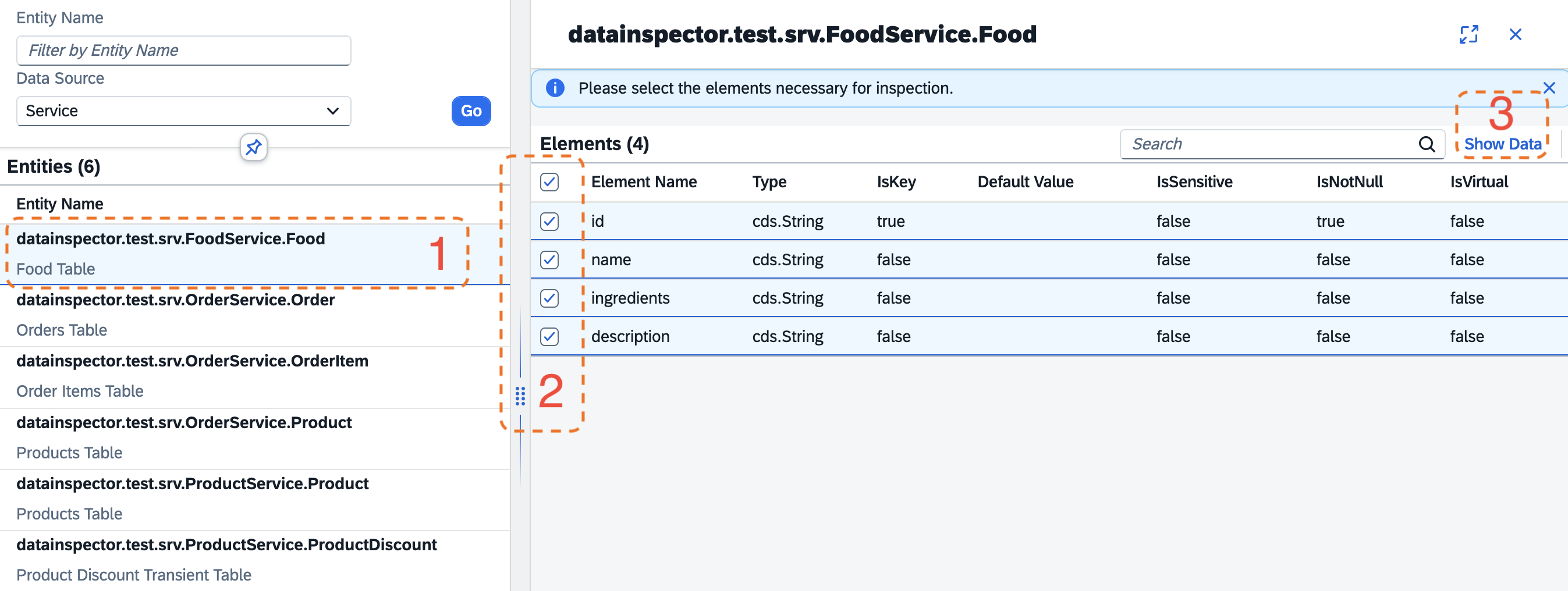
Learn more about the Data Inspector Plugin.
New Data Privacy Plugin Beta
The Node.js plugin @cap-js/data-privacy provides out-of-the-box integration with the SAP Data Privacy Integration (DPI) service for CAP applications.
Based on @PersonalData and @ILM annotations in your data model, the plugin automatically exposes two endpoints consumed by SAP DPI:
/dpp/information— shows personal data in the Manage Personal Data app/dpp/retention— handles blocking and deletion of personal data
Learn more about the Data Privacy Plugin.
New Event Mesh Support Beta
CAP Node.js now supports Event Mesh in SAP Integration Suite as an alternative to SAP Event Mesh classic (enterprise-messaging). CAP Java support will follow in a later release.
Two new messaging kind entries are available:
| Kind | Protocol | Use case |
|---|---|---|
event-mesh | HTTP/REST + webhooks | Standard single-tenant scenarios |
event-mesh-shared | AMQP | Shared/hybrid scenarios |
Use cds add to set up all required configuration automatically:
cds add event-mesh         # HTTP/webhooks — for production
cds add event-mesh-shared  # AMQP — for hybrid testing
Both commands accept a --cloudevents flag to enable CloudEvents formatting.
Learn more about Event Mesh in the Node.js Messaging guide.
Event Queues Evolution
CAP's event queues ship three major additions in this release: a new scheduling API, more efficient processing, and a ground-up documentation overhaul.
New Guide
Along with the new features, we overhauled the Event Queues documentation. The guide has been restructured from the ground up, now covering: a conceptual overview, configuration, scheduling, operations, and observability. The guide also includes Pub/Sub vs. Event Queues comparisons, callback events for SAGA-style compensation, and practical diagrams. Event Queues now appears as a first-level topic in the navigation.
Scheduling API
Schedule queued events to run after a minimum delay, on a recurring interval, or on a cron schedule — instead of processing immediately. Named tasks are guaranteed to run only once even when the application is scaled horizontally.
// Execute once, as soon as possible
await xflights.schedule('cleanup', { olderThan: '30d' })

// Execute once, after a delay
await xflights.schedule('cleanup', { olderThan: '30d' })
  .after('1h')

// Execute repeatedly — supports time strings and cron expressions
await xflights.schedule('replicate', { entity: 'Airports' })
  .every('10m')
await xflights.schedule('replicate', { entity: 'Airports' })
  .every('*/10 * * * *')

// Two independent singleton tasks for the same event — each removable by name
await xflights.schedule('replicate', { entity: 'Airports' }).every('10m')
  .as('replicate-airports')
await xflights.schedule('replicate', { entity: 'Airlines' }).every('1h')
  .as('replicate-airlines')

// Remove a previously scheduled task
await xflights.unschedule('replicate-airports')Schedulable<XFlightService> sxflights = Schedulable.of(xflights, outbox);
// Execute once, as soon as possible
sxflights.scheduled(Schedule.NOW).emit(cleanupEventContext);
// Execute once, after a delay
sxflights.scheduled(Schedule.create()
.after(Duration.ofHours(1))
).emit(cleanupEventContext);
// Execute repeatedly — supports time strings and cron expressions
sxflights.scheduled(Schedule.create()
.every(Duration.ofMinutes(10))
).emit(replicateEventContext);
sxflights.scheduled(Schedule.create()
.cron("0 */10 * * * *")
).emit(replicateEventContext);
// Two independent singleton tasks for the same event — each removable by name
sxflights.scheduled(Schedule.create().every(Duration.ofMinutes(10))
.as("replicate-airports")
).emit(replicateEventContext);
sxflights.scheduled(Schedule.create().every(Duration.ofHours(1))
.as("replicate-airlines")
).emit(replicateEventContext);
// Remove a previously scheduled task
sxflights.scheduled(Schedule.create().as("replicate-airports").cancel()).emit(replicateEventContext);.after() and .every() accept milliseconds, time strings ('1s', '10m', '1h'), or, in CAP Java, a java.time.Duration. .every() also accepts five-field cron expressions. Use .as(name) to give a task an explicit name, enabling independent scheduling and removal of multiple tasks for the same event.
More Efficient Processing
Two improvements make event queue processing more efficient:
Status-column locking is now the default — replacing long-held database locks. Messages are marked as processing via a status UPDATE, then deleted within the same transaction once processing succeeds. This enables parallel processing and avoids locks that could block other operations.
Efficient leftover recovery: CAP now keeps a tenant-aware schedule of pending work. On startup and recovery, the task runner checks this schedule to identify what needs processing — rather than scanning all tenant databases.
Migration from cds 9
In cds 9, legacy locking (legacyLocking: true) was still the default. If you relied on that behavior explicitly, remove the setting — it is no longer needed.
cds export GA
The cds export command, which was rolled out in December 25 as a public Beta, is now generally available. Use it to create API client packages from CDS service definitions. For example, given a service definition like the following:
service FlightsService {
  @readonly entity Flights as projection on my.Flights;
  @readonly entity Airlines as projection on my.Airlines;
  @readonly entity Airports as projection on my.Airports;
}
Export an API client package for the service:
shcds export srv/data-service.cdsPublish it to an npm registry:
shnpm publish ./apis/data-serviceImport it into a consuming app:
shnpm add @capire/xflights-data
Why use cds export?
Instead of exporting APIs to OData EDMX and cds importing them to consuming apps, cds export creates ready-to-use API client packages, with lossless CDS API models.
Learn more about cds export in the CAP-level Data Integration guide and the Command Line Interface docs.
CAP Node.js
Consolidated Service APIs
The generic CRUD handler now returns a uniform shape for all write operations: an array with an .affected property.
const result = await srv.create(Authors).entries(
  { name: 'Emily Brontë' },
  { name: 'Charlotte Brontë' }
)
const [Emily, Charlotte] = [...result]   // generated primary keys
const { affected: sale } = await srv.update(Books).set`price -= 11`.where`stock > 111`
const { affected: gone } = await srv.delete(Books).where`stock = 0`
Before cds 10, write results from app services were undocumented and inconsistent with db-service results. The new shape unifies app services, db services, and HCQL-proxied remote services on a single contract. Consumer code does not need to change when a service moves from in-process to remote. This is foundational for late-cut microservices: splitting a monolith no longer forces consumers to adapt to a different result shape across an HCQL hop.
The shape mirrors standard SQL INSERT … RETURNING semantics, supported natively by PostgreSQL, SQLite, and others, and aligns CAP with how popular DB libraries — Knex, Drizzle, Prisma — expose write results. A single, predictable result schema also benefits tooling: generic event handlers, test assertions, and AI agents whose tool definitions can now describe write operations once instead of per-operation.
For INSERT operations, iterating the result ([...result], for…of) materializes the generated primary keys of the inserted rows. For UPDATE, UPSERT, and DELETE operations, the array is reserved for rows returned by a SQL RETURNING clause. This is not yet supported, so the array is currently always empty.
See the migration guide for details, including the legacy_srv_results opt-out.
Bypass Drafts by Default
We consolidated and simplified the ways to work with active data, that is, active instances of @odata.draft.enabled entities. Especially for non-Fiori clients (for example, AI agents) that know nothing about the concept of Fiori Drafts at all.
Add IsActiveEntity=true as a key parameter to your requests to address active data:
POST   /Books { IsActiveEntity:true, ... }       //> CREATE
PATCH  /Books(ID=201,IsActiveEntity=true) {...}  //> UPDATE
DELETE /Books(ID=201,IsActiveEntity=true)        //> DELETE
GET /Books(ID=201,IsActiveEntity=true) //> READCompare with draft requests ...
Conversely, add IsActiveEntity=false to specifically address draft data:
POST   /Books { IsActiveEntity:false, ... }               //> NEW
POST   /Books(ID=201,IsActiveEntity=true)/draftEdit       //> EDIT
POST   /Books(ID=201,IsActiveEntity=false)/draftActivate  //> SAVE
PATCH  /Books(ID=201,IsActiveEntity=false) {...}          //> PATCH
DELETE /Books(ID=201,IsActiveEntity=false)                //> DISCARD
GET /Books(ID=201,IsActiveEntity=false) //> READAdditional Entry Points
This feature also requires you to handle partial CREATE/UPDATE requests to the draft root and its composition children. Previously, you could rely on a deep CREATE/UPDATE on the draft root.
Taking this further, CAP assumes IsActiveEntity=true by default. So, the following requests (no draft notion) always refer to active data, equivalent to the ones above:
POST   /Books {...} //> only with `cds.fiori.draft_new_action`
PATCH  /Books/201 {...}
DELETE /Books/201
GET /Books/201With cds.fiori.draft_new_action: true, the action replaces the POST on the entity collection to create drafts, similar to draftEdit and draftActivate for editing and saving drafts.
POST /Books/draftNew                  // creates a draft for a new book
POST /Books {...}                     // created a draft for a new book
POST /Books {...}                     // creates a new active book now
Draft locks are taken into account in all relevant cases: if a draft exists for a given instance, direct updates and deletes, as well as conflicting attempts to edit the entity, are rejected.
Key Benefits
The simplified approach to address active data is not only less clumsy to use, it also unblocks technical API clients, including AI use cases, that don't know anything about Fiori Drafts at all, as well as functionality like SAP Fiori Elements Mass Edit, which relies on direct modification of active entities via PATCH requests.
Learn more about Fiori Draft support in CAP.See the migration guide for more details, including opt-out options.
Going for Vitest & ESM
In April 26 we rolled out cds.test v1.0, with support for Vitest, and latest chai v6. Vitest allows you, and us, to write and run tests with ECMAScript Modules (ESM), which wasn't possible with Jest. Meanwhile, we started to ...
- Port our own CAP test suites to Node-native test runner and Vitest completely.
- Abandon Jest entirely mid/long-term, and remove support from
cds.test. - Move to ESM for CAP samples, e.g.
@capire/bookshop. - Move to ESM for CAP core packages, e.g.
@sap/cds.
Migrating from Jest to Vitest
Once we reach step 4, your existing Jest-based tests will no longer work, if any. Prepare for that by starting to port your tests to Vitest. See the Vitest migration paths for Jest and Mocha users.
New CAP projects are ESM-based
When you create a new CAP project with cds init, it is ESM-based by default. You can revert that to CommonJS-based project by removing the line "type": "module" from your package.json.
Going Native...
With recent minor releases, we started to replace third-party dependencies with built-in or native alternatives, in particular:
- In May 25 – built-in connection pool to replace
generic-pool. - In Feb 26 – Node-native SQLite driver to replace
better-sqlite3. - In Apr 26 – Node-native Fetch API to replace
axios, and Cloud SDK (in dev).
While these were beta opt-ins so far, they are now generally available and the defaults.
The table below shows the impact of these changes on the number of direct + transitive dependencies and the install footprint of a typical CAP project during development:
| Former Dependencies | → | Replaced By | 𝚫 |
|---|---|---|---|
@sap-cloud-sdk/http-client | → | Node-native Fetch API (in dev) | -93 |
axios | → | Node-native Fetch API | -30 |
better-sqlite3 | → | Node-native SQLite | -38 |
generic-pool | → | Built-in Connection Pool | -1 |
chai@4 | → | chai@6 | -7 |
| 190 packages total | → | 78 total – 69 of which by express | -112 |
| 32 MB total | → | 9 MB total | -23 MB |
Why this matters
- Smaller footprint – installs are faster, and images are significantly smaller.
- Fewer dependencies – less maintenance overhead, and fewer potential bugs.
- Less attack surface – fewer dependencies means fewer potential vulnerabilities.
Ad Reduced Attack Surface
More than 80 of the eliminated 3rd-party package dependencies had only 1 maintainer, which is a common risk factor for supply chain attacks. The new built-in and native implementations are maintained by the Node.js team, and the CAP team, and are therefore more secure and reliable.
Non-breaking, under the hood
These changes are non-breaking for existing CAP applications. The new built-in and native implementations are fully compatible with the previous 3rd-party implementations, and existing code does not need to be changed. Still, if you encounter any issues, check out the respective migration guide sections for instructions to revert to former implementations, and please report them to the CAP team.
Telemetry Plugin v2

The @cap-js/telemetry plugin got a major version upgrade to v2, which supports OpenTelemetry SDK 2.0, with these changes in total:
- All relevant
@opentelemetry/*dependencies bumped to 2.x. - Added
@opentelemetry/instrumentation-undicias default HTTP client - Replaced deprecated
@opentelemetry/host-metricswith@opentelemetry/instrumentation-host-metrics.
The second traces outbound HTTP calls via CAP's native Fetch API.
CAP Java
CAP Java 5 is a major release. It brings many new features, most notably support for Spring Boot 4. Consult the migration guide to prepare for the release.
Important Changes ❗️
Major Dependency Updates
Some minimum versions of major dependencies have been increased:
| Dependency | minimum | recommended |
|---|---|---|
| JDK | 21 | 25 |
| Spring Boot | 4.0 | 4.1 |
| Spring Security | 7.0 | 7.0 |
| BTP Security Library | 4.0.0 | 4.0.7 |
| Maven | 3.9.14 | 3.9.16 |
| @cds-dk | 9.9 | 10.x |
Upgrade Support with OpenRewrite Recipes
CAP Java 5 introduces some incompatible changes, but makes the migration easy by providing OpenRewrite recipes in cds-services-recipes that automate the bulk of required code adjustments:
mvn org.openrewrite.maven:rewrite-maven-plugin:run \
  -Drewrite.recipeArtifactCoordinates=com.sap.cds:cds-services-recipes:5.0.0 \
  -Drewrite.activeRecipes=com.sap.cds.services.migrations.Cap_5.0
Learn more about Java migrations with OpenRewrite.
Changes to CDS Properties
Various property defaults have changed to align with recommended settings for production use. Most prominently, read requests are now executed without a transaction, outboxes for services are now by default unordered, and the default authentication mode for local development is now model-relaxed. Moreover, the configuration of search has been simplified and fuzzy search is now enabled by default on SAP HANA.
Learn more about changes to CDS properties between versions 4 and 5.
API Changes
Some API methods deprecated in version 4 and flagged as forRemoval have been removed.
Learn more about API changes between versions 4 and 5.
Spring Boot 4
CAP Java 5 supports the new Spring Boot major version. It uses Spring Boot 4.1 and Spring Security 7 as the underlying framework:

For an overview of what's new in the underlying framework, see the Spring Boot 4.0 Release Notes and the Spring Boot 4.1 Release Notes.
If your application does not use native Spring APIs directly, the migration can be as straightforward as renaming Maven dependencies and making minor adjustments in test classes.
Otherwise, consult the Spring Boot 4.0 Migration Guide and the Spring Security 7 Migration Guide for details.
Tip
To help with necessary adaptations, there is a Spring Boot OpenRewrite recipe available.
JDK 25
CAP Java now defaults to JDK 25, which is an LTS version.
We recommend configuring SapMachine 25 JDK with the SAP Java buildpack as shown in the example (mta.yaml):
modules:
  - name: MyCAPJavaApp
    type: java
    path: srv
    parameters:
      buildpack: sap_java_buildpack_jakarta
    properties:
      JBP_CONFIG_COMPONENTS: "jres: ['com.sap.xs.java.buildpack.jre.SAPMachineJRE']"
      JBP_CONFIG_SAP_MACHINE_JRE: '{ version: 25.+ }'
JDK 25 brings significant performance improvements through enhanced garbage collection, faster startup times, and reduced memory footprint — making it the recommended choice for production deployments.
Tip
If your project uses Lombok, you must explicitly add its annotation processor to your POM when you switch to Java 25.
Harmonized Search
CAP Java 5 harmonizes search behavior with CAP Node.js and RAP. By default, search now uses the SAP HANA search syntax. Moreover, fuzzy search is now enabled by default on SAP HANA.
Search Syntax
CAP Java now adds full support for the SAP HANA search syntax, harmonizing the user experience with CAP Node.js and RAP. This is now the default. Alternatively, the OData search syntax is still supported by configuration. The syntaxes differ in how expressions are composed:
| operator | SAP HANA | OData |
|---|---|---|
| conjunction | <space> | <space> or AND |
| disjunction | OR | OR |
| negation | - | NOT |
| grouping | n/a | (, ) |
| precedence | OR has precedence over AND (!) | AND has precedence over OR |
Example - search for books on plants but not palm trees:
- SAP HANA search string:
plant -"palm tree" - OData search string:
plant AND NOT "palm tree"
On H2, SQLite, and Postgres, the SAP HANA syntax is emulated so that you can use search consistently in local development and CI.
The per-protocol search mode properties have been replaced by the unified cds.sql.search.syntax property with options HANA (default) and ODATA.
Fuzzy Search
Fuzzy search is now enabled by default on SAP HANA, with improved support for UUIDs and large strings. Fuzzy search is now also available in hierarchy queries.
Faster Typed Data Access
CAP Java introduces a new variant for typed data access that provides up to 10x the performance of the previously used methods. (The overall performance gain depends on how heavily an application uses typed data access.)
For typed access to data, CAP Java generates accessor interfaces. When using the accessor interfaces, the underlying data map was previously handled by a dynamic proxy, which introduces some performance overhead.
Now the CDS Maven Plugin can also generate implementation classes for the accessor interfaces so that you can use typed data access with minimal performance overhead. Use the new parameter generateClasses of the CDS Maven Plugin's generate goal to enable the generation of implementation classes:
<plugin>
  <groupId>com.sap.cds</groupId>
  <artifactId>cds-maven-plugin</artifactId>
  <executions>
    <execution>
      <id>cds.generate</id>
      <goals><goal>generate</goal></goals>
      <configuration>
        <generateClasses>true</generateClasses>
      </configuration>
    </execution>
  </executions>
</plugin>
Built-in OData Processing
CAP Java used Apache Olingo for OData processing - a project that has retired in 2025.
To safeguard OData support, reduce dependencies, and improve performance, CAP Java now has built-in support for OData.
The internal Maven modules repackaged/odata-v4-lib and repackaged/odata-v2-lib have been removed from the delivery, which typically does not affect you.
Removal of "repacked" modules
The modules repackaged/odata-v4-lib and repackaged/odata-v2-lib were never part of CAP Java's public API. However, if your project referenced them directly, there are two options:
- Recommended: Rewrite handler code using CAP Java native APIs and remove the Olingo dependencies.
- Use an own fork of open-source Apache Olingo and import packages
org.apache.olingo:olingo-odata4resp.org.apache.olingo:olingo-odata2.
Draft New Action
Like CAP Node.js, CAP Java now supports creating an active version of a draft-enabled entity, provided that the draft-new-action is configured via cds.fiori.draft_new_action: true:
POST /Books {...}Learn more about editing drafts.
Miscellaneous
- Support for filters through to-one associations into
cds.Mapelements. - All values in annotations with expression values are now treated as constants.
- Remote OData v4 services now support
$countinside$expand(). CQL.vectorEmbeddingnow accepts plain text asString.- The
addgoal of the Cds Maven Plugin now generates apom.xmlfor Maven modules exported viacds export.
MTX Services
Stricter Annotation Validation for Extensions
Field annotation @Common.FieldControl is now also blocked by default. You can allow this annotation by adding it as "annotations": ["@Common.FieldControl"] to the extension-allowlist
Migration Support from @sap/cds-mtx to @sap/cds-mtxs Removed
The migration support to migrate from @sap/cds-mtx to @sap/cds-mtxs using the command cds migrate or cds-mtx-migrate has been removed. If you still need to migrate, use an earlier version of @sap/cds-mtxs.