
CAP Release April 26





Preparing for cds 10
The next major release of CAP, cds 10, is planned for June 26. You can get prepared for it by checking your project for compatibility issues and adjusting your code accordingly already now.
CAP Node.js
node.js
Node.js v22 becomes the minimum supported runtime. Recommended is Node 24 (LTS). Learn more about the CAP Release Schedule
Native node:sqlite becomes the default SQLite driver. To keep using better-sqlite3 or sql.js, add them as an explicit dependency. -> See February 2026 Release Notes
Flags with Changed Defaults
Following are flags to opt out from related fixes, but stick to the old erroneous behavior. While these flags are still available, their default values are now set to the fixed behavior. That means you've to set it to the former default explicitly, if you still need that.
| Flag | Fixed erroneous behavior | Was | Since |
|---|---|---|---|
| ieee754compatible1 | Inconsistency b/w SQLite (dev) and HANA (prod) with regard to Decimal and Int64 values. | false | Jun 24 |
| compat_srv_getters | Wrong ability to call srv.entities with namespaces. | true | Dec 25 |
| compat_texts_entities | Generated .texts entries in srv.entities. | true | Dec 25 |
| legacyLocking | Outbox caused long-lived database locks. | true | May 25 |
Fix your code asap, as the flag will be removed with the next major release.
1 On SQLite and PostgreSQL only; no change for HANA, which always worked the new way. => The new default ensures consistency across all databases, and thus prevents late surprises in production tests, as well as potential data loss or corruption due to the old erroneous behavior.
Flags Entirely Removed
The following flags already had the new fixed behavior as default in cds 9, but you were still able to revert it to the former erroneous behavior. In cds 10, these flags are removed entirely, and hence ignored if set in your project.
| Removed Flag | Fixed behavior | Was | Since |
|---|---|---|---|
| service_level_restrictions | Ignored @requires on local service calls | true | May 25 |
| consistent_params | Unclear req.params -> now always an array | true | May 25 |
| compat_save_drafts | Draft SAVE handlers called on PATCH events | false | Sep 25 |
| compat_assert_not_null | ASSERT_MANDATORY instead of _NOT_NULL | false | Sep 25 |
| calc_elements | Calculated elements not supported for drafts | false | Feb 26 |
If you still use any of these in your project, you must fix your code now!
Are you affected?
Check the tables below for details on the relevant flags and their default values in cds 10, and whether your project is affected by any of these changes. If your project explicitly sets any of the flags listed in the "Flags Being Removed" table, you are affected and must adjust your code accordingly to avoid potential issues when upgrading to cds 10.
Run this in the root of your project to check for any of the flags listed below:
grep -rn \
-e ieee754compatible \
-e compat_srv_getters \
-e compat_texts_entities \
-e legacyLocking \
-e service_level_restrictions \
-e consistent_params \
-e compat_save_drafts \
-e compat_assert_not_null \
-e calc_elements \
-e direct_crud \
package.json .cdsrc*.* .env 2> /dev/null
If that yields any results, check the relevant files and lines for the flags, and adjust them as needed, following the details in the tables above.
Try it now
To give you the chance to try out the new defaults and adjust your project accordingly, we already turned on the new defaults in cds 9, while keeping the old behavior available as opt-out via feature flags. This allows you to test your project with the new defaults and fix any issues before they become enforced with cds 10. Check the tables below for details on the relevant flags, and set them in your project configuration to opt in early:
# Flags with changed defaults
cds.features.ieee754compatible = true
cds.features.compat_srv_getters = false
cds.features.compat_texts_entities = false
cds.requires.queue.legacyLocking = false

# Flags entirely removed
cds.features.service_level_restrictions = true
cds.features.consistent_params = true
cds.features.compat_save_drafts = false
cds.features.compat_assert_not_null = false
cds.fiori.calc_elements = falsefeatures:
service_level_restrictions: true
ieee754compatible: true
consistent_params: true
compat_srv_getters: false
compat_texts_entities: false
compat_assert_not_null: false
compat_save_drafts: false
fiori:
calc_elements: true
requires:
queue:
legacyLocking: false{
"cds": {
"features": {
"service_level_restrictions": true,
"ieee754compatible": true,
"consistent_params": true,
"compat_srv_getters": false,
"compat_texts_entities": false,
"compat_assert_not_null": false,
"compat_save_drafts": false
},
"fiori": {
"calc_elements": true
},
"requires": {
"queue": {
"legacyLocking": false
}
}
}
}CAP Java
java
Along with cds 10, CAP Java is planning to release the major version 5, which will support Spring Boot 4. To prepare for the next major version, please have a look at the preview of the migration guide. It lists deprecated APIs, which will be removed, and properties, for which default values will change. Please substitute your usage of deprecated APIs with the suggested replacements and adjust your properties to the future default values.
CDS Language
Annotate with invalid target
The compiler typically emits a warning when an annotation cannot be applied because its target is invalid.
Starting with cds-compiler 6.5, an annotate statement for for one of the security related annotations @restrict, @requires, or @ams with an invalid (i.e. non-existing) target is an error.
annotate com.sap.NotThere with @restrict: ...;
annotate com.sap.Books:notThere with @restrict: ...;
Compilation results in:
Error: Artifact “com.sap.NotThere” has not been found
Error: Element “notThere” has not been found
Fix the error by providing the correct target, or by removing the annotate statement in case it has become obsolete.
Vector Embeddings
The CAP Java runtime and the CDS compiler now come with enhanced support for vector embeddings, ... CAP Node.js will follow soon.
Now also for H2, SQLite, ...
You can now also use the built-in CDL Vector type with H2 and SQLite for local development, as well as with PostgreSQL (beta). In the past that was possible for SAP HANA only, which disallowed local development as soon you used Vector type in your models.
Along with the support for the type itself CAP Java now also supports related CQL.cosineSimilarity and CQL.l2Distance functions for similarity search and Retrieval-augmented generation (RAG) with vector embeddings on all the four databases.
PostgreSQL Support in Beta
Using Vector types on PostgreSQL is currently in beta, and requires the pgvector extension installed with PostgreSQL.
New Vector Embedding Function Beta
CAP Java now supports the VECTOR_EMBEDDING function via CQL.vectorEmbedding to generate vector embeddings from text data directly in SAP HANA.
To generate vector embeddings on write in the database, you can define a calculated element on-write using the vector_embedding function:
extend Incidents with {
  @cds.api.ignore
  embedding : Vector = vector_embedding(
    'Title: ' || title || ', Summary: ' || summary,
    'DOCUMENT', 'SAP_GXY.20250407'
  ) stored;
}
In Java queries, you can use CQL.vectorEmbedding to compute vector embeddings. For example, in a RAG scenario to enhance the context of a user query for the LLM, compute the vector embedding of the user query and use CQL.cosineSimilarity to find similar incidents based on their embeddings and add them to the request to the LLM.
var userQuery = CQL.val("""
  Have we seen incidents with solar inverters this month,
  and how were they resolved?
  """);
var embedding = CQL.vectorEmbedding(userQuery, TextType.QUERY, "SAP_GXY.20250407");
var similarity = CQL.cosineSimilarity(CQL.get(Incidents.EMBEDDING), embedding);

Select.from(INCIDENTS).columns(
  i -> i.ID(), i -> i.title(), i -> i.summary(), i -> i.date(),
  i -> similarity.times(100).as("relevance")
).where(i -> similarity.gt(0.75))
.orderBy(i -> i.get("relevance").desc());
Local Testing with H2 and SQLite
On H2 and SQLite the CQL.vectorEmbedding function is emulated using local ONNX embedding models, which can be added via LangChain4j embeddings for local testing.
Learn more about vector functions in CAP Java.
CDS Language
Declarative Constraints GA
In December 25 we initially released Declarative Constraints – i.e., the new @assert: syntax – under Gamma status. With this release, they are generally available and production-ready. You can now use them in your projects with confidence, and fully rely on their stability and support.
As part of the GA release, we applied a minor fix to the way we handle error codes. For example, given the following constraint:
@assert: (case
  when price is null then 'PRICE_MUST_BE_PROVIDED'
  when price < 0 then 'PRICE_MUST_BE_POSITIVE'
end)
Before, the error code returned in case of violations was always ASSERT, regardless of the specific error. With the GA release, the error code is now correctly set to the value specified in the constraint definition, such as PRICE_MUST_BE_PROVIDED or PRICE_MUST_BE_POSITIVE in the example above.
Extending Views with CQL Clauses
You can now extend view definitions with CQL clauses WHERE, GROUP BY, HAVING, ORDER BY, and LIMIT. For example, given the following view definition:
entity BooksByGenre as select from Books {
  avg(stock) as avg_stock,
} group by genre.name;
... you could now extend it like that:
extend BooksByGenre with
where title like '%of%'
group by author.name
having min(price) > 19.99;
If the base view already has a GROUP BY or ORDER BY clauses, the new elements specified in the extension will be appended to the existing clause.
If the base view already has a WHERE or HAVING clause, extending these clauses is currently not supported. We're thinking of supporting that by combinations with AND in an upcoming release.
Extending Derived Enums
You can now add enum values to a derived enum type via extend.
Example:
type Colors : String enum { red; green; blue }type Colory : Colors;
extend Colory with enum { yellow }The new color yellow is only available in Colory, but not in Colors.
CAP Node.js
New cds test Version 1.0
The new version 1.0 of @cap-js/cds-test marks a sign of stability: it's here to stay and plays a major role in our portfilo of CAP products with long-term support. It comes with the following updates:
Check out the updated docs
Ensure to check out the updated documentation to learn more about how to use the new version effectively in your testing strategy. Especially the Getting Started section has been significantly improved, as well as the Best Practices section.
(No) Breaking Changes
While we avoided any breaking changes, there are some edge cases with Jest, which is still widely used, but has unsolved issues, especially with ESM modules. => Ensure to check the Deprecated APIs section – not only, but especially if you are using Jest.
Upgraded to Chai 6
The default assertion library is now the latest version 6 of Chai. This version is used whenever you use the expect assertion function through cds.test.expect:
const { expect } = cds.test
expect (42) .to.be.a ('number') .gt (41)
When used with Jest, cds.test.expect returns a built-in emulation of chai.expect that covers the most common matchers, but not all. This is because chai 6 is ESM based, and Jest still struggles with ESM modules. You can always install and use chai directly, of course, or use another assertion library of your choice.
Featuring Vitest
You can now run tests with the Vitest framework, with cds.test fully supporting it as a primary choice, while still maintaining compatibility with other test runners like Jest, Mocha, or Node's built-in test runner – optionally through the cds test command, which provides a cleaner output.
For example, for the tests in @capire/samples...
git clone --recursive http://github.com/capire/samples
cd samples
npm install
These still work as before:
node --test
cds test
npx mocha --parallel bookstore/test
npx jest --silentnpx vitest --silentnpx vitest --ui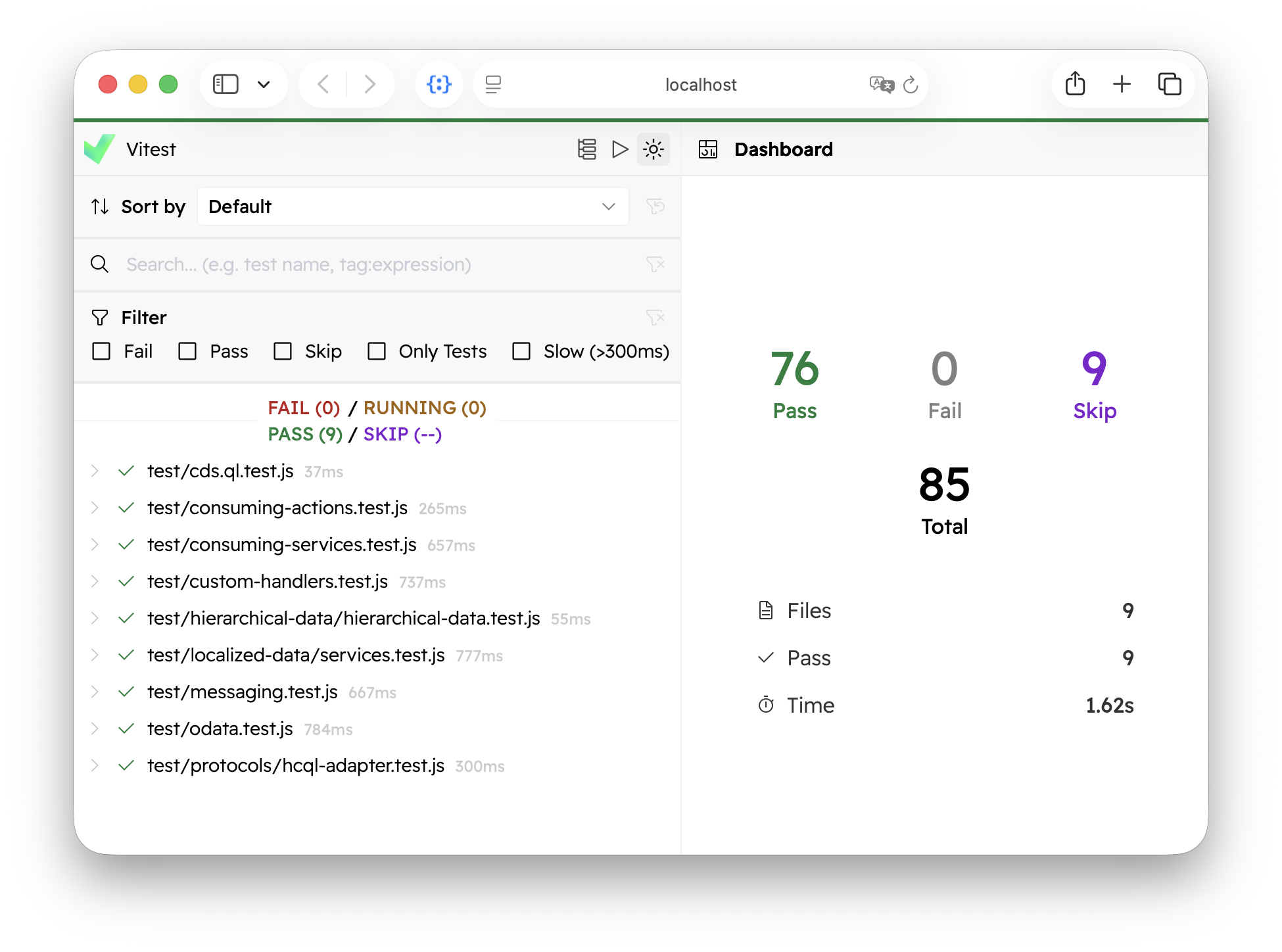
Vitest as a primary choice
Vitest is a modern test runner built on top of Vite, designed for speed and developer experience, with a feature set comparable to Jest, and fully ESM compatible. If you're starting a new project, Vitest is a great choice; it also offers straightforward migration paths for Jest and Mocha users.
Learn more about Vitest's feature set.
Node-native Fetch API
We replaced all dependencies on 3rd party HTTP client libraries like Axios in favor of using Node's native implementation of Fetch API in all relevant packages and scenarios, including:
- Remote service proxies in
@sap/cds-> reducing the need for Cloud SDK - CLI commands in
@sap/cds-dkthat perform HTTP calls, e.g.cds bind - HTTP shortcuts in
@cap-js/cds-test(GET,PUT,POST, ...)
This change is transparent to you for all uses in remote service proxies and CLI commands, as these APIs are not directly exposed. Same applies to usages of the HTTP shortcut methods provided through cds.test, which still have the same API and behavior as before, but are now implemented on top of the Fetch API instead of axios.
// Still works as before, but now implemented with Fetch API under the hood
const { GET, expect } = cds.test ('@capire/bookshop')
const { data } = await GET `/Books`
expect(data).to.have.length(5)
What about cds.test.axios?
Property cds.test.axios is still available, but deprecated, and with a subset of features only – mainly axios.defaults. Prefer using the new cds.test.defaults property instead, which works in a similar way as cds.test.axios.defaults did:
const { defaults, axios } = cds.test
axios.defaults.auth = { username: 'alice' } // still works ...
defaults.auth = { username: 'alice' } // but prefer that
Stuck with axios?
Install axios explicitly as a project dependency if you need the full feature set of it. In that case, cds.test.axios will point to the installed axios instance, and HTTP shortcuts will automatically use axios instead of the emulation, as before.
Key Benefits
The removal of Axios is part of our ongoing efforts to minimize external dependencies and the associated security attack surface.
Fetch API is a modern, standard Web API, natively supported through the global fetch() function in Node.js since version 18. It offers a powerful and flexible feature set, including better support for streaming, consistent with browser environments.
N/o Cloud SDK
( read this heading as: "Not only Cloud SDK" )
With the move to the native Fetch API, SAP Cloud SDK (which uses axios internally) is no longer a mandatory dependency for remote communication in development scenarios. Like in this example from the Getting Started guide:
cds watch bookshopcds replawait cds.service.bindings
const CatalogService = await cds.connect.to ('CatalogService')
await CatalogService .read `ID, title, genre` .from `Books`As long as given service bindings can be resolved from the process environment and use basic or no authentication, the CAP runtime's implementation of remote service proxies automatically uses Node's native fetch() function instead.
SAP Cloud SDK for Production and Hybrid Tests
Note though, that @sap-cloud-sdk/http-client is still required for production or hybrid test scenarios that need to resolve service bindings via BTP Destinations and/or use OAuth-based principle propagation. Hence, ensure to npm add it as a dependency to your project latest when preparing for production.
CAP Java
Important Changes ❗️
An Application Service no longer serves all protocols by default, but only odata-v2 and odata-v4. To serve other protocols, or to serve all protocols as before, the new property cds.protocols.defaults can be used. Please check the Protocol Configuration section below for details.
New date/time Functions
CAP Java now also supports these standard CQL date/time functions to extract date and time components from a timestamp (in UTC), as well as functions to calculate durations:
date(x)->yyyy-MM-ddDatetime(x)->HH:mm:ssTimeyears_between(x,y)-> Int32months_between(x,y)-> Int32days_between(x,y)-> Int32seconds_between(x,y)-> Int64
The functions can be called via the Value interface, or via the CQL interface, like that:
Select.from("Travels").colums(
  t -> t.createdAt().date().as("date"),
  t -> t.createdAt().time().as("time"),
  t -> t.start().daysBetween(t.end()).as("days"),
  t -> CQL.monthsBetween(CQL.get("start"), CQL.get("end")).as("months")
);
These functions are guaranteed to be supported for all databases. The *_between functions are mapped to native SQL functions in SAP HANA and emulated for other databases.
Protocol Configuration
Protocol annotations like @odata, @hcql, etc. now also support to specify the path for that protocol, which allows usages as shown in line 1 below, which is equivalent the more verbose variants 2 and 3 below:
@odata: 'browse'@odata @path: 'browse'@protocols: ['odata'] @path: 'browse'Application Services serve only protocols odata-v2, odata-v4 and odata-x4 by default now, i.e. in case the protocol is not explicitly specified in the model via annotation. In previous versions, all available protocols have been served by default.
To restrict the list of protocols an Application Service is serving by default, use the new property cds.protocols.defaults and define a list of protocols:
cds:
  protocols:
    defaults: ["odata-v4"]
To explicitly enable the previous behaviour of serving all protocols, the wildcard protocol * can be used as value in the new property cds.protocols.defaults.
Always specify protocols
Design use-case specific services and explicitly annotate the exposing protocols.
Learn more about configuring protocols.
'Brownfield' Projects
The CAP Java documentation now has a section explaining how CAP Java's BTP integration features (aka. Calesi plugins) can be used in brownfield Spring Boot applications.
Optimised Draft Deletion
After a Draft is activated the inactive version is deleted. So far, CAP Java used to perform a cascading delete of the inactive version. For deeply structured documents this cascading delete is an expensive operation. The implementation now performs a flat, non-cascading delete of all entities that are part of the draft document.
Miscellaneous
- The MTX sidecar health check now uses a configurable timeout. Set cds.multitenancy.health-check.timeout to adjust the threshold for your environment. The default is 1s.
CAP Plugins
Change Tracking v2
Version 2.0 of @cap-js/change-tracking introduces a fundamentally new architecture for tracking changes. Instead of capturing changes at the service level, the plugin now tracks changes at the database level using native database triggers on SQLite, SAP HANA, and PostgreSQL.
This new approach delivers significant performance improvements and resolves long-standing issues with bulk operations, sorting, and change log consistency.
Performance Benefits
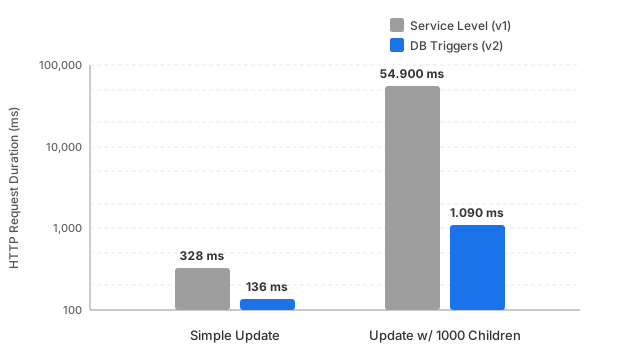
Median HTTP request duration measured on SAP HANA
(Logarithmic Scale)
| Scenario | Service Level (v1) | DB Triggers (v2) | Improvement |
|---|---|---|---|
| Simple column update | 328 ms | 136 ms | ~2.4x faster |
| Update with 1000 children | 54.900 ms | 1.090 ms | ~50x faster |
Tree Table Visualization
The change history is now displayed in a Tree Table that provides a hierarchical view of changes across parent and child entities. The depth of displayed child changes can be configured via the cds.requires.change-tracking.maxDisplayHierarchyDepth. The default is 3.

CDS Expression Language in Annotations
The @changelog annotation now supports CDS Expression Language (CXL), enabling broader customization of object IDs and changelog labels.
annotate Books {
  author @changelog: (author.firstName || ' ' || author.lastName)
}
Further Improvements
- Search now works on all columns of the change log table
- The
@Common.Timezoneannotation on properties is now considered in the change log - Change values are now dynamically localized when pointing to localized properties from code list entities, meaning that if for example a status column is tracked and the status name is shown in the change log, the name will dynamically adjust based on the users language if the name is a localized property
- Large string field values are automatically truncated
- Decimal values are now formatted correctly
- The change history section is hidden in draft mode
disableCreateTracking,disableDeleteTrackinganddisableUpdateTrackingnow apply correctly to composition entities, not just root entities
Schema Changes and Migration
Version 2 introduces breaking changes to the underlying schema. The ChangeLog table has been removed and its columns have been merged into Changes, which received further structural modifications as well. If you are upgrading from version 1, a database migration is required.
For SAP HANA deployments, a detailed migration plan including a HANA migration table is provided. Read the migration guide in the @cap-js/change-tracking repository for more information.
Learn more about the Change Tracking Plugin.
Attachments
cds-feature-attachments (Java)
- The OSS variant of the plugin now supports multitenancy via shared S3 buckets.
- The size of uploads can now be restricted via
@Validation.Maximum. - The type of uploads can now be restricted via
@Core.AcceptableMediaTypes. - Attachments are now also checked for malware on downloads, in addition to uploads.
- Integration with Malware Scanning Service now supports mTLS authentication.
- New
ScanStatesentity enables enhanced display of scan status, including criticality.
@cap-js/attachments (Node.js)
- File names are now automatically de-duplicated, ensuring multiple uploads of the same file yield unique file names.
- If used in combination with
@cap-js/audit-logging, security-relevant events (attachment download rejected, attachment size exceeded, attachment upload rejected) are automatically emitted as audit logs. - The attachment service now has a programmatic API to copy attachments using native object storage APIs.
const AttachmentsSrv = await cds.connect.to("attachments")
await AttachmentsSrv.copy(
  sourceAttachmentsEntity,
  sourceKeys,
  targetAttachmentsEntity,
  (targetKeys = {}),
)
Learn more about the Attachments Plugin.
New: Print Service
The Node.js plugin @cap-js/print is released as an initial version. It provides print service features through integration with the SAP Print Service.