
Deploy Multitenant SaaS Applications
Introducing the fundamental concepts of multitenancy, underpinning SaaS solutions in CAP. It describes how to run and test apps in multitenancy mode with minimized setup and overhead.
Introduction & Overview
CAP has built-in support for multitenancy with the @sap/cds-mtxs package.
Essentially, multitenancy is the ability to serve multiple tenants through single clusters of microservice instances, while strictly isolating the tenants' data. Tenants are clients using SaaS solutions.
In contrast to single-tenant mode, applications wait for tenants to subscribe before serving any end-user requests.
Learn more about SaaS applications.
Enable Multitenancy
Simply enable multitenancy for your CAP application using cds add, followed by an npm install for Node.js projects, or mvn install for Java projects, to install added package dependencies, like this:
cds add multitenancy
npm installcds add multitenancy
mvn installSee what this adds to your Node.js project…
In case of CAP Node.js projects, the cds add multitenancy command...
- Adds package dependency
@sap/cds-mtxsto your project:
{
  "dependencies": {
      "@sap/cds-mtxs": "^4"
  },
}- Adds this configuration to your package.json to enable multitenancy with sidecar:
{
  "cds": {
    "profile": "with-mtx-sidecar",
    "requires": {
      "[production]": {
        "multitenancy": true
      },
      "[with-mtx]": {
        "multitenancy": true
      }
    }
  }
}- Adds a sidecar subproject at
mtx/sidecarwith this package.json:
{
  "name": "bookshop-mtx",
  "dependencies": {
    "@cap-js/hana": "^3",
    "@sap/cds": "^10",
    "@sap/cds-mtxs": "^4",
    "@sap/xssec": "^4",
  },
  "devDependencies": {
    "@cap-js/sqlite": "^3"
  },
  "engines": {
    "node": ">=24"
  },
  "scripts": {
    "start": "cds-serve"
  },
  "cds": {
    "profile": "mtx-sidecar"
  }
}- If necessary, modifies deployment descriptors such as
mta.yamlfor Cloud Foundry and Helm charts for Kyma.
See what this adds to your Java project…
In case of CAP Java projects, the cds add multitenancy command...
Adds the following to .cdsrc.json in your app:
jsonc{ "profile": "with-mtx-sidecar", "requires": { "[production]": { "multitenancy": true }, "[with-mtx]": { "multitenancy": true } } }Adds the following to your srv/pom.xml in your app:
xml<dependency> <groupId>com.sap.cds</groupId> <artifactId>cds-feature-mt</artifactId> <scope>runtime</scope> </dependency> <dependency> <groupId>org.xerial</groupId> <artifactId>sqlite-jdbc</artifactId> <scope>runtime</scope> </dependency>Adds the following to your srv/src/main/resources/application.yaml:
yml--- spring: config.activate.on-profile: with-mtx cds: multi-tenancy: sidecar.url: http://localhost:4005/ # in production mode overwrite with the URL from mta.yamlAdds a sidecar subproject at
mtx/sidecarwith this package.json:json{ "name": "bookshop-mtx", "dependencies": { "@cap-js/hana": "^3", "@sap/cds": "^10", "@sap/cds-mtxs": "^4", "@sap/xssec": "^4" }, "devDependencies": { "@cap-js/sqlite": "^3" }, "engines": { "node": ">=24" }, "scripts": { "start": "cds-serve", "build": "cds build ../.. --for mtx-sidecar --production && npm ci --prefix gen" }, "cds": { "profiles": [ "mtx-sidecar", "java" ] } }
Profile-based configuration presets
The profiles with-mtx-sidecar and mtx-sidecar activate pre-defined configuration presets, which are defined as follows:
{
  "[with-mtx-sidecar]": {
    requires: {
      db: {
        '[development]': {
           kind: 'sqlite',
           credentials: { url: 'db.sqlite' },
           schema_evolution: 'auto',
         },
        '[production]': {
           kind: 'hana',
           'deploy-format': 'hdbtable',
           'vcap': {
             'label': 'service-manager'
           }
         },
      },
      "[java]": {
        "cds.xt.ModelProviderService": { kind: 'rest', model:[] },
        "cds.xt.DeploymentService": { kind: 'rest', model:[] },
      },
      "cds.xt.SaasProvisioningService": false,
      "cds.xt.DeploymentService": false,
      "cds.xt.ExtensibilityService": false,
    }
  },
  "[mtx-sidecar]": {
    requires: {
      db: {
        "[development]": {
           kind: 'sqlite',
           credentials: { url: "../../db.sqlite" },
           schema_evolution: 'auto',
         },
        "[production]": {
           kind: 'hana',
           'deploy-format': 'hdbtable',
           'vcap': {
             'label': 'service-manager'
           }
         },
      },
      "cds.xt.ModelProviderService": {
        "[development]": { root: "../.." }, // sidecar is expected to reside in ./mtx/sidecar
        "[production]": { root: "_main" },
        "[prod]": { root: "_main" } // for simulating production in local tests
      },
      "cds.xt.SaasProvisioningService": true,
      "cds.xt.DeploymentService": true,
      "cds.xt.ExtensibilityService": true,
    },
    "[development]": {
      server: { port: 4005 }
    }
  },
  …
}
Inspect configuration
You can always inspect the effective configuration with cds env.
Test-Drive Locally
Before deploying to the cloud, you can test-drive common SaaS operations with your app locally, including SaaS startup, subscribing tenants, and upgrading tenants.
Additional configuration required for CAP Java projects…
In case of CAP Java projects you need additional dependencies in the pom.xml of the srv directory. To support mock users in the local test scenario add cds-starter-cloudfoundry:
<dependency>
  <groupId>com.sap.cds</groupId>
  <artifactId>cds-starter-cloudfoundry</artifactId>
</dependency>
Then you add additional mock users to the spring-boot profile:
---
spring:
  config.activate.on-profile: with-mtx
#...
cds:
  multi-tenancy:
    mtxs.enabled: true
  security.mock.users:
    alice:
      tenant: t1
      roles: [ admin ]
    bob:
      tenant: t1
      roles: [ cds.ExtensionDeveloper ]
    erin:
      tenant: t2
      roles: [ admin, cds.ExtensionDeveloper ]
1. Start MTX Sidecar
In a first terminal, start the MTX sidecar process:
cds watch mtx/sidecarInspecting the log output...
In the trace output, we see several MTX services being served; most interesting for multitenancy: the ModelProviderService and the DeploymentService.
[cds] - connect using bindings from: { registry: '~/.cds-services.json' }
[cds] - connect to db > sqlite { url: '../../db.sqlite' }
[cds] - serving cds.xt.ModelProviderService { path: '/-/cds/model-provider' }
[cds] - serving cds.xt.DeploymentService { path: '/-/cds/deployment' }
[cds] - serving cds.xt.SaasProvisioningService { path: '/-/cds/saas-provisioning' }
[cds] - serving cds.xt.ExtensibilityService { path: '/-/cds/extensibility' }
[cds] - serving cds.xt.JobsService { path: '/-/cds/jobs' }
In addition, we can see a [t0 tenant]./mtxs#about-technical-tenant-t0) being deployed, which is used by the MTX services for book-keeping tasks.
[cds] - loaded model from 1 file(s):

  ../../db/t0.cds

[mtx|t0] - (re-)deploying SQLite database for tenant: t0
/> successfully deployed to db-t0.sqlite
With that, the server waits for tenant subscriptions, listening on port 4005 by default in development mode.
[cds] - server listening on { url: 'http://localhost:4005' }
[cds] - launched at 3/5/2023, 1:49:33 PM, version: 7.0.0, in: 1.320s
[cds] - [ terminate with ^C ]
If you get an error on server start, read the troubleshooting information.
2. Launch the app server
In a second terminal, start the main CAP application server:
cds watch --with-mtxmvn cds:watch -Dspring-boot.run.profiles=with-mtxLaunched with shared database...
The server starts as usual, but automatically uses a persistent database shared with the MTX sidecar instead of an in-memory one, as we can see in the trace output:
[cds] - loaded model from 6 file(s):

  db/schema.cds
  srv/admin-service.cds
  srv/cat-service.cds
  srv/user-service.cds
  ../../../cds-mtxs/srv/bootstrap.cds
  ../../../cds/common.cds

[cds] - connect using bindings from: { registry: '~/.cds-services.json' }
[cds] - connect to db > sqlite { url: 'db.sqlite' }
[cds] - serving AdminService { path: '/odata/v4/admin', impl: 'srv/admin-service.js' }
[cds] - serving CatalogService { path: '/odata/v4/catalog', impl: 'srv/cat-service.js' }
[cds] - serving UserService { path: '/user', impl: 'srv/user-service.js' }

[cds] - server listening on { url: 'http://localhost:4004' }
[cds] - launched at 3/5/2023, 2:21:53 PM, version: 6.7.0, in: 748.979ms
[cds] - [ terminate with ^C ]2023-03-31 14:19:23.987 INFO 68528 --- [ restartedMain] c.s.c.bookshop.Application : The following 1 profile is active: "with-mtx"
...
2023-03-31 14:19:23.987 INFO 68528 --- [ restartedMain] c.s.c.services.impl.ServiceCatalogImpl : Registered service ExtensibilityService$Default
2023-03-31 14:19:23.999 INFO 68528 --- [ restartedMain] c.s.c.services.impl.ServiceCatalogImpl : Registered service CatalogService
2023-03-31 14:19:24.016 INFO 68528 --- [ restartedMain] c.s.c.f.s.c.runtime.CdsRuntimeConfig : Registered DataSource 'ds-mtx-sqlite'
2023-03-31 14:19:24.017 INFO 68528 --- [ restartedMain] c.s.c.f.s.c.runtime.CdsRuntimeConfig : Registered TransactionManager 'tx-mtx-sqlite'
2023-03-31 14:19:24.554 INFO 68528 --- [ restartedMain] o.s.b.w.embedded.tomcat.TomcatWebServer : Tomcat initialized with port(s): 8080 (http)
2023-03-31 14:19:24.561 INFO 68528 --- [ restartedMain] o.apache.catalina.core.StandardService : Starting service [Tomcat]
2023-03-31 14:19:24.561 INFO 68528 --- [ restartedMain] org.apache.catalina.core.StandardEngine : Starting Servlet engine: [Apache Tomcat/9.0.71]3. Subscribe Tenants
In the third terminal, subscribe and unsubscribe tenants as follows:
cds subscribe t1 --to http://localhost:4005
cds subscribe t2 --to http://localhost:4005cds unsubscribe t1 --from http://localhost:4005
cds unsubscribe t2 --from http://localhost:4005Behind the scenes...
The cds subscribe command sends HTTP requests to the MTX sidecar's SaasProvisioningService as follows:
POST http://localhost:4005/-/cds/saas-provisioning/subscribe HTTP/1.1
Content-Type: application/json
Authorization: Basic yves:
{ "tenant": "t1" }
A programmatic call from a CAP Node.js client would look like this:
const ds = await cds.connect.to ('cds.xt.SaasProvisioningService')
await ds.subscribe('t1')
Upon receiving a subscription request, the sidecar creates a new persistent tenant database per tenant, hence keeping tenant data isolated:
[cds] - POST /-/cds/deployment/subscribe
[mtx] - (re-)deploying SQLite database for tenant: t1
> init from db/init.js
> init from db/data/sap.capire.bookshop-Authors.csv
> init from db/data/sap.capire.bookshop-Books.csv
> init from db/data/sap.capire.bookshop-Books_texts.csv
> init from db/data/sap.capire.bookshop-Genres.csv
/> successfully deployed to ./../../db-t1.sqlite

[mtx] - successfully subscribed tenant t1
4. Test via the app's UI
For example, in case of @capire/bookshop sample, you can now test your app with different users/tenants as follows...
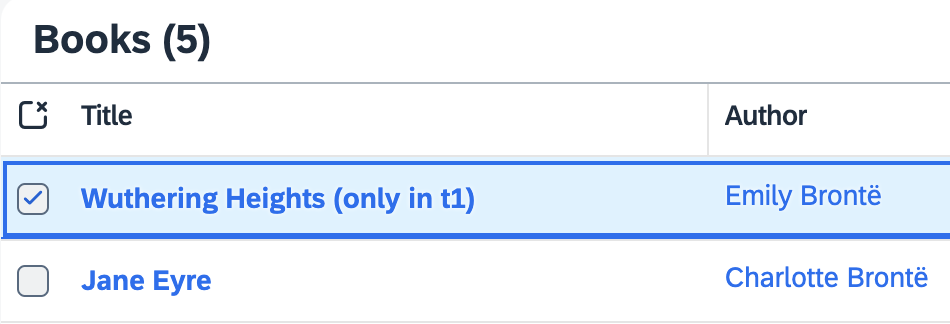
Open the Manage Books app at http://localhost:4004/#Books-manage and log in with alice. Select Wuthering Heights to open the details, edit here the title and save your changes. You've changed data in one tenant.
To see requests served in tenant isolation, that is, from different databases, check that it's not visible in the other one. Open a private/incognito browser window and log in as erin to see that the title still is Wuthering Heights.
In the following example, Wuthering Heights (only in t1) was changed by alice. erin doesn't see it, though.
Use private/incognito browser windows to test with different tenants...
Do this to force new logins with different users, assigned to different tenants:
- Open a new private / incognito browser window.
- Open http://localhost:4004/#Books-manage in it → log in as
alice. - Repeat that with
erin, another pre-defined user, assigned to tenantt2.
Note tenants displayed in trace output...
We can see tenant labels in server logs for incoming requests:
[cds] - server listening on { url: 'http://localhost:4004' }
[cds] - launched at 3/5/2023, 4:28:05 PM, version: 6.7.0, in: 736.445ms
[cds] - [ terminate with ^C ]

...
[odata|t1] - POST /adminBooks { '$count': 'true', '$select': '... }
[odata|t2] - POST /adminBooks { '$count': 'true', '$select': '... }
...
Pre-defined users in mocked-auth
How users are assigned to tenants and how tenants are determined at runtime largely depends on your identity providers and authentication strategies. The mocked authentication strategy, used by default with cds watch, has a few pre-defined users configured. You can inspect these by running cds env requires.auth:
[bookshop] cds env requires.auth
{
 kind: 'basic-auth',
 strategy: 'mock',
 users: {
   alice: { tenant: 't1', roles: [ 'admin' ] },
   bob:   { tenant: 't1', roles: [ 'cds.ExtensionDeveloper' ] },
   carol: { tenant: 't1', roles: [ 'admin', 'cds.ExtensionDeveloper' ] },
   dave:  { tenant: 't1', roles: [ 'admin' ], features: [] },
   erin:  { tenant: 't2', roles: [ 'admin', 'cds.ExtensionDeveloper' ] },
   fred:  { tenant: 't2', features: ... },
   me:    { tenant: 't1', features: ... },
   yves:  { roles: [ 'internal-user' ] }
   '*':     true //> all other logins are allowed as well
 },
 tenants: { t1: { features: … }, t2: { features: '*' } }
}
You can also add or override users or tenants by adding something like this to your package.json:
"cds":{
 "requires": {
   "auth": {
     "users": {
       "u2": { "tenant": "t2" },
       "u3": { "tenant": "t3" }
     }
   }
 }
}
5. Upgrade Your Tenant
When deploying new versions of your app, you also need to upgrade your tenants' databases. For example, open db/data/sap.capire.bookshop-Books.csv and add one or more entries in there. Then upgrade tenant t1 as follows:
cds upgrade t1 --at http://localhost:4005 -u yves:POST http://localhost:4005/-/cds/deployment/upgrade HTTP/1.1
Content-Type: application/json
Authorization: Basic yves:
{ "tenant": "t1" }const ds = await cds.connect.to('cds.xt.DeploymentService')
await ds.upgrade('t1')After that, open or refresh http://localhost:4004/#Books-manage again as alice and erin → the added entries are visible for alice, but still missing for erin, as
t2has not yet been upgraded.
Deploy to Cloud
In order to get your multitenant application deployed, follow this excerpt from the deployment to CF and deployment to Kyma guides.
Prepare your application for production, once:
shcds add hana,xsuaa # add required production services cds add portal # as an option to serve UIs, if any cds add mta # to enable MTA based deploymentsshcds add hana,xsuaa # add required production services cds add portal # as an option to serve UIs, if any cds add kyma # to enable Kyma/Helm based deploymentsDeploy the application:
shcds up
For manual setups, ensure the metadata container (t0) is unique
If you’re not running cds-mtx upgrade * as a Cloud Foundry hook (as set up by cds add multitenancy) and instead use a custom setup, deploy the MTX sidecar with a single instance for the initial rollout. This avoids conflicts when t0 is created.
Subscribe via BTP Cockpit
Create a BTP subaccount to subscribe to your deployed application. This subaccount has to be in the same region as the provider subaccount, for example, us10.
See the list of all available regions.
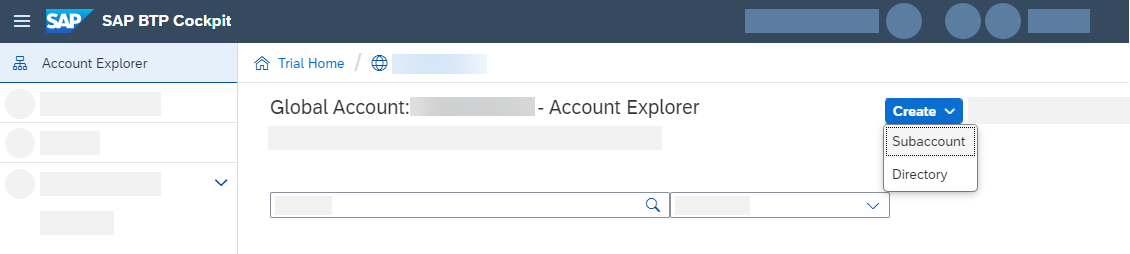
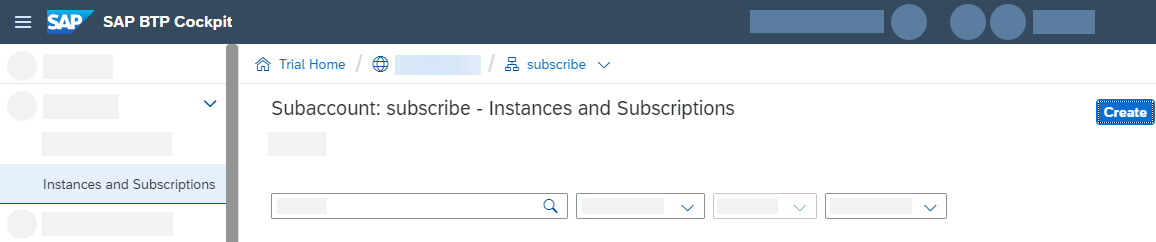
In your subscriber account go to Instances and Subscription and select Create.
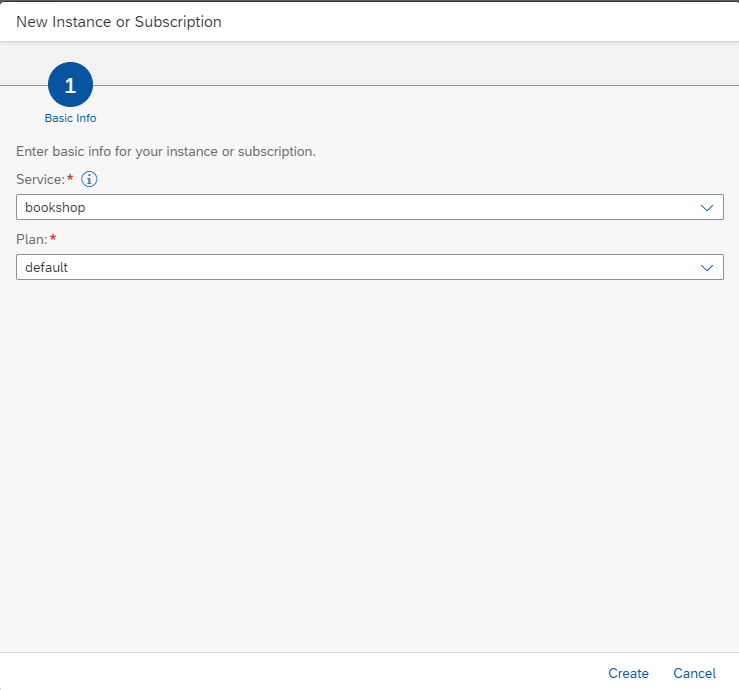
Select bookshop and use the only available plan default.
Learn more about subscribing to a SaaS application using the SAP BTP cockpit.Learn more about subscribing to a SaaS application using the btp CLI.
You can now access your subscribed application via Go to Application.
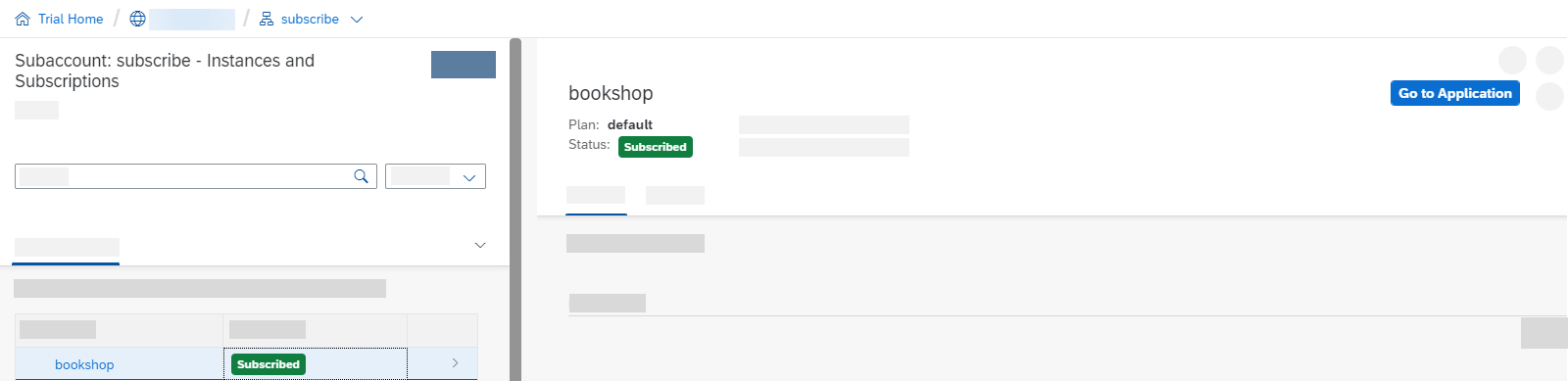
As you can see, your route doesn't exist yet. You need to create and map it first.
If you're deploying to Kyma, your application will load and you won't get the below error. You can skip the step of exposing the route.
404 Not Found: Requested route ('...') does not exist.Leave the window open. You need the information to create the route.
Cloud Foundry
Use the following command to create and map a route to your application:
cf map-route ‹app› ‹paasDomain› --hostname ‹subscriberSubdomain›-‹saasAppName›In our example, let's assume our saas-registry is configured in the mta.yaml like this:
- name: bookshop-registry
  type: org.cloudfoundry.managed-service
  parameters:
    service: saas-registry
    service-plan: application
    config:
      appName: bookshop-${org}-${space}
Let's also assume we've deployed to our app to Cloud Foundry org myOrg and space mySpace. This would be the full command to create a route for the subaccount with subdomain subscriber1:
cf map-route bookshop cfapps.us10.hana.ondemand.com --hostname subscriber1-myOrg-mySpace-bookshopDNS host label limit
The hostname must not exceed 63 characters.
If <subscriberSubdomain>-<saasAppName> is too long, the route will fail. Use shorter app names or configure an explicit short route via the routes parameter in your mta.yaml.
Learn how to do this in the BTP cockpit instead…
Switch to your provider account and go to your space → Routes. Click on New Route.
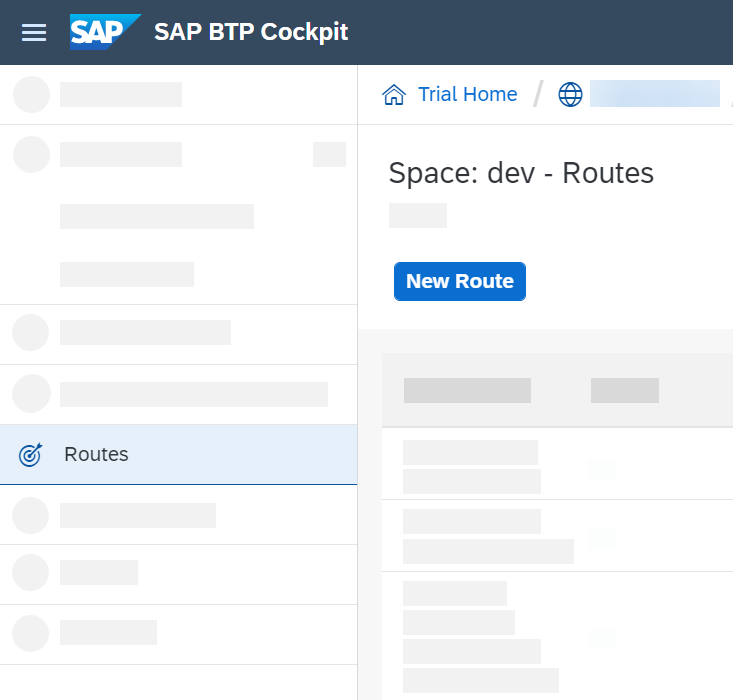
Here, you need to enter a Domain and Host Name.
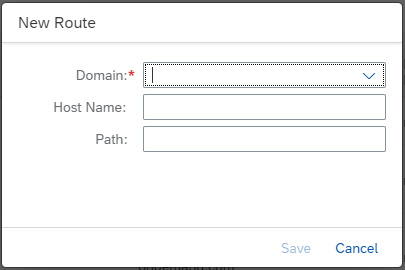
Let's use this route as example:
https://subscriber1-bookshop.cfapps.us10.hana.ondemand.com
- The Domain here is cfapps.us10.hana.ondemand.com
- The Host Name here is subscriber1-bookshop
Hit Save to create the route.
You can now see the route is created but not mapped to an application yet.
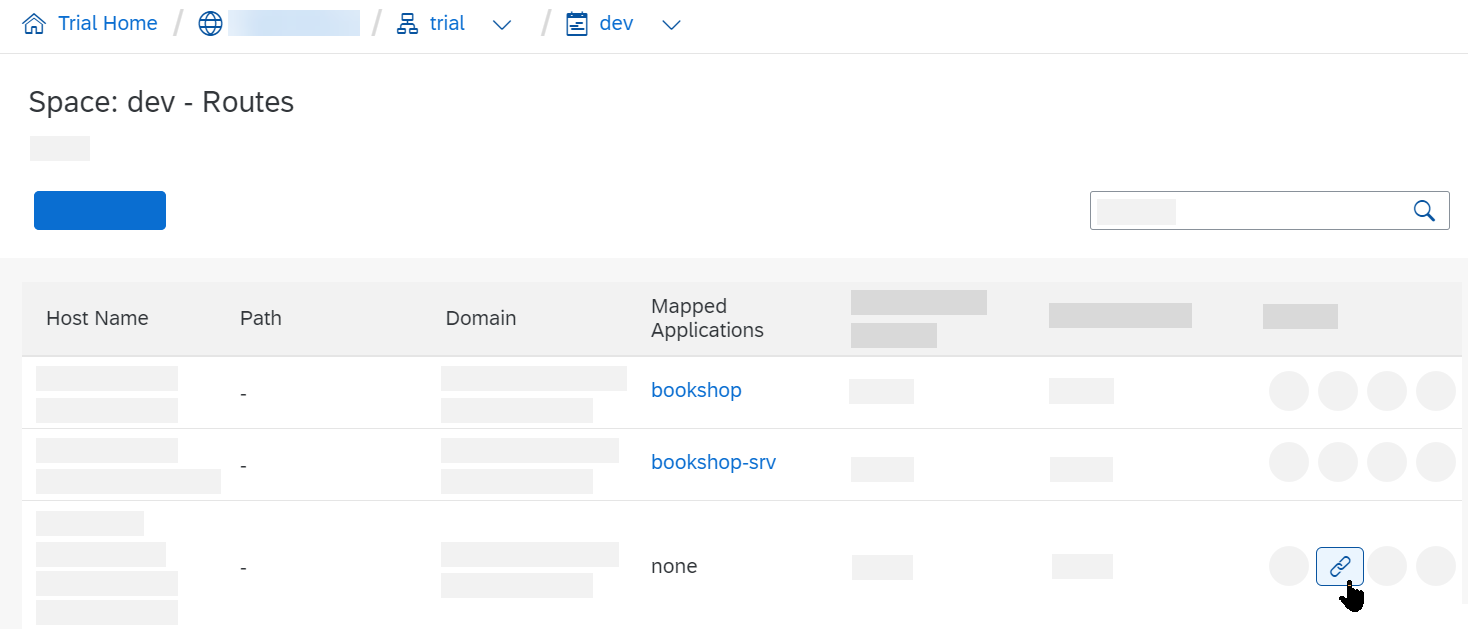
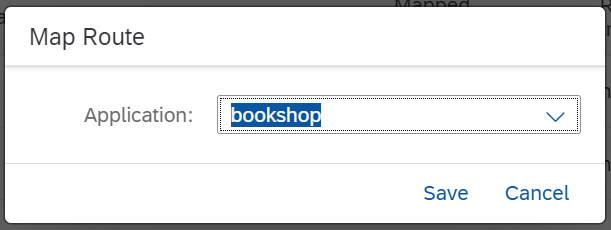
Click on Map Route, choose your App Router module and hit Save.
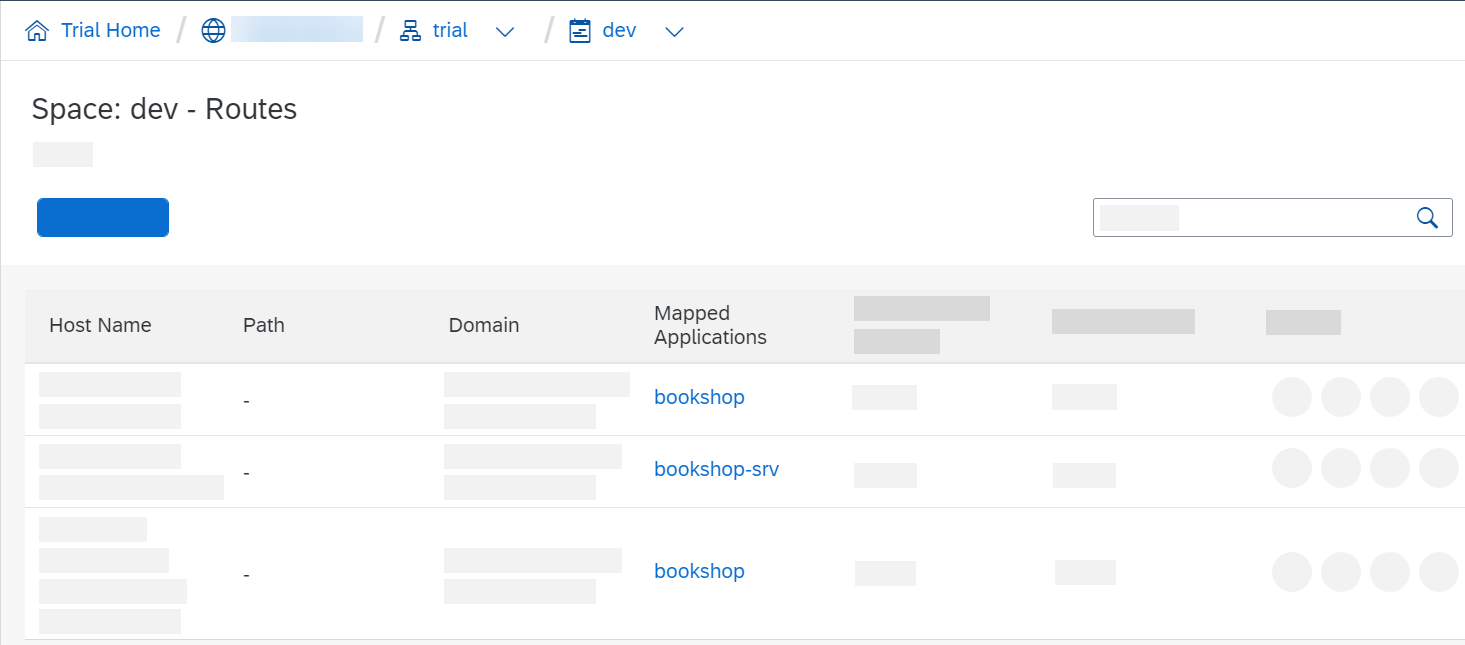
You should now see the route mapped to your application.
Update Database Schema
There are several ways to update the database schema of a multitenant application.
- For CAP Java applications, schema updates should be done as described in the respective Java Guide.
- For CAP Node.js applications, you can use either of the following as shown in the examples below:
- the
cds-mtx upgradecommand from a terminal - the MTX Sidecar API
- via a CloudFoundry hook
- via a CloudFoundry task
- via a Kubernetes job
- the
cd mtx/sidecar
cds-mtx upgrade t1 # single tenants
cds-mtx upgrade \* # all tenantsPOST /-/cds/saas-provisioning/upgrade HTTP/1.1
Content-Type: application/json
{ "tenants": ["t1"] }# mta.yaml
hooks:
- name: upgrade-all
type: task
phases:
- blue-green.application.before-start.idle
- deploy.application.before-start
parameters:
name: upgrade
memory: 512M
disk-quota: 768M
command: cds-mtx upgrade '*'cf run-task ‹app› --name "upgrade-all" --command "cds-mtx upgrade '*'"# values.yaml
mtx-upgrade:
bindings:
saas-registry: # when using XSUAA
serviceInstanceName: saas-registry
subscription-manager: # when using IAS
serviceInstanceName: subscription-manager
service-manager:
serviceInstanceName: service-manager
image:
repository: bookshop-sidecar
resources:
limits:
ephemeral-storage: 1G
memory: 1G
requests:
ephemeral-storage: 1G
cpu: 1000m
memory: 1G
command: ["launcher"]
args:
- "cds-mtx"
- "upgrade"
- '*'Managing large upgrade workloads
Very large projects might need to increase resources or limit parallelism of tenant upgrades.
The best practice algorithm is laid out in our Get Help guide.
Test-Drive in Hybrid Setup
You can run the app locally while binding it to remote service instances created by a Cloud Foundry deployment. To do so, use cds bind to bind your SaaS app and the MTX sidecar to its required cloud services, like that:
cds bind -a bookshop-srvFor testing the sidecar, make sure to run the command there as well:
cd mtx/sidecar
cds bind -a bookshop-mtx
To generate the SAP HANA HDI files for deployment, go to your project root and run the build:
cds build --productionRun cds build after model changes
Each time you update your model or any SAP HANA source file, you need repeat the build.
Make sure to stop any running CAP servers left over from local testing.
By passing --profile hybrid you can now run the app with cloud bindings and interact with it as you would while testing your app locally. Run this in your project root:
cds watch mtx/sidecar --profile hybridThen, in another terminal, start the main application:
cds watch --profile hybridcd srv
mvn cds:watch -Dspring-boot.run.profiles=hybridLearn more about Hybrid Testing.
Manage multiple deployments
Use a dedicated profile for each deployment landscape if you are using several, such as dev, test, prod. For example, after logging in to your dev space:
cds bind -2 bookshop-db --profile dev
cds watch --profile dev
sap-hana-tenant-management-service-v2
SAP HANA TMS v2
The SAP HANA Tenant Management Service (TMS) v2 service provides direct support for managing SAP HANA tenants.
Be aware of the current limitations:
- Not suitable for existing applications as there is no migration from Service Manager available yet. This will be provided as HANA tool later.
There won't be support for both Service Manager and TMS v2 together in one application.
For more information, see the SAP HANA documentationFind the TMS v2 API on the SAP Business Accelerator Hub
Configure MTXS for Tenant Management Service
This documentation uses the bookshop sample to showcase necessary configuration.
If you start with a multitenant application that's configured to use to SAP HANA, you need to change the configuration of the database in your mta.yaml file:
- name: bookshop-db
  type: org.cloudfoundry.managed-service
  parameters:
    service: hana-cloud
    service-plan: hana-multitenancy
Only use the `hana-multitenancy` plan
As the tenant containers are filtered by the SAP HANA Cloud service instance, applications will potentially access data of other applications when using a different plan.
For SAP HANA TMS v2, you also need to specify the database ID of the database that you plan to use for your tenant containers. You can specify this using the cds.xt.DeploymentService configuration.
With cds.xt.DeploymentService you only configure the default database ID. If you want to specify different database IDs for a tenant HDI container, you need to add the database ID to the payload of the individual subscription using a handler.
To keep the application configuration agnostic, we recommend adding the database_id configuration as an environment variable to the MTX service in mta.yaml:
- name: bookshop-mtx
  type: nodejs
  path: gen/mtx/sidecar
  ...
  properties:
    CDS_CONFIG: |
      {
        "requires": {
          "cds.xt.DeploymentService": {
            "hdi": {
              "create": {
                "database_id": "4baa4d82-a474-4281-90af-67261c893590"
              }
            }
          }
        }
      }
To further separate deployment configuration, you can also use a separate Deployment Extension Descriptor on Cloud Foundry.
You can also pass the configuration for each individual subscription as a payload extension in the request to the SaasProvisioningService.
Handle SAP HANA Tenants
By default, MTXS creates a separate SAP HANA tenant for each subscriber tenant (BTP tenant). In some scenarios, you might also want to use the same SAP HANA tenant for several applications or microservices.
The SAP HANA tenant ID must be unique across all SAP HANA database instances within a region. If you intend to deploy your application multiple times in a region, ensure this uniqueness across deployments.
Mandatory: specify a unique prefix for the SAP HANA tenant name
Specify a hana_tenant_prefix value that is unique for each deployed application instance:
"cds.xt.DeploymentService": {
  "hdi": {
    "create": {
      ...
      "hana_tenant_prefix": "<prefix>"
    }
  }
}
The resulting SAP HANA tenant name is constructed from prefix+subscriber tenant. The SAP HANA tenant ID is generated as a hashed UUID from the SAP HANA tenant name, and the original name is added as a label.

To help ensure that the generated SAP HANA tenant UUID is unique within a region, you could build the hana_tenant_prefix in your deployment descriptor using various variables, for example, like prefix-${org}-${space} in Cloud Foundry.
Prefix is mandatory
The hana_tenant_prefix configuration is mandatory to ensure that the internal tenant t0 is created with its own SAP HANA tenant.
Length restriction
The prefix and subscriber tenant name are each limited to 63 characters maximum.
Do not use hana_tenant_prefix in queries
The hana_tenant_prefix is only used to generate the SAP HANA tenant UUID to avoid duplicates when creating an SAP HANA tenant. Although it is added as prefix label to the SAP HANA tenant, it is not reliable and must not be used for any query.
Mandatory for CAP Java Applications
For CAP Java applications you need to set the same prefix in the cds.multitenancy.hanaMtService.hanaTenantPrefix property. We recommend doing this using the environment variable in the mta.yaml:
- name: srv
  type: java
  path: srv
  ...
  properties:
    CDS_MULTITENANCY_HANAMTSERVICE_HANATENANTPREFIX: "some-prefix"
Assign Many Tenant Containers to a Common SAP HANA Tenant
To group the tenant containers of many applications or microservices in a common HANA tenant, you need to make sure that the same SAP HANA tenant ID is used.

- Option 1: Configure the same
hana_tenant_prefix - You can configure the same
hana_tenant_prefixmany applications or microservices. With that, the SAP HANA tenant ID is generated in the same way for each subscriber tenant. - If you choose this option, the following preconditions need to be met
- The subscriber tenant ID (BTP tenant ID) needs to be the same for all applications or microservices.
- All applications or microservices need to use the same database for the same subscriber tenant.
- Option 2: Pass the SAP HANA Tenant ID with a Subscription
... in CAP Node.js
If you want to control the ID of the SAP HANA tenant ID on your own, you can pass it as subscription payload as parameters, for example, using a handler for the
SaasRegistryService:jsonc{ "subscribedTenantId": "t1", "subscribedSubdomain": "subdomain1", "eventType": "CREATE" ... "_": { "hdi": { "create": { "hana_tenant_id": "5b3c0699-1c65-4ec1-9a8e-b7cfc3cc15bc" } } } }The
hana_tenant_idmust be a valid UUID and must be unique per subscriber tenant. Specifyinghana_tenant_idoverrides the prefix settings mentioned earlier, except for the internal tenant t0. Also ensure that the ID is unique within a region.... in CAP Java
To specify the ID of the SAP HANA tenant in CAP Java applications you can register a custom handler for the
beforephase of theSUBSCRIBEevent that sets thehana_tenant_idwithin the provisioning parameters:java@Before public void beforeSubscription(SubscribeEventContext context) { context.getOptions().put("provisioningParameters", Collections.singletonMap("hana_tenant_id", "<ID>")); }This will affect every new tenant subscription and will set the specified SAP HANA tenant ID.
Delete SAP HANA tenants
When you unsubscribe and the tenant container is deleted, the corresponding SAP HANA tenant isn't deleted as it could potentially still be in use for other applications.
Limitations
There are still some limitations with the current client implementation.
- Database ID is Mandatory As mentioned, you need to specify a database ID that's to be used, either for all tenants or per subscription request, see Deployment configuration.
SaaS Dependencies
Some of the xsuaa-based services your application consumes need to be registered as reuse services to work in multitenant environments. This holds true for the usage of both the SaaS Registry service and the Subscription Manager Service (SMS).
CAP Java as well as @sap/cds-mtxs, each offer an easy way to integrate these dependencies. They support some services out of the box and also provide a simple API for applications. Most notably, you need such dependencies for the following SAP BTP services: Audit Log, Event Mesh, Destination, HTML5 Application Repository, and Cloud Portal.
For CAP Java, all these services are supported natively and SaaS dependencies are automatically created if such a service instance is bound to the CAP Java application, that is, the srv module.
Explicitly activate the Destination service
SaaS dependency for Destination service needs to be activated explicitly in the application.yaml due to security reasons. SaaS dependencies for some of the other services can be deactivated by setting the corresponding property to false in the application.yaml.
Refer to the cds.multiTenancy.dependencies section in the CDS properties.
For CAP Node.js, all these services are supported natively and can be activated individually by providing configuration in cds.requires. In the most common case, you simply activate service dependencies like so:
"cds": {
  "requires": {
    "audit-log": true,
    "connectivity": true,
    "destinations": true,
    "html5-repo": true,
    "portal": true
  }
}
Defaults provided by @sap/cds-mtxs...
The Boolean values in the mtx/sidecar/package.json activate the default configuration in @sap/cds-mtxs:
"cds": {
  "requires": {
    "connectivity": {
      // Uses credentials.xsappname
      "vcap": { "label": "connectivity" },
      "subscriptionDependency": "xsappname"
    },
    "portal": {
      "vcap": { "label": "portal" },
      // Uses credentials.uaa.xsappname
      "subscriptionDependency": {
        "uaa": "xsappname"
      }
    },
    ...
  }
}
Additional Services
In CAP Java, if your application uses a service that isn't supported out of the box, you can define dependencies by providing a custom handler.
Learn more about defining dependent services
In CAP Node.js, you can use a custom subscriptionDependency entry in your application's or CAP plugin's package.json:
"cds": {
  "requires": {
    "my-service": {
      "subscriptionDependency": "xsappname"
    }
  }
}
The
subscriptionDependencyspecifies the property name of the credentials value with the desiredxsappname, starting fromcds.requires['my-service'].credentials. Usually it's just"xsappname", but JavaScript objects interpreted as a key path are also allowed, such as{ "uaa": "xsappname" }in the defaults example forportal.
Alternatively, overriding the dependencies handler gives you full flexibility for any custom implementation.
Adding Custom Handlers
MTX services are implemented as standard CAP services, so you can add custom handlers to all respective lifecycle events just as you would for any application service. To do so simply add a server.js file in the mtx/sidecar/ folder, with content like this:
cds.on('served', () => {
  const { 'cds.xt.DeploymentService': ds } = cds.services
  ds.before('subscribe', async (req) => {
    // HDI container credentials are not yet available here
    const { tenant } = req.data
  })
  ds.before('upgrade', async (req) => {
    // HDI container credentials are not yet available here
    const { tenant } = req.data
  })
  ds.after('deploy', async (result, req) => {
    const { container } = req.data.options
    const { tenant } = req.data
    ...
  })
  ds.after('unsubscribe', async (result, req) => {
    const { container } = req.data.options
    const { tenant } = req.data
  })
})
Learn more about that in the MTX Services Reference documentation
In case of CAP Java projects, you can alternatively add custom handlers to the main app as described in the Java documentation:
@After
private void subscribeToService(SubscribeEventContext context) {
   String tenant = context.getTenant();
   Map<String, Object> options = context.getOptions();
}

@On
private void upgradeService(UpgradeEventContext context) {
   List<String> tenants = context.getTenants();
   Map<String, Object> options = context.getOptions();
}

@Before
private void unsubscribeFromService(UnsubscribeEventContext context) {
   String tenant = context.getTenant();
   Map<String, Object> options = context.getOptions();
}
Learn more about that in the Java Multitenancy Guide documentation
Configuring the Java Service
In case of CAP Java projects, cds add multitenancy adds additional configuration similar to this:
modules:
  - name: bookshop-srv
    type: java
    path: srv
    parameters:
      ...
    provides:
      - name: srv-api # required by consumers of CAP services (e.g. approuter)
        properties:
          srv-url: ${default-url}
    requires:
      - name: app-api
        properties:
          CDS_MULTITENANCY_APPUI_URL: ~{url}
          CDS_MULTITENANCY_APPUI_TENANTSEPARATOR: "-"
      - name: bookshop-auth
      - name: bookshop-db
      - name: mtx-api
        properties:
          CDS_MULTITENANCY_SIDECAR_URL: ~{mtx-url}
- name: bookshop-registry...
srv:
bindings:
...
image:
repository: bookshop-srv
env:
SPRING_PROFILES_ACTIVE: cloud
CDS_MULTITENANCY_APPUI_TENANTSEPARATOR: "-"
CDS_MULTITENANCY_APPUI_URL: https://{{ .Release.Name }}-srv-{{ .Release.Namespace }}.{{ .Values.global.domain }}
CDS_MULTITENANCY_SIDECAR_URL: https://{{ .Release.Name }}-sidecar-{{ .Release.Namespace }}.{{ .Values.global.domain }}
...In which the following environment variables are set:
CDS_MULTITENANCY_... | Description |
|---|---|
SIDECAR_URL | Sets the application property cds.multitenancy.sidecar.url. This URL is required by the CAP Java runtime to connect to the MTX Sidecar application and is derived from the property mtx-url of the mtx-sidecar module. |
APPUI_URL | Sets the entry point URL that is shown in the SAP BTP Cockpit. |
APPUI_TENANTSEPARATOR | The separator in generated tenant-specific URL. |
The tenant application requests are separated by the tenant-specific app URL:
https://<subaccount subdomain><CDS_MULTITENANCY_APPUI_TENANTSEPARATOR><CDS_MULTITENANCY_APPUI_URL>Keep hostnames short
The resulting hostname must stay within the 63-character DNS host label limit. Choose short values for separator and app URL components.
Use MTA extensions for landscape-specific configuration
You can define the environment variable CDS_MULTITENANCY_APPUI_TENANTSEPARATOR in an MTA extension descriptor:
_schema-version: "3.1"
extends: my-app
ID: my-app.id
modules:
  - name: srv
    properties:
      CDS_MULTITENANCY_APPUI_TENANTSEPARATOR: "-"
  - name: app
    properties:
TENANT_HOST_PATTERN: ^(.*)-${default-uri}Option: Provisioning Only
Under certain conditions it makes a lot of sense to use the MTX Sidecar only for tenant provisioning. This configuration can be used in particular when the application doesn't offer (tenant-specific) model extensions and feature toggles. In such cases, business requests can be served by the Java runtime without interaction with the sidecar, for example to fetch an extension model.
Use the following MTX Sidecar configuration to achieve this:
{
    "requires": {
        "multitenancy": true,
        "extensibility": false,
        "toggles": false
    },
    "build": {
        ...
    }
}
In this case, the application can use its static local model without requesting the MTX sidecar for the model. This results in a significant performance gain because CSN and EDMX metadata are loaded from the JAR instead of the MTX Sidecar. To make the Java application aware of this setup as well, set the following properties:
cds:
  model:
    provider:
      extensibility: false
      toggles: false
Enable only the features that you need
You can also selectively use these properties to enable only extensibility or feature toggles, thus decreasing the dimensions when looking up dynamic models.
Appendix
About SaaS Applications
Software-as-a-Service (SaaS) solutions are deployed once by a SaaS provider, and then used by multiple SaaS customers subscribing to the software.
SaaS applications need to register with the SAP BTP SaaS Provisioning service to handle subscribe and unsubscribe events. In contrast to single-tenant deployments, databases or other tenant-specific resources aren't created and bootstrapped upon deployment, but upon subscription per tenant.
CAP includes the MTX services, which provide out-of-the-box handlers for subscribe/unsubscribe events, for example to manage SAP HANA database containers.
If everything is set up, the following graphic shows what's happening when a user subscribes to a SaaS application:

- The SaaS Provisioning Service sends a
subscribeevent to the CAP application. - The CAP application delegates the request to the MTX services.
- The MTX services use Service Manager to create the database tenant.
- The CAP Application connects to this tenant at runtime using Service Manager.
About Sidecar Setups
The SaaS operations subscribe and upgrade tend to be resource-intensive. Therefore, it's recommended to offload these tasks onto a separate microservice, which you can scale independently of your main app servers.
Java-based projects even require such a sidecar, as the MTX services are implemented in Node.js.
In these MTX sidecar setups, a subproject is added in ./mtx/sidecar, which serves the MTX Services as depicted in the illustration below.

The main task for the MTX sidecar is to serve subscribe and upgrade requests.
The CAP services runtime requests models from the sidecar only when you apply tenant-specific extensions. For Node.js projects, you have the option to run the MTX services embedded in the main app, instead of in a sidecar.