
Model Context Protocol Adapter Beta
The Model Context Protocol (MCP) is an open-source standard that enables direct integration between large language model (LLM) applications and external data sources. Any CAP service can be turned into an MCP server, allowing AI agents and LLM-powered tools to interact with the service without additional implementation work. All that is required is annotating it with @mcp. From CAP perspective MCP is just another protocol which we serve similar to OData, GraphQL, REST, or HCQL.
SAP API Policy Applies!
The CAP MCP adapter, as documented herein, is designed exclusively to expose custom CAP application services via MCP. It is not an SAP-endorsed architecture, data service, or service-specific pathway for purposes of section 2.2.2 of the SAP API Policy, and should not be relied upon as a basis for compliance with any exception described in that section. In particular, it is not an endorsed pathway for exposing, proxying, or providing agentic access to SAP Application APIs via MCP. For SAP-endorsed architectures covering agentic access to SAP APIs, refer to the reference architectures published on the SAP Architecture Center.
Note
This guide is about the MCP Adapter – for example, as provided through the @cap-js/mcp plugin – which powers domain-specific application use cases, for example, to respond to questions for CAP-based applications like "List all overstocked books".
In parallel, there's also the MCP Server plugin (@cap-js/mcp-server), which serves a different purpose, though, that is: AI-assisted development of CAP projects.
Preliminaries
Following are one-time preparatory setup tasks. Basically, you need to ensure that you have access to LLM(s) to use with your MCP clients in local test-drives.
Get Sample
We use the @capire/bookshop as a running sample hereinafter. Clone it and open it in VSCode as follows:
git clone https://github.com/capire/bookshopgit clone https://github.com/SAP-samples/cloud-cap-samples-java bookshopcode bookshopAdding MCP Plugins
In CAP Node.js Projects
Within your project root run this to add the @cap-js/mcp plugin:
npm add @cap-js/mcpIn CAP Java Projects
Add this to the srv/pom.xml file:
<dependencies>
  <dependency>
    <groupId>com.sap.cds</groupId>
    <artifactId>cds-adapter-mcp</artifactId>
    <version>${cds.services.version}</version>
  </dependency>
</dependencies>
Not yet public
The feature is not yet released publicly. Stay tuned.
SAP only Make sure internal artifactory is configured for Maven build as described in Java > Getting Started > Setting Up Local Development.Serving MCP
Annotate services with @mcp
Simply add the @mcp annotation to an existing service to expose it via MCP. For example, add the following to srv/cat-service.cds:
// Serve via OData, HCQL and REST
annotate CatalogService with @odata @hcql @rest;
annotate CatalogService with @mcp;
Start your server with cds watch or mvn cds:watch and note that the MCP server starts:
[cds] - serving CatalogService {
  at: [ ..., '/mcp/browse' ],
  ...
}INFO com.sap.cds.adapter.mcp.McpServlet : MCP Server initialized at endpoint '/mcp/browse' for service 'CatalogService'You can also specify an alternative path under which the MCP server should be served as follows:
annotate CatalogService with @mcp:'books'Just Another Protocol
From the perspective of a developer in a CAP-based project, @mcp is just another protocol for your services, similar to @odata, @graphql, @rest, or @hcql. The adapter takes care of the rest, with all the standard CAP features you know working out of the box also with MCP, including annotations like @cds.query.limit, etc.
Tailored services for MCP use
In case you want to tailor the entities or elements served via MCP you can also create specific services for MCP and annotate only those with @mcp. For example, you could create a BooksService that only exposes a subset of the entities of the AdminService like that:
using { AdminService } from './admin-service';
@mcp service BooksService {
  entity Authors as projection on AdminService.Authors {
    ID, name, books,
  }
  entity Books as projection on AdminService.Books {
    ID, title, stock, price,
    author,
    genre.name as genre,
    currency.name as currency,
  }
}
=> See also: Use Case-Oriented Services in the getting started guide.
Adding Context Information
As LLMs rely heavily on context information to create high-quality output, the adapter evaluates existing doc comments and annotations to provide additional information about the service, entities, elements, actions, and parameters to the LLM. This information is included in the output of the describe tool and can be used by agents to better understand the data model and available actions/functions. In particular, the following information is evaluated:
- Doc comments -> most recommended (Node.js only)
@title@description
Note
Doc comments are only supported in Node.js. In Java, use @title and @description annotations instead.
For example, you can add doc comments to your entities and their elements like that:
/**
 * This is the author entity.
 * It contains information about book authors.
 */
entity Authors {
  /** The ID of the author. */
  ID : Integer;
  /** The name of the author. */
  name : String;
  /** The books written by the author. */
  books : Association to many Books;
}
Test-drive Locally
With the above setup, your CAP services are exposed via MCP. To consume them, you need an MCP client. For local testing, you can use tools like Claude Code or Opencode, which have built-in support for MCP and can be easily configured to connect to your local CAP server.
Using Claude Code
Install Claude Code, for example via Homebrew:
shellbrew install claude-codeOptionally add Claude Code for VSCode:
shellcode --install-extension anthropic.claude-code
Using OpenCode
Install OpenCode, for example via npm:
shellnpm i -g opencode-ai
Run your CAP server
With an MCP Client installed locally, (re-)run your CAP server in a terminal and keep it running to serve MCP requests.
cds watchmvn cds:watchUsing Autowired CAP Services
Whenever you start your application, the MCP adapter automatically registers all MCP endpoints with local MCP clients, so you can just go ahead and run queries from your MCP client without any additional configuration. This makes it super easy to test and interact with your services via MCP during development. Learn more about that in section Autowired MCP Clients below.
Running Queries
With one of the above clients, you can now run queries against your local MCP server.
With Claude Code CLI:
claude "list books with authors and genres"⏺ cds:AdminService - query (MCP)(entity: "Books", select: ["ID","title","author.name","genre.name","stock","price"], limit: 20)
⎿ {
"entity": "Books",
"count": 5,
… +43 lines (ctrl+o to expand)
┌─────┬───────────────────┬───────────────────┬─────────┬───────┬────────┐
│ ID │ Title │ Author │ Genre │ Stock │ Price │
├─────┼───────────────────┼───────────────────┼─────────┼───────┼────────┤
│ 201 │ Wuthering Heights │ Emily Brontë │ Drama │ 12 │ 11.11 │
├─────┼───────────────────┼───────────────────┼─────────┼───────┼────────┤
│ 207 │ Jane Eyre │ Charlotte Brontë │ Drama │ 11 │ 12.34 │
├─────┼───────────────────┼───────────────────┼─────────┼───────┼────────┤
│ 251 │ The Raven │ Edgar Allan Poe │ Mystery │ 333 │ 13.13 │
├─────┼───────────────────┼───────────────────┼─────────┼───────┼────────┤
│ 252 │ Eleonora │ Edgar Allan Poe │ Romance │ 555 │ 14.00 │
├─────┼───────────────────┼───────────────────┼─────────┼───────┼────────┤
│ 271 │ Catweazle │ Richard Carpenter │ Fantasy │ 22 │ 150.00 │
└─────┴───────────────────┴───────────────────┴─────────┴───────┴────────┘
5 books total across 4 genres (Drama, Mystery, Romance, Fantasy) and 4 authors.Here's the same query ran in Claude Code for VSCode:
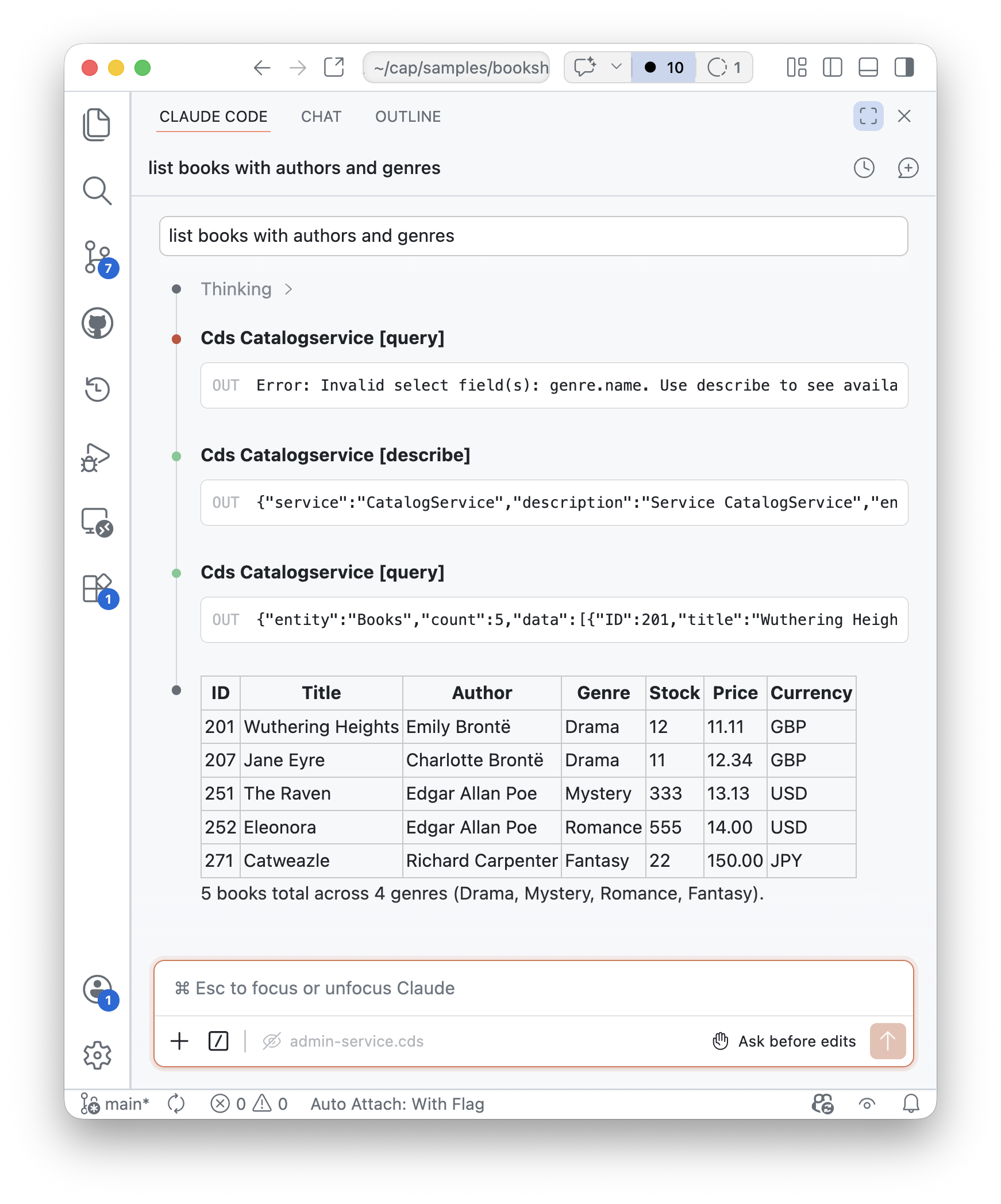
With Opencode CLI:
opencode run list books with authors and genres⚙ cds_AdminService_query {"entity":"Books","select":["ID","title","stock","price","author.name","genre.name"],"limit":20}
Here are the books with their authors and genres:
| ID | Title | Author | Genre | Stock | Price |
|-----|-------------------|-------------------|---------|-------|--------|
| 201 | Wuthering Heights | Emily Brontë | Drama | 12 | 11.11 |
| 207 | Jane Eyre | Charlotte Brontë | Drama | 11 | 12.34 |
| 251 | The Raven | Edgar Allan Poe | Mystery | 333 | 13.13 |
| 252 | Eleonora | Edgar Allan Poe | Romance | 555 | 14.00 |
| 271 | Catweazle | Richard Carpenter | Fantasy | 22 | 150.00 |
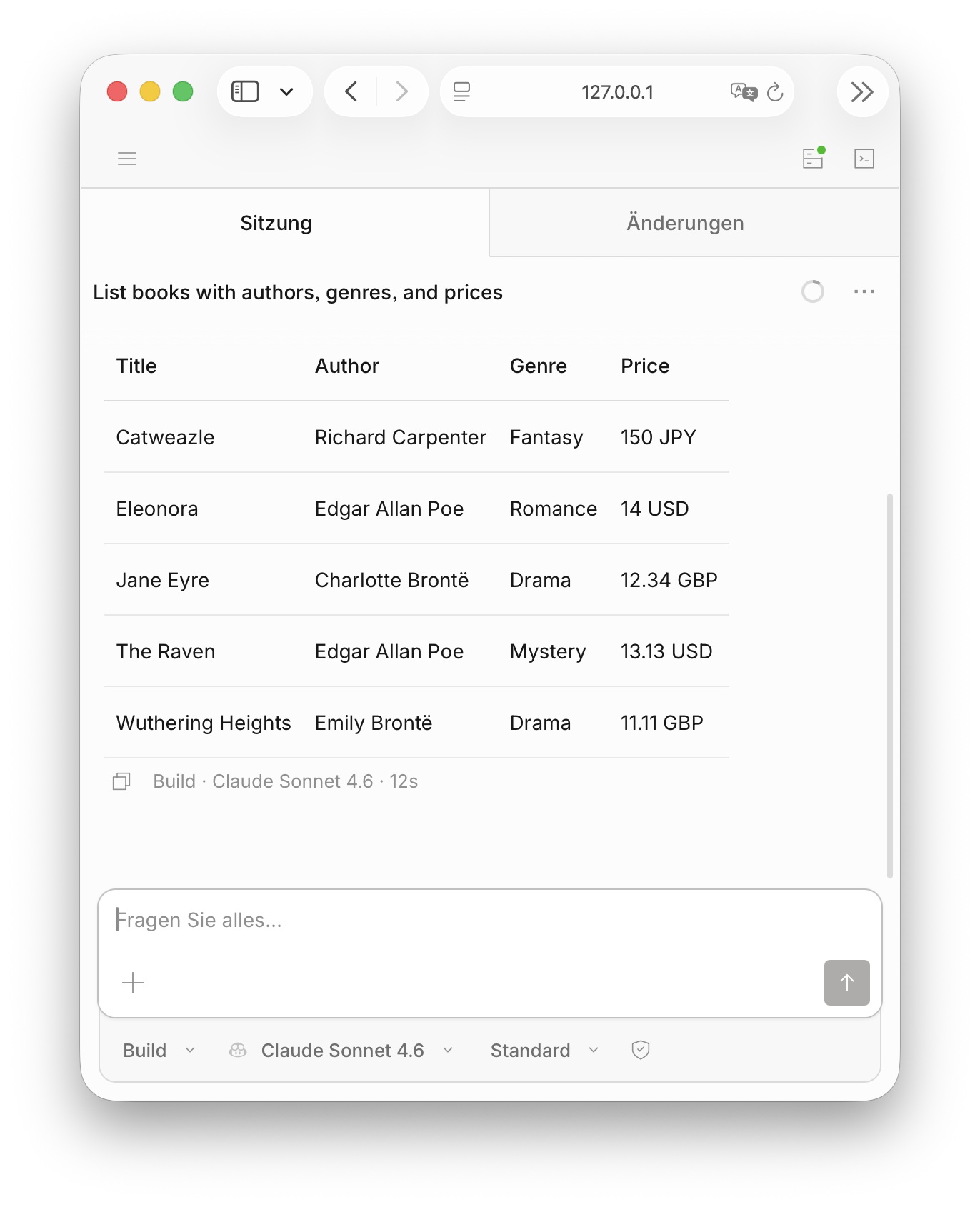
5 books total. Edgar Allan Poe has two entries, and Drama is the most common genre.You can also run opencode web to open the OpenCode web interface, which provides a more user-friendly way to interact with your MCP servers, including features like tool inspection and query building. Here's a screenshot of a simple session:
Inspect Log Output
When you run queries, you can inspect the log output of your CAP server to see the incoming MCP requests and how they are processed. This can be helpful for debugging and understanding the interaction between the MCP client and your CAP services.
For example, for the above query, you should see log output similar to this:
[mcp] - query {
  service: 'AdminService',
  entity: 'Books',
  select: [
    { ref: [ 'ID' ] },
    { ref: [ 'title' ] },
    { ref: [ 'stock' ] },
    { ref: [ 'price' ] },
    { ref: [ 'author', 'name' ] },
    { ref: [ 'genre', 'name' ] }
  ]
}INFO com.sap.cds.adapter.mcp.McpServlet : Received MCP query request for entity 'Books' with select fields [ID, title, author.name, genre.name, stock, price] and limit 20Under the Hood
Autowired MCP Clients
Whenever you start your application, the MCP adapter automatically registers all MCP servers with local MCP clients – currently supported for Claude Code and Opencode - so you can just go ahead and run queries from your MCP client without any additional configuration. This makes it super easy to test and interact with your services via MCP during development.
MCP servers
Note the distinction between the CAP server that listens on a certain port, and MCP servers which are just endpoints provided and served by the CAP server. We use the term "MCP server" despite this, to align with MCP terminology.
During startup, information about the MCP server endpoints is added to the client-specific configuration files like that:
{
  "mcpServers": {
    "cds:AdminService": {
      "type": "http",
      "url": "http://localhost:4004/mcp/admin",
      "headers": {
        "Authorization": "Basic YWxpY2U6"
      }
    },
    "cds:CatalogService": {
      "type": "http",
      "url": "http://localhost:4004/mcp/browse",
      "headers": {
        "Authorization": "Basic YWxpY2U6"
      }
    }
  },
}{
"$schema": "https://opencode.ai/config.json",
"mcp": {
"cds:AdminService": {
"type": "remote",
"url": "http://localhost:4004/mcp/admin",
"headers": {
"Authorization": "Basic YWxpY2U6"
},
"enabled": true
},
"cds:CatalogService": {
"type": "remote",
"url": "http://localhost:4004/mcp/browse",
"headers": {
"Authorization": "Basic YWxpY2U6"
},
"enabled": true
}
}
}When the application stops, the added configuration is removed. This is only intended for local development.
For Development Only
The autowiring is only enabled during development (that is, when running cds watch or mvn cds:watch) and not meant for production use cases.
Mock Authentication
Note that the automatic client configuration adds Authorization headers for the mock user alice (Node.js) or privileged (Java). If your service requires something different, you can customize the credentials via the cds.mcp.autowire configuration:
{
  "cds": {
    "mcp": {
      "autowire": {
        "user": "admin",
        "password": "admin"
      }
    }
  }
}
Opting out of Autowiring
You can opt out of this by setting the cds.mcp.autowire option to false, like so in your package.json:
{
  "cds": {
    "mcp": {
      "autowire": false
    }
  }
}
Manually add the MCP server config to your client, for example with Claude Code CLI:
claude mcp add --transport http CatalogService http://localhost:4004/mcp/browseMCP served out of the box
The adapter creates an MCP server per CAP service, hence each CAP application can expose multiple MCP servers. By default, the adapter creates the following tools for each MCP server, which can be used by LLMs and AI agents to interact with the service.
Warning
Tools are meant to be used by LLMs and AI agents and do not constitute a stable API. They may change in the future based on the needs of LLMs and AI agents. For stable APIs, please use the existing CAP protocols like OData, REST, GraphQL, etc.
Tool: describe
This tool returns information about the entities and their elements exposed by the service. It also returns information about unbound actions and functions. If you do not provide a parameter, the tool describes all exposed entities, actions and functions. The optional parameter entity restricts the output to a single entity, the optional parameter action restricts the output to a single action/function. The tool provides an enum that lists all available entities, actions and functions.
Tool: query
This tool is used to read data from the service. The only required parameter is entity, an enum that lists all entities exposed by the service. This tool takes all provided parameters and translates them to a CQN query, which the service runs via service.run(query). The parameter descriptions explain how to use them.
Parameters of query requests:
| Parameter | Description |
|---|---|
| select | Array of expr objects or strings ; allows path expressions along associations. |
| entity | The entity to query (enum values from describe) |
| where | Array of xpr objects used as predicates used for filtering |
| limit | An integer limiting the results to return |
| one | Return a single record instead of an array. Implies limit:1; default: false |
| distinct | Return only unique rows; default: false (Node.js only) |
| groupBy | An array of ref objects or strings to group results. |
| orderBy | List of objects to order the results (ref, sort, nulls) |
Tool: call_action
This tool is used to call unbound actions or functions. The required parameter action is an enum that lists all unbound actions and functions exposed by the service. The parameters of the action or function to call can be provided via the optional parameter parameters, that must contain all required parameters of the action or function. The tool takes these parameters and calls the action or function on the service.
Inspect the Tools
You can start an MCP Inspector to inspect tools:
npx @modelcontextprotocol/inspectorThe inspector should automatically open in your browser.
- Select Streamable HTTP as Transport Type.
- Enter the URL of your service - for example,
http://localhost:4004/mcp/browse. - Select
Via Proxyas connection type and select Connect. - Go to the Tools tab and select List Tools.
- To get data, select the query tool.
- Choose an entity.
- Scroll down and select Run Tool.
Current Limitations
Query and Actions Only
The MCP tools created by the adapter are currently focused on reading data and calling unbound actions and functions only. This means that you can use MCP to query data from your CAP services, while any data changes need to be implemented via unbound actions for now.
For example, action submitOrder in the CatalogService ultimately creates an Order:
service CatalogService {
  ...
  @requires: 'authenticated-user'
  action submitOrder ( book: Books:ID, quantity: Integer );
}
Future versions of the adapter may add support for data changes using CREATE, UPDATE, and DELETE operations.
Prompt Injection Attacks
Caution!
The MCP adapter does not perform any input validation or output validation to prevent prompt injection attacks. Agents can potentially be manipulated by data returned from the service to execute unintended actions. For any deployment ensure you use infrastructure and practices that mitigate prompt injection risks and connect only to trusted MCP agents (e.g., Joule).
Missing Governance Controls
Caution!
The adapter itself does not provide any built-in governance features: there is no automatic rate limiting, no specific audit logging of agent actions, no approval workflows for sensitive operations, and no policy enforcement layer. Before using MCP in a productive environment, put appropriate controls for example by using MCP Gateway of SAP Integration Suite or integrate with SAP Agent Gateway (not GA yet).
Caution!
The CAP MCP adapter must not be used as a gateway or proxy for SAP Application APIs. The adapter is not an SAP-endorsed architecture, data service, or service-specific pathway under section 2.2.2 of the SAP API Policy and is not an endorsed mechanism for exposing, proxying, or providing agentic access to SAP Application APIs. Any use of SAP Application APIs must be in accordance with the SAP API Policy. For SAP-endorsed patterns on agentic access to SAP Application APIs, consult the SAP Architecture Center reference architectures.