
December Release





CDS Language & Compiler
New CQN Spec Using .d.ts
We rewrote the CQN specification using TypeScript declarations (.d.ts files). This not only fills in many gaps that we had in our former documentation, it also allows for better IntelliSense and easier integration with other projects.
class SELECT { SELECT: {
  distinct?   : true
  count?      : true
  one?        : true
  from        : source
  columns?    : column[]
  where?      : xo[]
  having?     : xo[]
  search?     : xo[]
  groupBy?    : expr[]
  orderBy?    : order[]
  limit?      : { rows: val, offset: val }
}}Annotating Foreign Keys beta
Now, you can specifically annotate a foreign key element of a managed association:
entity Authors { key ID : Integer; }
entity Books   { author : Association to Authors; }

annotate Books:author.ID with @label: 'Author';
Previously it wasn't possible to specifically annotate the foreign key elements of a managed association. The workaround was a mechanism in the OData API generation that copied all annotations assigned to a managed association to the respective foreign key elements.
Node.js
cds.on w/ new compile Events beta
We introduced new lifecycle events emitted by different cds.compile commands. In contrast to cds.on('loaded') that was used before, these new events allow plugins to transform models for specific usages, and even more important, also work for multitenant usages.
The individual events are:
NOTE
You can already try out using these new events, but there's not much documentation yet, and they're still beta, so could change in the final release. Next, we'll adapt the plugins maintained by us and with that, validate, document, and showcase the new events.
cds.env Enhancements
The cds.env module has been optimized and enhanced with these new features:
- Config can be provided also in
.cdsrc.jsand.cdsrc.yamlfiles, also in plugins. - Profile-specific
.envfiles can be used, for example,.hybrid.envor.attic.env.
cds:
  requires:
    db:
      kind: sql
      "[hybrid]":
kind": hanamodule.exports = {
cds: {
requires: {
db: {
kind: 'sql',
'[hybrid]': {
kind: 'hana'
}
}
}
}
}{
"cds": {
"requires": {
"db": {
"kind": "sql",
"[hybrid]": {
"kind": "hana"
}
}
}
}
}cds.requires.kind = hanaTIP
As these enhancements apply also to any configuration for cds-dk and cds-mtxs, you can now use the same configuration files for all tools, even in Java projects.
Do not load @sap/cds in .cdsrc.js
You can generally use any JavaScript code within a .cdsrc.js file. However, you must not import or load any @sap/cds module, as this can create circular dependencies in cds.env, leading to undefined behaviors.
cds.ql Enhancements
The cds.ql module has been optimized, consolidated, and improved for robustness, as well as enhanced with new functions to facilitate programmatic construction of CQN objects. In detail:
Besides being a facade for all related features,
cds.qlnow also is a function to turn any respective input into an instance of respective subclasses ofcds.ql.Query; for example, the following all produce an equivalent instance ofcds.ql.SELECT:jslet q = cds.ql `SELECT from Books where ID=${201}` let q = cds.ql (`SELECT from Books where ID=${201}`) let q = cds.ql ({ SELECT: { from: { ref: [ 'Books' ] }, where: [ { ref: [ 'ID' ] }, '=', { val: 201 } ] } }) let q = SELECT.from('Books').where({ID:201})New CXL-level helper functions to facilitate construction of CQN objects have been added, which you can use like that:
jsconst { expr, ref, val, columns, expand, where, orderBy } = cds.ql let q = { SELECT: { from: ref`Authors`, columns: [ ref`ID`, ref`name`, expand (ref`books`, where`stock>7`, orderBy`title`, columns`ID,title` ) ], where: [ref`name`, 'like', val('%Poe%')] } } await cds.run(q)All
cds.qlfunctions, as well as allcds.parsefunctions, and all relatedsrv.runmethods now consistently support tagged template literals. For example, all of these work now:jsawait cds.run (cds.parse.cql `SELECT ID,title from Books`) await cds.run `SELECT ID,title from Books` await cds.ql `SELECT ID,title from Books` await SELECT `ID,title from Books` await SELECT `ID,title`.from`Books` await SELECT.from `Books {ID,title}` await cds.read `ID,title from Books` await cds.read `Books` await cds.read `Books where ID=201`
WARNING
In course of this, former globals CDL, CQL, and CXL have been deprecated in favor of respective cds.parse.cdl, .cql, and .expr counterparts.
Learn more in the reference docs for cds.ql
Note in there the recommendation for cds repl
OData Containment
The new config option cds.odata.containment: true allows to switch on containment mode which maps CDS Compositions to effective OData Containment Navigation Properties as introduced in OData v4 and supported meanwhile by Fiori clients.
For example, given the following CDS model:
service Sue {
  entity Orders { //...
    Items : Composition of many { /*...*/ }
  }
}
That will be exposed like that with containment mode enabled (the removed line indicates what is not exposed anymore):
 <EntityContainer Name="EntityContainer">
   <EntitySet Name="Orders" ... />
-  <EntitySet Name="Orders_Items" ... />
 </EntityContainer>
Contained entities can only be reached via navigation from their roots reducing the entry points of the OData service.
TIP
While we think that containment mode is best for most applications, and fully supported by Fiori clients, we provide it as an opt-in for the time being, for you to test it in your apps. It's planned to become the default in the next major release.
Function Parameters via Query Options
The OData V4.01 specification allows providing parameters of functions as query options which is now supported by the Node.js runtime. The example below illustrates the usage:
GET sue/stock(id=2) // traditional syntax
GET sue/stock?id=2  // new syntax
Learn more about functions in CDS
Consolidated Authorization Checks
The processing of @restrict.where was aligned with the CAP Java stack. As a result, there are the following behavioral changes in edge cases, each with their own compat feature flag to deactivate the change until the next major:
Read restrictions on the entity are no longer taken into consideration when evaluating restrictions on bound actions/ functions. Instead, only the restrictions that apply to the bound action/ function are evaluated.
Deactivate viacds.features.compat_restrict_bound: true.For
UPDATEandDELETErequests, additional filters (these are, those not originating from key predicates) are no longer considered during the authorization check. For example, assumed we got the equivalent of this query:sqlUPDATE Books SET title = 'foo' WHERE title = 'bar'The filter
title = 'bar'is ignored for access control checks, and, effectively, the user needs to be allowed to update all books.
Please note that UPDATE and DELETE requests from a client always contain key predicates, making this change only affect service calls executed in custom handlers. In case you encounter issues with the new behavior, you can deactivate it via cds.features.compat_restrict_where: true.
Java
Important Changes ❗️
NPM Build-Plugin Support
To support a growing number of NPM build-plugins for CDS build, we recommend a slightly different CAP Java project setup which uses devDependencies section in the package.json file. Consequently, also the required dependency to @sap/cds-dk now should be added there.
To ensure stable versions of the packages, npm ci should be configured for the CDS build:
<execution>
  <id>cds.npm-ci</id>
  <goals>
    <goal>npm</goal>
  </goals>
  <configuration>
    <arguments>ci</arguments>
  </configuration>
</execution>
The goal install-cdsdk of the cds-maven-plugin has been deprecated and should be removed from the project.
Learn how to Migrate From Goal install-cdsdk to npm ci.
New projects in recommended setup
The built-in Maven Archetype creates a Java project with the recommended setup.
SAP Document Management Service Plugin
The new Calesi plugin com.sap.cds/sdm is now available as open source on GitHub. You can easily add the dependency to your application's dependencies and use the Attachments type in your model.
<dependency>
  <groupId>com.sap.cds</groupId>
  <artifactId>sdm</artifactId>
  <version>1.0.0</version>
</dependency>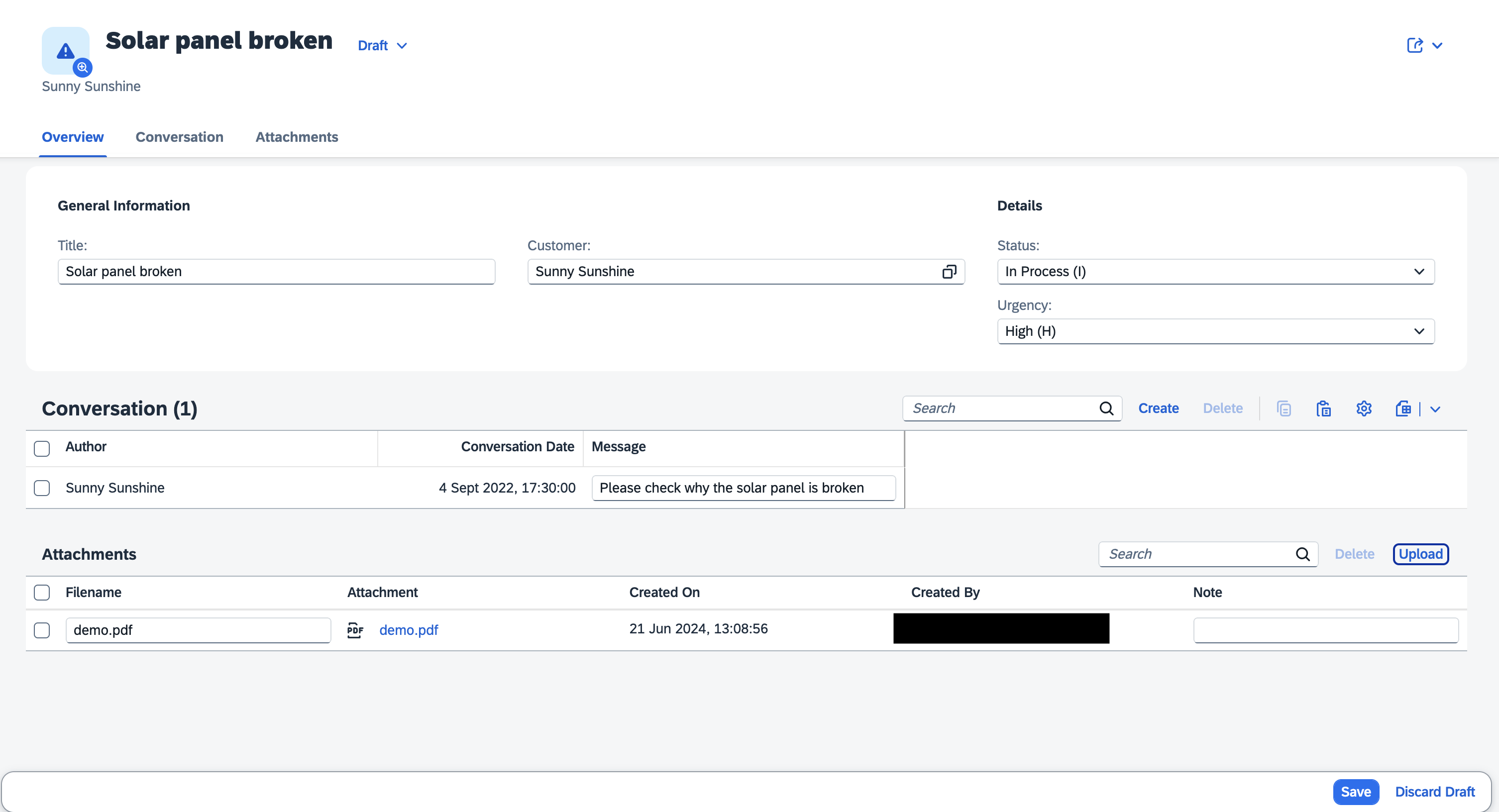
Find more details about the SAP Document Management Service Plugin.
IAS Support for Kyma
CAP Java now offers out-of-the-box integration for SAP Cloud Identity Authentication (IAS) in the SAP BTP, Kyma runtime. It performs proof-of-possession checks on the client certificates passed by calling IAS applications in the context of Kyma runtime.
SAP HANA Connection Pooling Optimized
Multitenant applications configured with a shared database pool for all tenants help reduce resource consumption from database connections. However, this mode requires logging in with the technical database user of the current business tenant for each request. To optimize performance, CAP Java now skips the login if the pooled connection is already connected to the corresponding user, saving an extra roundtrip and reducing CPU consumption in the database.
Outbox Message Versioning
Messages written to Transactional Outbox can originate from application instances of different versions. Instances of an outdated version might introduce failures or inconsistencies when trying to collect messages of younger versions.
To avoid such a situation, you can now configure CAP Java to write an application version outbox message being published. Outbox collectors of an application instance will not collect messages of younger versions.
Using cds.environment.deployment.version, we recommend configuring the application with the version identifier from the Maven build automatically.
This requires the build version available in the resources folder:
<build>
  <resources>
    <resource>
      <directory>src/main/resources</directory>
      <filtering>true</filtering>
    </resource>
  </resources>
</build>
CAP Java can only support version identifiers which have an ordering.
Learn more about Outbox Event Versions.
CDS Config in .cdsrc.yaml Files
Alternative to .cdsrc.json files, Java projects can now also use .cdsrc.yaml files to configure the CDS compiler and cds-dk.
See respective entry in the Node.js section.
Tools
cds repl Enhancements
As you know, cds repl is your friend when you want to find out, how things work. While this is especially relevant for Node.js projects, it also applies to Java projects. For example, to find out how a CSN or CQN object notation for a given CDL or CQL could look like that:
cds repl # from your command linecds.parse`
entity Foo { bar : Association to Bar }
entity Bar { key ID : UUID }
`cds.ql`SELECT from Authors {
ID, name, books [order by title] {
ID, title, genre.name as genre
}
} where exists books.genre[name = 'Mystery']`This release brings a few new enhancements to cds repl as follows:
New REPL dot command
.runallows to start Node.jscds.servers:sh.run cap/samples/bookshopNew CLI option
--runto do the same from command line, for example:shcds repl --run cap/samples/bookshopNew CLI option
--useto easily use the features of acdsmodule, for example:shcds repl --use ql # as a shortcut of that within the repl:jsvar { expr, ref, columns, /* ...and all other */ } = cds.qlNew REPL dot command
.inspectto display objects with configurable depth:sh.inspect cds .depth=1 .inspect CatalogService.handlers .depth=1
cds watch for TypeScript
In a TypeScript project, you can now just run cds watch as if it was a JavaScript project. It will automatically detect TypeScript mode based on a tsconfig.json and run cds-tsx under the hood. In other words, it's not necessary anymore to use cds-tsx watch.
cap/sflight $ cds watch

Detected tsconfig.json. Running with tsx.
...
[cds] serving TravelService { impl: 'srv/travel-service.ts', path: '/processor' }
...