---
title: March 2024
versions:
cdsjs: 7.8.0
cdsdk: 7.8.0
cdsc: 4.8.0
cdsmtxs: 1.17.0
java: 2.8.1
---
# March 2024
[[toc]]
## Capire Documentation
### Consolidated Cookbooks

We merged the guides from the former *Advanced* section into the *[Cookbook](/@external/guides/)* section. In detail, these guides have moved:
| From | To |
|------------------------------------|----------------------------------------------------------------------------------|
| Advanced / Serving Fiori UIs | [Cookbook / Serving UIs](/@external/guides/uis/fiori) |
| Advanced / OData API | [Cookbook / Protocols](/@external/guides/protocols/odata) |
| Advanced / Publish APIs / OpenAPI | [Cookbook / Protocols](/@external/guides/protocols/openapi) |
| Advanced / Publish APIs / AsyncAPI | [Cookbook / Protocols](/@external/guides/protocols/asyncapi) |
| Advanced / Analytics | [Cookbook / Analytics](/@external/guides/uis/analytics) |
| Advanced / Performance | [Cookbook / Performance](/@external/guides/databases/performance) |
| Cookbook / Media Data | [Cookbook / Providing Services](/@external/guides/services/media-data) |
| Cookbook / Authorization | [Cookbook / Security / Authorization](/@external/guides/security/authorization) |
### Restructured Java Docs
The Java documentation grew over the years and needed a cleanup. So, we gave the documentation more structure, which is an improvement over the old long and flat list. All the content is still available but URLs might have changed. We do have redirects in place but update your bookmark if you encounter any redirects.
These guides have moved:
| From | To |
|------------------------------------|----------------------------------------------------------------------------------|
| Services | [CQN Services](/@external/java/cqn-services/) |
| Application Services | [CQN Services / Application Services](/@external/java/cqn-services/application-services) |
| Persistence Services | [CQN Services / Persistence Services](/@external/java/cqn-services/persistence-services) |
| Remote Services | [CQN Services / Remote Services](/@external/java/cqn-services/remote-services) |
| Modular Architecture | [Developing Applications / Building](/@external/java/developing-applications/building) |
| Development / CDS Properties | [Developing Applications / CDS Properties](/@external/java/developing-applications/properties) |
| Observability | [Operating Applications](/@external/java/operating-applications/) |
### Toggle Node.js/Java on All Pages
The toggle to select Node.js or Java content is now visible on every page in the title bar near the logo:
{style="box-shadow: rgba(0, 0, 0, 0.3) 0 1px 3px;"}
This makes it easily accessible and allows you to see which content is shown at all times.
## SAP HANA Cloud Vector Engine
We introduced the type `Vector` to facilitate tasks like similarity search, anomaly detection, recommendations, and classification of unstructured data using [vector embeddings](/@external/guides/databases/vector-embeddings).
Vector embeddings of unstructured data like text and images are typically computed using embedding models. These models are specifically designed to capture important features and semantics of the input data. Similar data is represented by vectors with high similarity (low distance) to each other.
In CDS, such vector embeddings are stored in elements of type `Vector`, which are mapped to `REAL_VECTOR` on the [SAP HANA Cloud Vector Engine](https://community.sap.com/t5/technology-blogs-by-sap/sap-hana-cloud-s-vector-engine-announcement/ba-p/13577010):
```cds
entity Books : cuid { // [!code focus]
title : String(111);
description : LargeString; // [!code focus]
embedding : Vector(1536); // vector space w/ 1536 dimensions // [!code focus]
} // [!code focus]
```
In CAP Java you can compute the similarity and distance of vectors in the SAP HANA vector store using the `CQL.cosineSimilarity` and `CQL.l2Distance` (Euclidean distance) functions in queries:
```Java
// Compute vector embedding of Book description, for example, via LangChain4j
float[] embedding = embeddingModel.embed(bookDescription).content().vector();
Result similarBooks = service.run(Select.from(BOOKS).where(b ->
CQL.cosineSimilarity(b.embedding(), CQL.vector(embedding)).gt(0.9)));
```
[Learn more about Vector Embeddings in CAP Java](/@external/java/cds-data#vector-embeddings) {.learn-more}
In CAP Node.js:
```js
let embedding; // vector embedding as string '[0.3,0.7,0.1,...]';
let similarBooks = await SELECT.from('Books')
.where`cosine_similarity(embedding, to_real_vector(${embedding})) > 0.9`
```
::: warning
The `Vector` type is only supported on SAP HANA Cloud (QRC 1/2024 or later).
Elements of type `Vector` cannot be exposed via OData services.
:::
## Node.js {#cds-js}
### Improved `cds.linked`
All accesses to CSN definitions are now consistently done through instances of [`LinkedDefinitions`](/@external/node.js/cds-reflect#iterable). It allows both, object-style access, as well as *array-like* access. For example:
```js
let linked = cds.linked (model)
let { Books, Authors } = linked.entities // object-like
let [ Entity1, Entity2 ] = linked.entities // array-like, assumes a certain order
```
The array-like nature also supports `for..of` loops, as well as common *Array* methods:
```js
for (let each of linked.definitions) console.log (each.name)
```
```js
linked.definitions .forEach (d => console.log(d.name))
linked.definitions .filter (d => d.is_entity)
linked.definitions .find (d => d.name === 'Foo')
linked.definitions .some (d => d.name === 'Foo')
linked.definitions .map (d => d.name)
```
[Learn more about `LinkedDefinitions`](/@external/node.js/cds-reflect#iterable) {.learn-more}
### Enhanced `cds.service`
Class `cds.service` is enhanced with convenience shortcuts to access `entities`, `events`, and `actions` — which is the same as with instances of `cds.Service`:
```js
let { CatalogService } = linked.definitions
let { Books, Authors } = CatalogService.entities // object-like
let [ Books, Authors ] = CatalogService.entities // array-like
```
[Learn more about the new convenience shortcuts offered by `cds.service`](/@external/node.js/cds-reflect#cds-service) {.learn-more}
### New SAP HANA Database Service
{align="left" width="100" style="padding-right:20px;padding-top:10px" class="mute-dark"}
The new database service for SAP HANA [`@cap-js/hana`](https://www.npmjs.com/package/@cap-js/hana) is released as a beta version. It is based on the same architecture as the previously released database services for PostgreSQL and SQLite.
All services are developed as open source packages. Be aware that the same recommendations as for SQLite migration apply.
[Learn more about databases in general.](/@external/guides/databases/index) {.learn-more}
[Learn more about SAP HANA Cloud.](/@external/guides/databases/hana) {.learn-more}
::: warning
`@cap-js/hana` is still in the beta phase and not yet ready for productive usage.
:::
## Java {#cds-java}
### Outbox Enhancements
#### Optimized Processing
So far, messages sent via any [OutboxService](https://www.javadoc.io/doc/com.sap.cds/cds-services-api/latest/com/sap/cds/services/outbox/OutboxService.html) were processed in the order they were submitted.
While it is necessary for some cases such as Messaging, it imposes a performance penalty on services that allow messages to be processed in an arbitrary order.
CAP Java now allows you to configure custom Outbox instances that don't enforce strict ordering and thus allow optimized processing:
```yaml
cds:
outbox:
services:
UnorderedOutbox:
maxAttempts: 10
ordered: false
```
Multiple application instances can work in parallel on the same unordered outbox instance and therefore increase the throughput of processed messages.
#### Type-Safe Service Access
[Generic Outbox API for services](https://www.javadoc.io/doc/com.sap.cds/cds-services-api/latest/com/sap/cds/services/outbox/OutboxService.html#outboxed(S)) now takes an interface type as an optional `Class` argument.
This interface can be used to wrap the outboxed service with an API that explicitly reflects the asynchronous nature of the service consumption:
```java
OutboxService outboxService = ...;
CqnService remoteS4Service = ...;
AsyncCqnService outboxedS4 = outboxService.outboxed(remoteS4Service, AsyncCqnService.class);
```
Note that the interface [`AsyncCqnService`](https://www.javadoc.io/doc/com.sap.cds/cds-services-api/latest/com/sap/cds/services/cds/AsyncCqnService.html) is provided as an asynchronous variant of `CqnService`, suitable for remote OData services.
In contrast to `CqnService`, there are no methods for `READ` operations and all methods have the return type `void`.
#### Custom Exception Handlers
You can now write custom exception handlers that react to errors when processing outboxed messages.
This gives you fine-grained control over the exception handling.
Depending on the cause of the error you could, for example, retry the processing, execute some compensation logic, or mark the message as undeliverable.
Find an example handler in [Wrapping On-Handlers](#wrapping-on-handlers) or in the detailed [documentation](/@external/java/event-queues#error-handling).
### Wrapping On-Handlers { #wrapping-on-handlers }
In some situations, you may want to customize a service implementation to add pre-processing and post-processing logic rather than replacing it entirely (that is, by defining a custom [On-handler](/@external/java/event-handlers/#on)).
The [EventContext](https://www.javadoc.io/doc/com.sap.cds/cds-services-api/latest/com/sap/cds/services/EventContext.html) API now provides a new method called `proceed`, which executes the subsequent On-handlers.
This allows you to wrap the execution of the existing On-handlers with additional Java code:
```java
@On(service = OutboxService.PERSISTENT_ORDERED_NAME, event = "*")
void handleOutboxErrors(OutboxMessageEventContext context) {
try {
context.proceed(); // call standard event handlers
} catch (Exception e) {
if (isUnrecoverable(e)) {
executeCompensationLogic(context); // don't retry
} else {
throw e; // trigger standard retry logic
}
}
}
```
This example wraps the standard Outbox processing with exception handling to control the error handling of failed events if any.
Read more about this feature in [Event Handlers](/@external/java/event-handlers/#proceed-on).
### Simplified Remote Service Consumption
[Remote OData Services](/@external/java/cqn-services/remote-services) can be easily configured with destinations to connect to external services such as an S/4 system.
CAP Java now provides another convenient integration with remote OData services. These can be services either offered as SAP BTP reuse services or are local to the application (i.e. bound to the same XSUAA or IAS service instance). In both cases, the application has a service binding to establish the connection accordingly.
This is an example configuration to define a remote BTP reuse service `MeteringService` called on behalf of the platform user:
```yaml
cds:
remote.services:
- name: "MeteringService"
binding:
name: metering-service
onBehalfOf: systemUserProvider
```
Read more about remote service consumption capabilities in the renewed [Remote Service](/@external/java/cqn-services/remote-services) documentation.
### ETag in Remote OData Services
CAP [Remote Services](/@external/java/cqn-services/remote-services) can now work with [ETag-enabled](/@external/guides/services/served-ootb#etag) entities from remote OData APIs. If the `where` clause of an `Update` or `Delete` statement contains an [`ETagPredicate`](/@external/java/working-with-cql/query-execution#etag-predicate), an `If-Match` header will be added to the remote request:
```java
RemoteService remoteS4 = ...;
remoteS4.run(Update.entity("BusinessPartner")
.entry(Map.of("lastname", "Doe"))
.where(b -> b.get("ID").eq(4711).and(b.eTag(""))));
```
When reading an ETag-enabled entity from a remote OData API, the ETag is automatically stored in the metadata container of the entity data.
If an Update statement is triggered with modified data that contains the ETag in the metadata container, no explicit `ETagPredicate` is required:
```java
RemoteService remoteS4 = ...;
CdsData partner = remoteS4.run(Select.from("BusinessPartner").byId(4711)).single();
partner.put("lastname", "Doe");
// If-Match automatically set to previously read ETag value
partner = remoteS4.run(Update.entity("BusinessPartner").entry(partner)).single();
// ETag header value
Object etag = partner.getMetadata("etag");
```
### Change Tracking Localized
The UI of the [Change Tracking](/@external/java/change-tracking) plugin now includes translations for all CAP languages out of the box.
The language bundles are automatically added to the `i18n.json` file by the CDS build.
## Tools { #tools}
### IntelliJ Plugin Available on GitHub
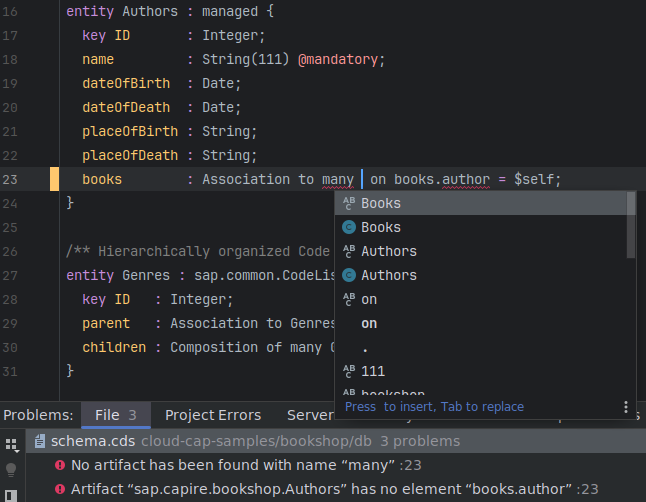
The [CAP CDS Language Support](https://github.com/cap-js/cds-intellij) plugin for IntelliJ is now available as Open Source on GitHub.
{ .ignore-dark style="width:450px"}
It adds features like syntax highlighting, code completion, formatting, diagnostics, and more.
See the [detailed feature list](https://github.com/cap-js/cds-intellij/blob/main/FEATURES.md) and the [installation instructions](https://github.com/cap-js/cds-intellij#requirements) for how to get started.
Note that only commercial IntelliJ products including IntelliJ IDEA Ultimate and WebStorm are supported.
### CDS Previews From Editor Title Bars
The commands to preview CDS models in different formats in VS Code are now available in the CDS editor's title area:

You can also access these commands through the command palette (F1 → *CDS...*) as well as through the editor's context menu.
## CAP Plugins
### New Attachments Plugin
The new CDS plugin [@cap-js/attachments](https://www.npmjs.com/package/@cap-js/attachments/) is now available as [open source on GitHub](https://github.com/cap-js/attachments). You can easily add the package to your application's dependencies and use the `Attachments` type in your model.
```sh
npm add @cap-js/attachments
```

::: warning Single tenant only
Please note that `@cap-js/attachments` currently supports single tenant application scenarios.
:::
[Find more details about the Attachments Plugin.](https://github.com/cap-js/attachments#readme){.learn-more}